Chapter 75B — Learning: courses, quizzes and certificates
Some things every employee has to know: how to handle a password, what the code of conduct says, where the fire exits are. Telling people once is not enough, and a signature on a policy shows only that it was opened. A course shows that a person went through the material and, if you ask questions, that they understood it. This chapter is about writing such courses, getting them to the right people, and reading who has finished.
What this chapter covers
- 75B.1 Writing a course
- 75B.2 The quiz
- 75B.3 Assigning a course
- 75B.4 Completion, certificates and skills
- 75B.5 The progress report
The concept
Mandatory training is training the company requires of a group of people, usually with a deadline: security awareness for everyone, safety training for the warehouse, a conduct course for new joiners. Three questions define it: who must take it, by when, and how the company knows it was done.
A course answers the third. It is a set of lessons in an order, optionally followed by a quiz with a pass mark. A person completes the course by going through every lesson and, where there is a quiz, passing it.
Some training goes out of date, or the law asks for it every year. Recertification means the completion is valid for a period, after which the person takes the course again. A certificate is the person's record that they completed it, and until when it counts.
Compliance is the share of the people who must take a course who have. HR is asked for that number by auditors, insurers and customers, so it has to come from records, not from a spreadsheet of signatures.
How Operentra handles it
- Learning › Courses holds every course; Learning › Progress Report shows who has done what. Employees take courses under Learning in the portal. Learning is on the Growth and Enterprise plans (Appendix F).
- A course is Draft, Published or Archived (Appendix G). Employees never see a draft.
- A lesson is text, a video (a YouTube, Vimeo or Loom link), a knowledge base article (Chapter 81B) or a document in the company document library.
- A quiz is optional: multiple-choice questions with one right answer each, a pass mark (80% unless changed), and optionally a smaller number of questions drawn for each sitting and a limit on attempts.
- An assignment sends a published course to an audience: everyone, or chosen departments, branches, roles or named people, the same audience an announcement has (Chapter 78). It sets the days to finish and, if the course repeats, after how many months.
- A course can also be open to everyone, so that anyone can start it without being assigned it.
- The person is told by email and in the bell when they are assigned a course, when it is due within seven days, when it is overdue, and when they complete it (Appendix C).
- Who:
learning.takefor everyone;learning.view_teamfor Super Admin, HR Manager, HR Officer and Department Head;learning.managefor Super Admin, HR Manager and HR Officer (Appendix E).
Walkthrough
Northwind Labs has four courses. Two are assigned to everyone, one is open for anyone who wants it, and one is still being written.
75B.1 Writing a course
Learning › Courses lists them.
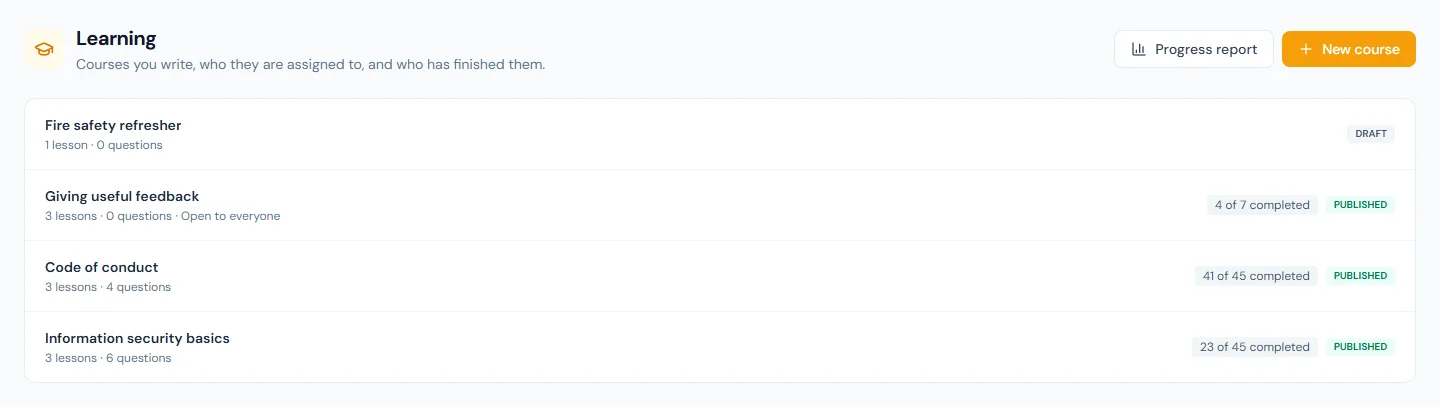
Each row shows the status, the number of lessons and questions, and how many of the people enrolled have completed the course. Fire safety refresher is a draft: nobody outside HR can see it.
Open Information security basics.
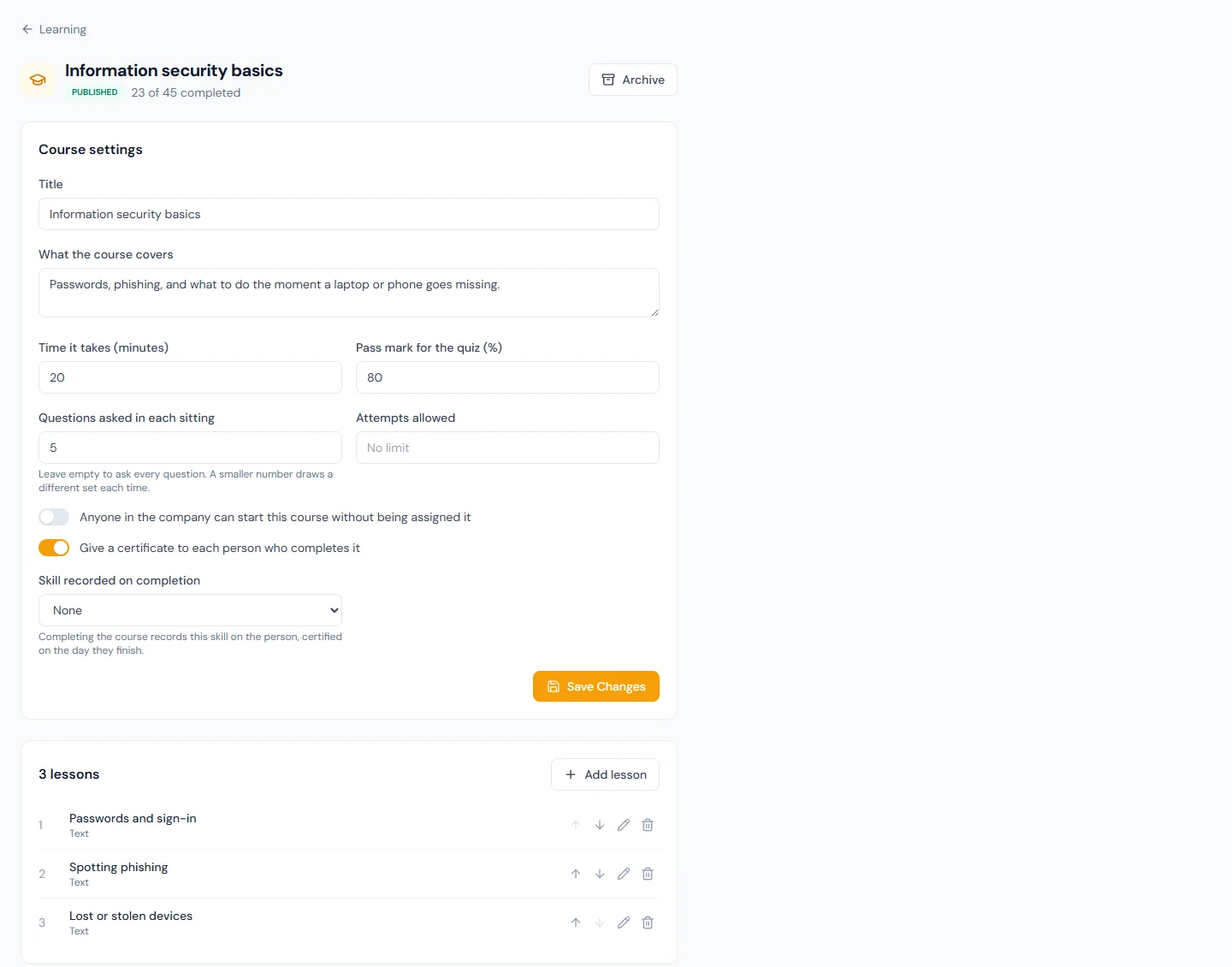
Course settings holds the title, What the course covers, the time it takes, and the quiz and certificate settings covered below.
Add lesson asks for a title and what the lesson is:
| Kind | What it holds |
|---|---|
| Text | Text written in the editor the knowledge base uses. |
| Video | A YouTube, Vimeo or Loom link. The video plays inside the lesson. A link to any other site is refused. |
| Knowledge article | A published article, which the person opens from the lesson. |
| Library document | A published document in the company document library. |
The last two point at something that has its own audience. A lesson does not widen it: choose an article or a document the people taking the course are able to open.
The arrows beside a lesson move it up or down. A course holds up to 50 lessons; three to five short ones are finished more often than one long one.
75B.2 The quiz
Below the lessons is the quiz. Information security basics has six questions. Add question asks for the question, two to six answers with the right one selected, and What to tell someone who gets it wrong.
Three settings on the course shape a sitting:
| Setting | At Northwind | What it does |
|---|---|---|
| Pass mark for the quiz (%) | 80 | The share of the questions asked that must be right. |
| Questions asked in each sitting | 5 | Each sitting draws five of the six at random. Empty asks all of them. |
| Attempts allowed | empty | No limit. A number stops the person after that many sittings. |
What the person meets:
- The quiz opens only when every lesson is marked done.
- The answers are in a different order each sitting.
- A sitting they started and did not hand in is given back as it was. A refresh costs nothing.
- Hand in grades the sitting once. A blank answer is wrong.
- After a sitting that did not pass they see their score and the questions they missed, each with HR's explanation. They are never shown the right answer, so the next sitting still tests them.
Publish makes the course available. It is refused for a course with no lesson and no question, and while the number of questions asked is larger than the number written.
75B.3 Assigning a course
A published course has a Who takes this course card.

Assign asks three things:
- Who should take it. Northwind chose Everyone.
- Days to finish. 14, counted from the day each person is enrolled. Empty means no due date.
- Take it again every (months). 12. Empty means the course is taken once.
The people in the audience are enrolled at once and told. What makes an assignment more than a mailing list is what happens afterwards: anyone who joins the audience later, a new hire or a transfer into the department, is enrolled the next morning, with their own 14 days.
Nobody is enrolled twice. Someone already on the course, or who has completed it, is left alone, even when two assignments overlap.
The switch on an assignment reads Enrolling or Stopped. The audience of an assignment cannot be edited: stop it and assign again.
Giving useful feedback has no assignment. Its setting Anyone in the company can start this course without being assigned it is on, so it sits under Open to everyone on each person's Learning page, with no due date and no email.
75B.4 Completion, certificates and skills
A course with a quiz is complete when every lesson is done and a sitting is passed. A course without one is complete when the last lesson is marked done.
With Give a certificate to each person who completes it on, as it
is by default, the person downloads a PDF certificate: the company's
name and logo, their name, the course, the completion date, the score
if there was a quiz, and a certificate number such as
LRN-7K2M-9QXD-4HTW. It is written in the workspace's document
language.
Because Information security basics repeats every 12 months, each completion carries a Valid until date, 12 months after the day the person completed. Thirty days before that day the person is enrolled for the next round, due on the day the old completion runs out. A completion with no Valid until date is final.
On a workspace with skills (Chapter 24A), Skill recorded on completion ties the course to a skill and a level. Completing the course records the skill on the person, certified that day and expiring on the Valid until day, with the source From a course. A higher level the person already holds is never lowered.
75B.5 The progress report
Learning › Progress Report is the compliance view.
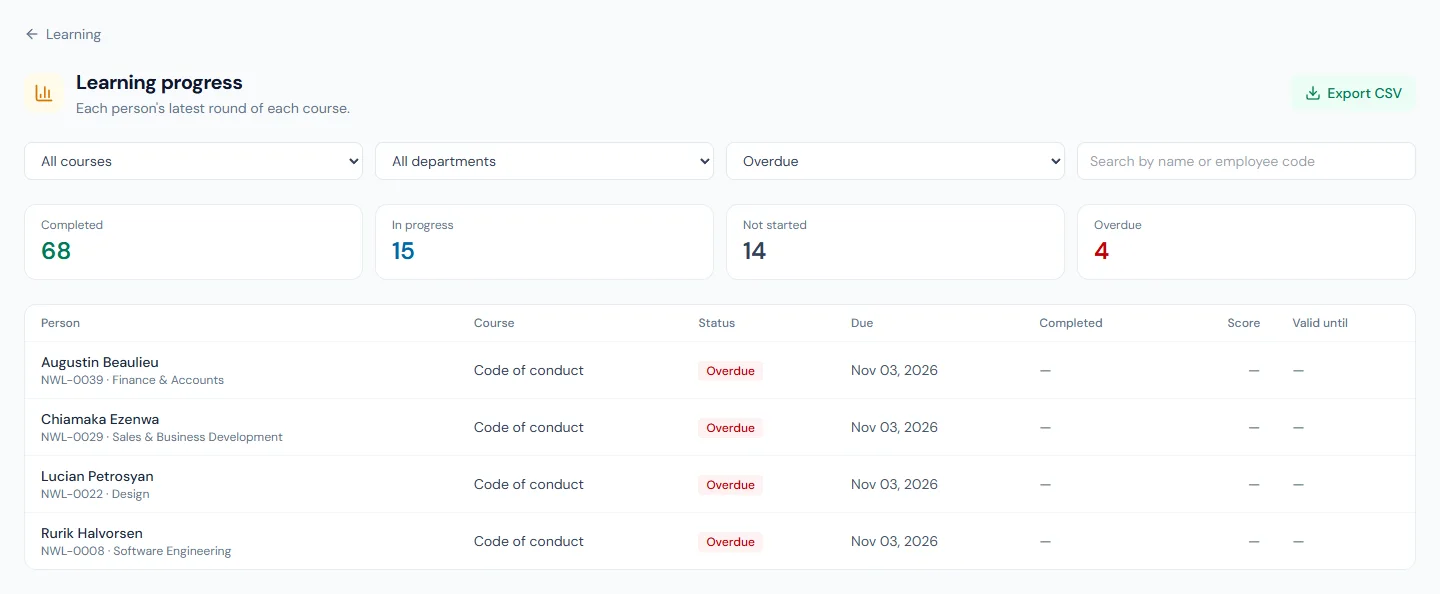
Each row is one person's latest round of one course: status, due date, completion date, score and Valid until. Overdue is shown for a course that is not completed and past its due date.
Filter by course, department and status, or search by name or employee code. The four totals above the list count everything that matches the course, the department and the search, whatever status is selected, so filtering to Overdue still shows how many completed. Export CSV downloads every matching row.
At Northwind, Code of conduct was assigned six weeks ago with 30 days to finish. Most people have completed it, and four are overdue. Each of them was emailed the day after the due date and is emailed again every seven days, four times at most. After that it is the report, and a conversation, that follows up.
Where a quiz has a limit on attempts, a person who has used them all shows No quiz attempts left under their status. Allow another attempt starts their count over for the current round; their lessons stay done.
What happens next
- Every morning, in the workspace's 9 o'clock hour, newcomers to an audience are enrolled, next rounds are started and reminders are sent.
- Portal Home lists Courses to complete under Needs your attention (Chapter 84).
- Managers who hold
learning.view_teamsee a My team tab on their own Learning page, with the progress of their direct reports (Chapter 90). - The four emails can be reworded or switched off under Email Templates (Chapter 79).
- Archiving a course stops new enrolments, switches its assignments off and stops people who have not finished. Completions and certificates are kept. A course can be deleted only while nobody has ever been enrolled on it.
- Erasing a person (Chapter 93) deletes their enrolments, quiz sittings and certificates.
- The assistant (Chapter 98) can show a person their courses, and show the people who manage learning the course list and the progress report.
What the employee sees
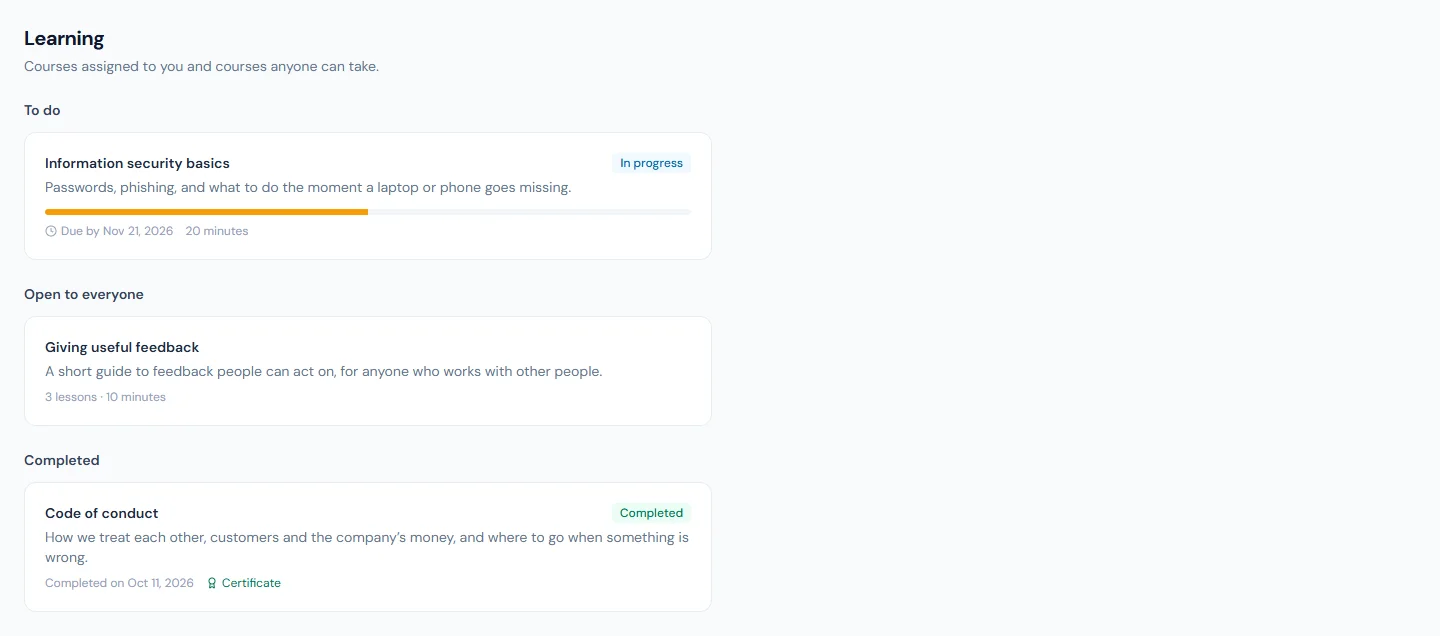
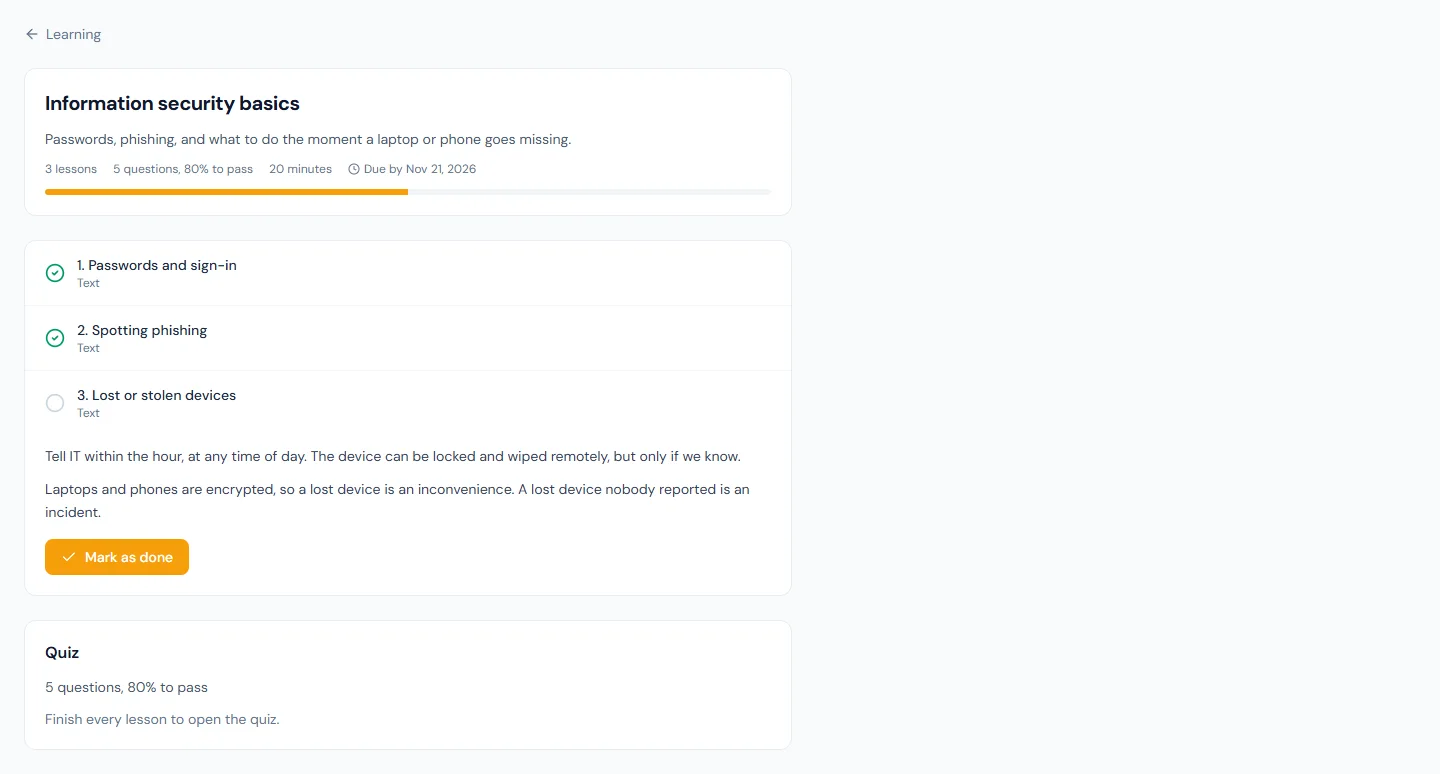
Learning in the portal has three sections: To do, Open to everyone and Completed. Imani Castellanos has Information security basics to do, due in five days, and has completed Code of conduct.
Inside a course the lessons are listed in order, with the next one open. Mark as done moves to the next. The quiz stays closed until the last lesson is done.
A course that HR has archived stays on the person's list, marked Withdrawn, and cannot be continued.
Common mistakes
- Assigning a draft in your head. A course can be assigned only once it is published. Finish it, publish it, then assign.
- One long lesson. Nothing is recorded until a lesson is marked done. Several short lessons show progress and are easier to come back to.
- Pointing a lesson at an article the audience cannot open. The lesson does not widen the article's audience. Check the article is aimed at the same people as the course.
- Putting the right answer in the explanation. The explanation is shown after a failed sitting, and the same question can come up again. Say where to look, not what to tick.
- Setting an attempt limit and not watching the report. A person who runs out is stopped until HR chooses Allow another attempt. Set a limit only if someone will look for No quiz attempts left.
- Asking more questions than there are. Publishing is refused while Questions asked in each sitting is larger than the number of questions. Write a few more than you ask, so sittings differ.
- Leaving "Days to finish" empty on mandatory training. No due date means no reminder and nobody ever overdue.
- Editing an assignment's audience by assigning on top of it. The old assignment keeps enrolling. Stop it first.
- Deleting a course to tidy up. Once anyone has been enrolled the course can only be archived, which keeps the completions and certificates an auditor will ask for.
Practice
Use your own trial workspace, not a customer's.
- Create a course with two text lessons and three questions. Set Questions asked in each sitting to 2 and publish it.
- Assign it to one department with 7 days to finish. Read the number of people enrolled on the assignment.
- Sign in as someone in that department. Mark both lessons as done, start the quiz, refresh the page, and continue the sitting.
- Fail the quiz on purpose and read what you are shown. Then pass it and download the certificate.
- Open the progress report, filter to that course, and compare the four totals with the assignment's count.
- Switch on Anyone in the company can start this course without being assigned it, sign in as someone outside the department, and start the course from Open to everyone.
Quiz
1. When is a course complete?
When every lesson is marked done and, if the course has a quiz, a sitting is passed. A course with no quiz is complete when the last lesson is marked done.
2. A course is assigned to the Sales department with 14 days to finish. Someone joins Sales three weeks later. What happens?
They are enrolled the next morning and told, with 14 days counted from the day they were enrolled. An assignment keeps enrolling the people who join its audience until it is stopped.
3. What does a person see after a quiz sitting they did not pass?
Their score and the questions they missed, each with the explanation HR wrote, if there is one. The right answers are never shown.
4. An assignment says "again every 12 months". What happens to a person who completed the course on 10 March?
Their completion is valid until 10 March the next year. Thirty days before that day they are enrolled for the next round, due on the day the old completion runs out.
5. The report is filtered to Overdue and shows four people. What do the four totals above the list count?
Everything that matches the course, the department and the search, whatever status is selected. So the totals still show how many completed, are in progress and have not started, beside the four overdue.
6. HR archives a course. What happens to the people on it?
Nobody new is enrolled and its assignments are switched off. People who have not finished can no longer continue; the course stays on their list, marked Withdrawn. Completions and certificates are kept.