Chapter 65 — Payroll reports and year-end
A run page answers questions about one month. Finance, auditors and the board ask different ones: what did payroll cost this quarter, how much went on overtime adjustments, who still has no bank account on file, what is the employer's cost for the year. This chapter is the four payroll reports and the short list of things to do when a payroll year closes.
What this chapter covers
- 65.1 Monthly summary and component breakdown
- 65.2 Bank transfer report
- 65.3 Fiscal-year summary
The concept
Payroll reporting has three audiences with three questions. Finance wants totals that reconcile to the bank and the ledger: gross, each deduction, net paid, employer cost, by month and year. Auditors want to trace a total back to people and lines. Managers want their department. Good reports start from the same entries the slips came from, so a figure in a report can always be followed to a slip, and a year closes when the reports, the certificates and the filings agree.
How Operentra handles it
- Reports › Payroll has four tabs: Monthly Summary, Component Breakdown, Bank Transfer File and FY Summary, each with a CSV export.
- The figures are the run entries' own, the same that print on the slips, imported months included.
- Tax reports are under Reports › Tax where income tax applies (Chapter 63); loan reports under Loans (Chapter 60).
- Who:
reports.all(Super Admin, HR Manager, Accountant).
Walkthrough
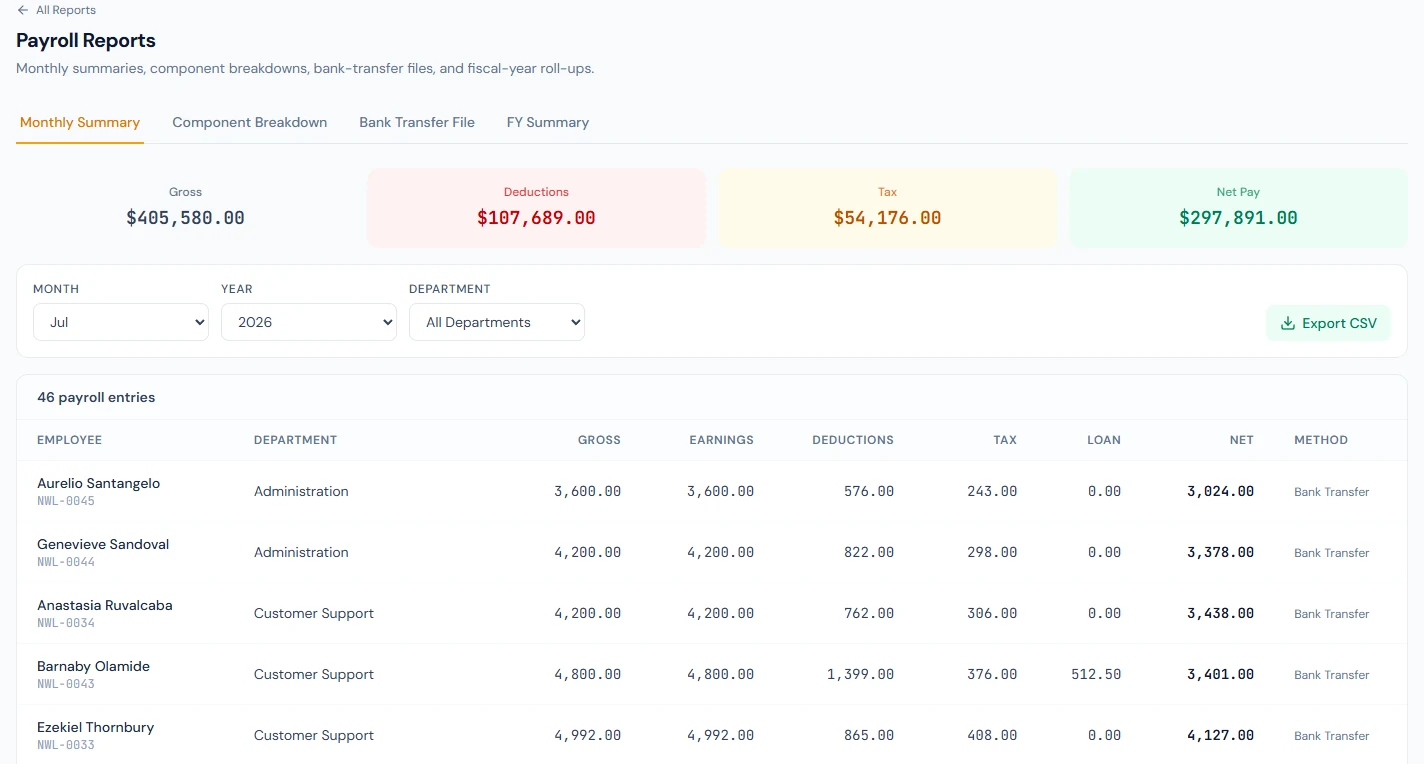
Northwind's reports cover September 2025 to September 2026, thirteen runs. July 2026, the latest locked run, is the month to read: 46 entries, gross 405,580 and net 297,891.
65.1 Monthly summary and component breakdown
Monthly Summary takes a month and an optional department and shows the totals (gross, deductions, tax, net paid) and a row per entry: employee, code, department, gross, earnings, deductions, tax, loan, net and the payment method. It is the payroll register as data; Export CSV is what the accountant posts from.
Component Breakdown lists every salary component used that month with its type and total: Basic as an earning, Income Tax and FICA as deductions, FICA Employer as an employer contribution. It answers "how much did we pay in allowances" or "what was the employer's social security this month" without adding up slips.
65.2 Bank transfer report
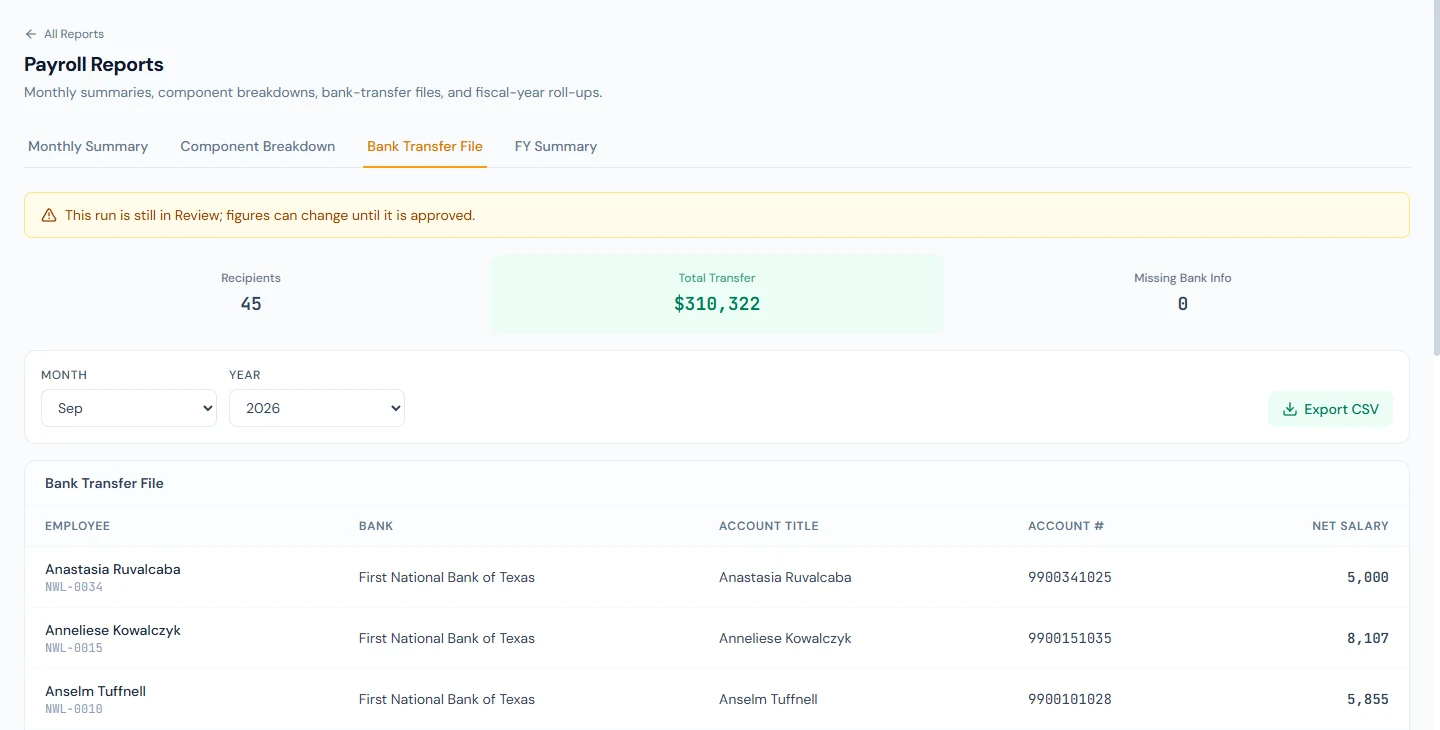
Bank Transfer File lists, for a month, each employee's net salary with the bank, account title, account number and IBAN on their profile, and counts the recipients, the total and anyone missing bank information. It is a check before paying, not the file the bank receives: that file is built in the paying account's own format from the run page (Chapter 58). Use it to find the employees whose profile would leave them out of the bank file, and fix them first.
65.3 Fiscal-year summary
FY Summary takes a fiscal year and shows its totals (gross, deductions, net, employer cost) and a month-by-month table with each run's status. It is the year at a glance and the first thing to check at year-end:
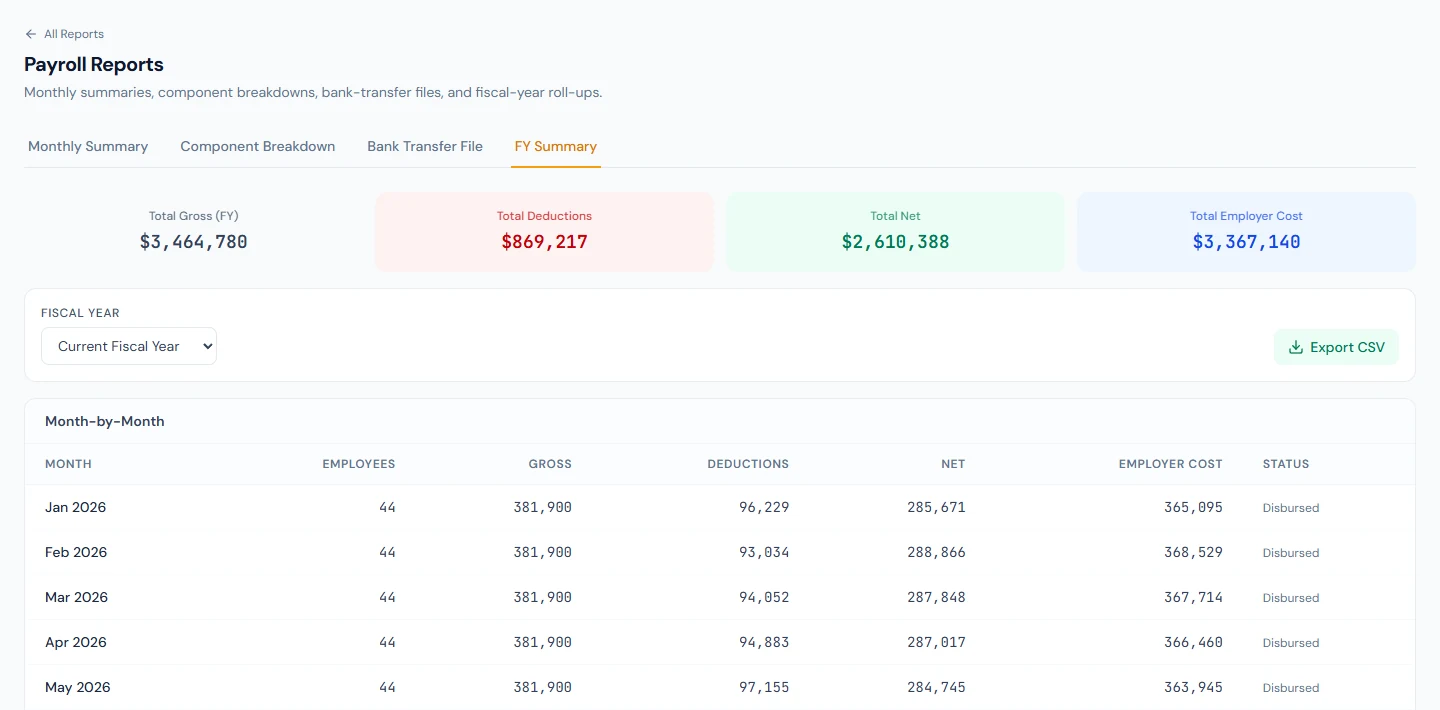
- Every month has a run, and every run is locked and paid.
- The year's totals agree with what was filed with the tax authority and the social security body.
- Tax adjustments are entered, and certificates are issued or available in the portal (Chapter 63).
- Provident-fund remittances match the members' ledgers (Chapter 61).
- Leave rolls into the new year (Chapter 47) and the new year's tax brackets are entered before its first run.
What happens next
- Part 10 turns to expenses, whose approved claims arrive in payroll as adjustments.
What the employee sees
Nothing of the reports; their slips and certificates carry their own share of the same figures.
Common mistakes
- Reading a report before the month is locked. Figures in Review can change; report from locked months.
- Using the bank-transfer listing as the bank's file. It is a check; the file comes from the run page in the bank's format.
- Adding up slips by hand. The component breakdown and the CSV already do it.
- Closing the year without the summary. A missing or unpaid month shows there first.
- Department filters for company totals. The filter narrows the rows; clear it for finance.
Practice
Use your own trial workspace, not a customer's.
- Open Reports › Payroll for a locked month and export the Monthly Summary; total the net in a spreadsheet and compare with the run.
- Read the Component Breakdown for the same month and find the employer's contributions.
- Open Bank Transfer File and fix one employee missing bank details.
- Open FY Summary for the current year and work through the year-end list.
Quiz
1. Where do the report figures come from?
The run entries, the same figures as the slips, imported months included.
2. What does the Component Breakdown answer?
How much each salary component came to in a month, by type: earnings, deductions and employer contributions.
3. Is the Bank Transfer File report the file the bank receives?
No; it is a check of recipients and bank details. The bank's file is built from the run page in the paying account's format.
4. What does the FY Summary show?
The fiscal year's totals and each month's gross, deductions, net, employer cost and run status.
5. Name three year-end checks.
Every month locked and paid; totals agreeing with the filings; certificates issued; fund remittances matching ledgers; the new year's brackets entered.