Chapter 95 — What Operentra does on its own
Much of what keeps an HR system accurate happens when nobody is looking: a year rolls over at midnight, leave is allocated, a contract lapses, a reminder goes out to someone who forgot to clock out. Knowing what runs on its own, and when, explains many "why did this change?" questions and keeps you from doing by hand what is already done.
What this chapter covers
- 95.1 Time, attendance and leave
- 95.2 People and documents
- 95.3 Pay and performance
- 95.4 Workspace housekeeping
- 95.5 When something did not happen
The concept
Scheduled work saves effort only if three things hold. It runs at the right moment for each company (midnight in Dubai is not midnight in Chicago). It runs once, even when the system runs on several servers. And it never overwrites a human decision: an attendance day HR corrected by hand must survive the nightly job. Operentra's jobs are built on those rules; HR's part is to know they exist and to set the switches that steer them.
How Operentra handles it
- Each job claims its run before starting, so it happens once however many servers there are, and catches up after a restart where missing a day would matter (leave allocation, the fiscal-year rollover, monthly badges).
- Date-based jobs use each workspace's time zone (Chapter 8): auto- present marks, birthday wishes, contract expiry, missed reports, asset nudges, the probation digest, address and payslip reminders, account closing, the holiday check, badges, work-based accrual and the fiscal-year rollover. A Chicago workspace gets its morning reminders shortly after 09:00 Chicago time, a Dubai one shortly after 09:00 Dubai time.
- Settings steer them: the email triggers (Chapter 79), attendance reminders (Chapter 36), daily reports (Chapter 72), address verification (Chapter 23) and the offboarding grace period (Chapter 82).
- Human-approved records are protected: a regularised or manually overridden attendance day is never rewritten by a job (Chapter 39).
Walkthrough
What a normal day at Northwind looks like to the scheduler.
95.1 Time, attendance and leave
| Job | When | What it does |
|---|---|---|
| Auto-present | 00:30 in the workspace's time zone | Marks staff on auto-present shifts present for the day before, skipping their days off and holidays (Chapter 35) |
| Missing punch reminders | Every 15 minutes | Emails a person an hour (or the set offset) after their shift starts or ends without a punch, unless it is a day off, a holiday or leave (Chapter 36) |
| Biometric polling | Every minute | Pulls new punches from devices set to sync (Chapter 40) |
| Fiscal-year rollover | Just after midnight in the workspace's time zone, on the day after its year ends | Creates the next fiscal year for each workspace, makes it current and allocates its leave straight away (Chapter 10) |
| Leave allocation | Daily, 02:20 UTC | A safety net: allocates any workspace whose current year still has no allocations, with carry-forward (Chapter 47) |
| Work-based accrual | Shortly after 01:00 in the workspace's time zone | Credits leave earned by days worked the day before, for policies that accrue that way (Chapter 47) |
| Holidays | Mondays, shortly after 09:00 in the workspace's time zone | Rolls recurring holidays into the next year and flags new holiday suggestions for review (Chapter 43) |
95.2 People and documents
| Job | When | What it does |
|---|---|---|
| Birthday wishes | 09:00 in the workspace's time zone | Sends the birthday email, if switched on (Chapter 79) |
| Probation | 09:15 in the workspace's time zone | Emails HR a list of probations ending within 14 days, and opens a probation review in time (Chapter 69) |
| Contract expiry | Hourly | Marks contracts expired once their end date has passed in the workspace's time zone (Chapter 31) |
| Address verification | Shortly after 09:00 in the workspace's time zone | Reminds people with an address still to verify, while verification is on (Chapter 23) |
| Assets | Hourly | Nudges people holding overdue assets at 09:00 and sends HR a handover digest at 18:00, workspace time (Chapter 33) |
| Interview reminders | Hourly | Reminds panel members of upcoming interviews (Chapter 29) |
| Account closing after an exit | Shortly after 10:00 in the workspace's time zone | Warns a leaver five days before, then closes their sign-in when the grace period after settlement ends (Chapter 82) |
| Scheduled announcements | Every 10 minutes | Emails an announcement when its publish time arrives (Chapter 78) |
95.3 Pay and performance
| Job | When | What it does |
|---|---|---|
| Payslip acknowledgment | Shortly after 09:00 in the workspace's time zone | Reminds people who have not acknowledged a paid slip, two days and five days after it was sent, then stops (Chapter 59) |
| Recurring tasks | Hourly | Creates each day's recurring tasks and scores the ones missed, on working days only (Chapter 71) |
| Missed daily reports | Hourly | Records a missed report once its deadline passes, for people who must write one (Chapter 72) |
| Weekly sales reports | Hourly | Records missed weekly reports after the due hour (Chapter 73) |
| Task reminders | Hourly | Reminds people of open tasks and nudges overdue ones (Chapter 71) |
| GitHub and WHMCS | Hourly | Collects new reviews and tickets as evidence (Chapter 74) |
| Badges | 1st of each month, shortly after 03:00 in the workspace's time zone | Awards the badges for the month just ended (Chapter 70) |
95.4 Workspace housekeeping
| Job | When | What it does |
|---|---|---|
| Backups | Nightly | Takes each workspace's encrypted backup and keeps the last 14 (Chapter 92) |
| Seats | Nightly | Syncs the billed headcount (Chapter 93) |
| Trial end | Daily | Ends lapsed trials and emails the workspace (Chapter 93) |
| Notifications | Nightly | Deletes bell notifications 90 days after they were read, or 180 days if never read |
| Webhooks | Every 5 minutes | Retries failed webhook deliveries (Chapter 96) |
| Custom domain | Hourly | Checks the domain's DNS and certificate (Chapter 13) |
95.5 When something did not happen
Most "it didn't happen" questions have one of four answers:
- A switch is off. The email trigger, the reminder setting, the daily-report requirement or the verification itself (check the relevant chapter's settings).
- The person is excluded on purpose: on leave, on a day off, on an auto-present or exempt shift, already separated.
- The data was not there yet. No shift assigned, no date of birth, no probation end date, no device set to sync.
- The email went but did not arrive. Email Logs show whether it was sent, skipped or failed, and why (Chapter 91).
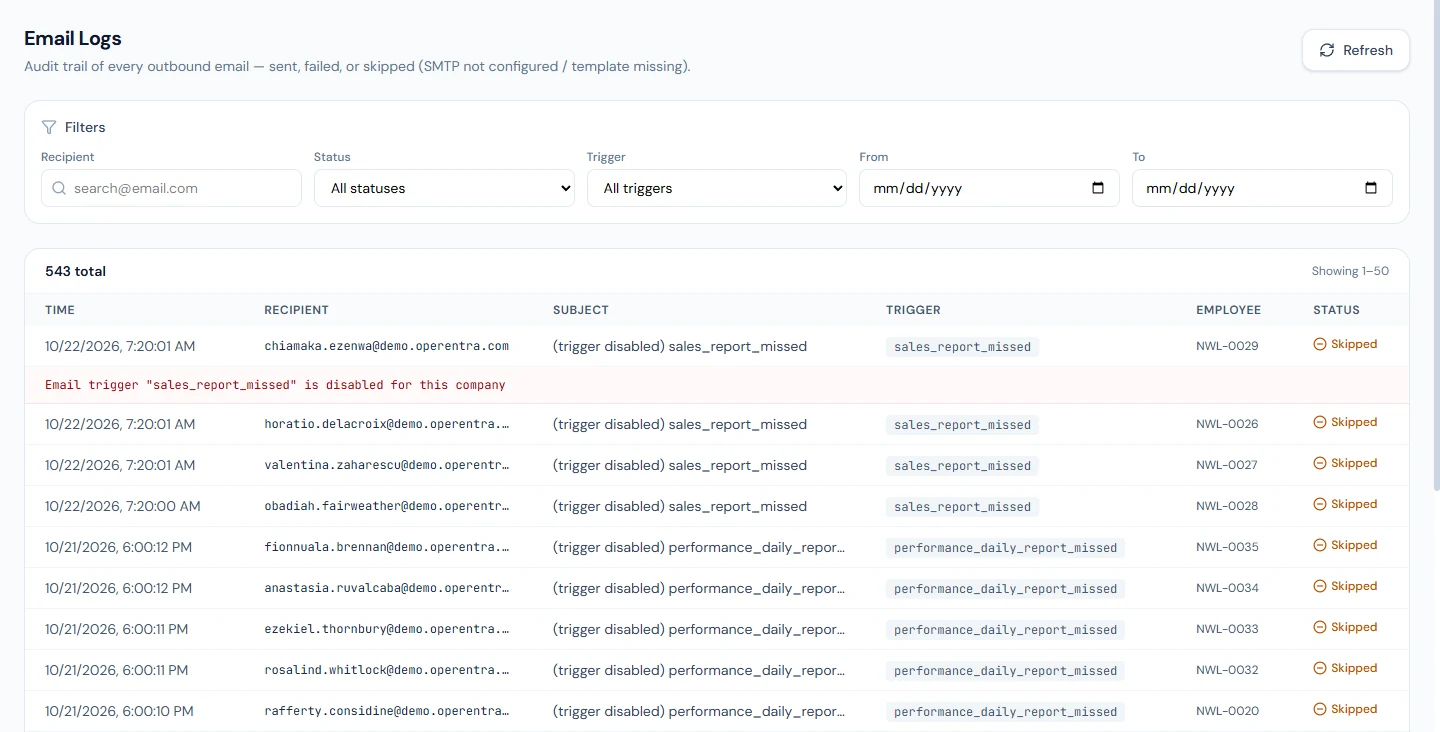
If none applies, report it with the date, the person and what you expected; the job's own record will show whether it ran.
What happens next
- Chapter 96 covers the public API and webhooks, for when you want to connect your own systems.
What the employee sees
Reminders and notices by email and in the bell, attendance marks that appear overnight, leave balances that grow by themselves.
Common mistakes
- Doing by hand what a job does. Allocating the new year's leave or expiring contracts manually creates duplicates and confusion.
- Expecting a reminder on a day off or during leave. Those days are skipped on purpose.
- Leaving data incomplete. No probation end date means no probation reminder; no shift means no punch reminder.
- Overwriting a corrected day expecting the job to fix it. Jobs never touch a day a person approved or overrode.
Practice
Use your own trial workspace, not a customer's.
- Give a test employee a probation end date within 14 days and look for HR's digest after 09:15 the next morning, workspace time.
- Switch the birthday email off, set a test employee's birthday to tomorrow, and confirm in Email Logs that nothing was sent; switch it back on.
Quiz
1. When does auto-present run?
At 00:30 in each workspace's own time zone, for the day before.
2. How many payslip acknowledgment reminders are sent?
Two: two days and five days after the slip was sent; then they stop.
3. Can a nightly job overwrite a day HR corrected?
No: approved and overridden days are protected.
4. What happens to a leaver's sign-in after settlement?
A warning five days before the grace period ends, then the account is closed.
5. Where do you check whether a scheduled email went out?
Email Logs, with the reason for any skip or failure.