Chapter 49 — Leave encashment
Unused leave is a liability on the company's books and a sum of money in the employee's mind, and encashment is where the two meet. It is a short chapter because the rule is short: days times a rate, taken from the balance, with the policy deciding whether it is allowed at all. The two moments it happens are during employment, from the Encashment page, and at separation, inside the final settlement.
What this chapter covers
- 49.1 Encashing a balance
- 49.2 Encashment at separation
The concept
Encashment turns an entitlement into pay. A policy that allows it needs a rate that prices each encashed day, and the figure that matters to the employee is that price times the days they have not taken. A day of leave is usually priced at the employee's own pay, one day's basic, so the rate differs from person to person; some companies pay a flat amount per day instead. Carrying leave forward and encashing it are alternatives to the same question, what to do with the leftover, and a company usually permits one, the other, or a capped mix. At separation the question stops being optional: a leaver's unused leave is money owed, and the settlement has to value it by the same rule the policy states, or the employee will.
How Operentra handles it
- The basis: each policy's Encashment Basis says how its rate reads. Days of basic pay: the rate is a multiple of the employee's daily basic pay, their monthly basic ÷ 30, so 1 pays one day's basic per encashed day and every employee is paid at their own salary. The monthly basic is the one payroll pays: what the salary structure's Basic component gives on the employee's gross, so an edit to the structure moves it too. Fixed amount per day: the rate is an amount in the workspace currency, the same for everyone.
- Leave › Encashment: choose an employee; the leave types whose policy allows encashment show their available balance, the per-day figure and the total; Process Encashment pays out the whole balance of a type. The amount is days times the per-day figure, the encashed days are recorded on the allocation, and the balance falls by them.
- A type without encashment is not offered. A type that allows it but cannot be priced (a rate of zero, or days of basic pay for an employee whose salary structure gives no basic pay) is listed with the reason and cannot be processed; the server refuses the same cases.
- The final settlement (Chapter 82) values every encashable type's remaining balance the same way, lists it in the settlement breakdown, and writes the encashment when the settlement is processed.
- Who:
leave.configure(Super Admin, HR Manager) on the Encashment page; the settlement follows the offboarding permissions.
Walkthrough
Northwind's Annual Leave is encashable and its other types are not, so the Encashment page shows one card per employee; nobody in service has encashed anything yet, and each of the three settled leavers had their unused annual leave valued in their settlement: 6.5 days for NWL-0046, 6.67 for NWL-0047 and 5 for NWL-0048. Northwind's policy pays in days of basic pay at a rate of 1: one day of the employee's own basic for each encashed day (Chapter 45).
49.1 Encashing a balance
Leave › Encashment opens with an employee selector and a prompt to choose one. For the chosen employee it lists each encashable type with Available: N days, the per-day figure ("1 × daily basic pay ($200.00) = $200.00 per day", or "$350.00 per day (fixed amount)"), the total, and a Process Encashment button. The available days are the balance the leave cards show: for a type that accrues monthly or quarterly, only the days accrued so far. A type whose policy does not allow encashment is absent, one that cannot be priced says why and its button is disabled, and an employee with nothing to encash reads "No encashable leave balances for this employee." The note under the list explains the two bases.
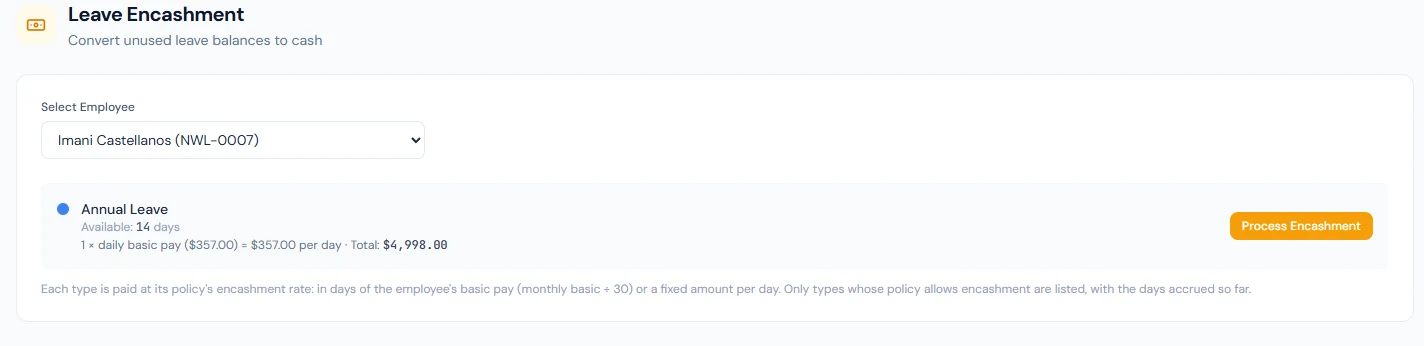
Process Encashment asks "Encash all 12 days of Annual Leave?" with the total and, on confirmation, writes the encashment: the allocation's Encashed figure rises by the days, the balance falls by them, and the toast states the result with the amount in the workspace currency ("Encashed 12 days of Annual Leave — USD 2,400.00" for an employee on a monthly basic of 6,000 at one day's basic per day). It encashes the whole available balance of the type, not a chosen number of days, and there is no undo; a mistaken encashment is corrected by editing the allocation. Paying the amount is payroll's step: it is not added to the next run automatically, so record it as an adjustment (Chapter 56) in the month it is paid.
49.2 Encashment at separation
When an employee leaves (Chapter 82), the final settlement preview walks every leave allocation of the current fiscal year, keeps the types whose policy allows encashment, and values each remaining balance, accrued plus carried forward minus used minus encashed, at the per-day figure, with the daily basic taken from the salary structure of the assignment in force on the last working day, as payroll would pay it: the breakdown lists the type, the days, the per-day figure and the amount beside gratuity and any outstanding loan, and the cash settlement adds them up. A type that allows encashment but cannot be priced is shown as a warning under the figures and left out, its days still in the balance, until HR sets the rate or adds basic pay to the structure. Processing the settlement writes the encashment for each type exactly as the Encashment page would, so the leaver's balances read zero afterwards and the amount is in the settlement, not in a separate payout. A policy with encashment off contributes nothing, which is why a company that intends to pay out leave at exit checks the basis and the rate before the first resignation.
What happens next
- The balance on the employee's cards shows the Encashed figure and the lower balance at once.
- Payment is a payroll adjustment for an in-service encashment (Chapter 56) and part of the settlement for a leaver (Chapter 82).
What the employee sees
The Encashed figure on their balance card and the lower available balance; a leaver sees the leave line in their settlement. There is no portal request for encashment; it is HR's action.
Common mistakes
- Reading the rate as money on a days-of-basic-pay policy. There a rate of 1 is one day's basic, not one unit of currency; a flat amount needs the Fixed amount per day basis.
- Expecting to encash part of a balance. The page encashes the whole available balance of the type.
- Expecting the money in the next payslip. Add it as an adjustment; the encashment changes the balance, not the run.
- Switching encashment on without a rate. The page refuses the type, and the settlement leaves it out with a warning.
- Encashing a type the policy carries forward instead. Decide which the company does; both at once pays twice for the same days over two years.
- Valuing a leaver's leave by hand. The settlement does it from the policy; change the policy, not the figure.
Practice
Use your own trial workspace, not a customer's, and a throwaway employee.
- Open Leave › Encashment and read the empty prompt; choose an employee with annual leave and read the card.
- Read the basis and the rate on the Annual Leave policy (Chapter 45), return, and Process Encashment; read the toast and the employee's balance card.
- Switch encashment off on Sick Leave's policy and confirm it is absent from the page.
- Open a separated employee's settlement (Chapter 82) and find the leave encashment line.
Quiz
1. How is an encashment amount calculated?
The type's available balance in days times the per-day figure: the rate times the employee's daily basic pay (monthly basic ÷ 30, the basic the salary structure gives, as payroll pays it) on the days-of-basic-pay basis, or the rate itself on the fixed-amount basis. The whole available balance is encashed.
2. When does a type appear on the Encashment page?
When its policy allows encashment and the employee has a positive balance. A type with no rate, or priced in days of basic pay for an employee whose salary structure gives no basic pay, is listed with the reason and cannot be processed.
3. What does an encashment change, and what does it not?
It raises Encashed on the allocation and lowers the balance; it does not add anything to a payroll run.
4. How does the final settlement value unused leave?
For each encashable type, the remaining balance times the same per-day figure, listed in the breakdown and encashed when the settlement is processed; a type that cannot be priced is shown as a warning and left out.
5. Can an encashment be undone?
No; a mistake is corrected by editing the allocation.