Chapter 57 — Salary changes
A salary changes three ways: it goes up, it occasionally goes down, and it moves with a new role. Each change needs a date it takes effect from, a reason, a letter the employee keeps, and a payroll that pays the new figure from that date and not a day earlier. Operentra records all three through one screen, Increments, and keeps every change as a dated record that is never edited, so the salary history of anyone can be read back month by month.
What this chapter covers
- 57.1 Increments and increment types
- 57.2 Decrements, decrement letters and emails
- 57.3 Promotions with a salary change
The concept
A pay change is a contract change, so it is treated like one: in writing, dated, and not rewritten later. The effective date matters more than the date it was decided, and the two are rarely the same; a raise agreed in a June review may take effect on the first of July, or be backdated to April. Backdating creates arrears, the difference owed for months already paid, which has to be paid explicitly. A reduction needs particular care: in most places it needs the employee's agreement or a contractual basis, and it should never arrive as a surprise on a payslip.
How Operentra handles it
- Payroll › Increments lists every change: employee, previous and new salary, the change and the percentage, the type, the effective date. Process Increment and Process Decrement open the form.
- The form takes the employee (their current salary is shown), the New Gross Salary, the Effective Date, the Increment Type (Annual, Promotion, Performance or Adjustment; Decrement for a reduction) and a reason. The change and percentage are worked out from the current salary.
- Saving records the change, ends the current salary assignment on the day before the effective date and opens a new one at the new figure on the same structure (Chapter 52), emails the employee, and issues the increment or decrement letter if the workspace has an active template for it.
- Payroll pays the new figure from the month that contains the effective date, the whole of that month; earlier months already run keep the old figure, so backdated arrears are an adjustment.
- Changes are never edited or deleted; a mistake is corrected by another change.
- Who:
payroll.salary_assign(Super Admin, HR Manager, Accountant).
Walkthrough
Northwind has eighteen changes on record: twelve annual increases between November 2025 and July 2026, averaging just over six percent, and six promotion increases averaging fifteen and a half. The most recent are three annual increases effective 20 July 2026, among them Augustin Beaulieu's, from 10,000 to 10,600, six percent.
57.1 Increments and increment types
Process Increment asks for the employee and shows their current salary, then the New Gross Salary, the Effective Date, the type and a reason ("Annual performance review 2026"). The hint says what happens: the change and percentage are worked out from the current salary and the salary assignment is updated. A figure below the current salary is refused in this form with a pointer to Process Decrement. The type is a label for the record, the letter and the reports: Annual for the yearly cycle, Performance for an off-cycle reward, Promotion for a new role (57.3), Adjustment for a market or correction change.
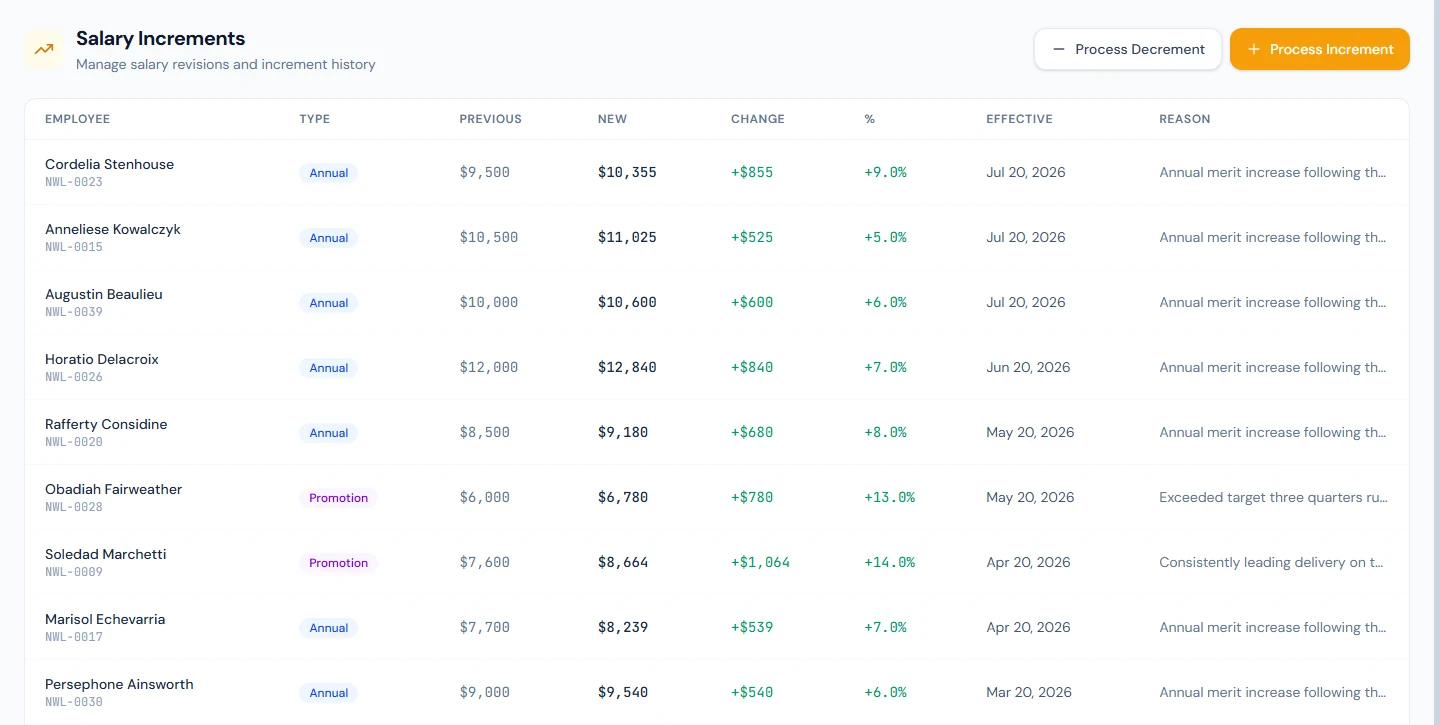
Saving writes three things. The record on the Increments list. The salary assignment: the current one ends the day before the effective date and a new one starts on it, at the new figure, on the same structure; a structure change is a separate step (Chapter 52). And the communications: an email to the employee with the old and new figures, and an increment letter under their Letters (Chapter 76) if the workspace has an active increment-letter template.
Payroll reads the assignment in force for each month (Chapter 54). A change effective on the first of a month is paid from that month; one effective mid-month, like Augustin's 20 July, pays the whole of July at the new figure, because a month is not split between two salaries. A change recorded in advance is not paid early: September's run pays the old figure even if a raise effective 1 October was entered in September. A backdated change does not reach months already paid: if a raise effective 1 April is recorded in July, April to June stay at the old figure on locked runs, and the difference is an adjustment in the next open month (Chapter 56), "Arrears April to June", taxable.
57.2 Decrements, decrement letters and emails
Process Decrement is the same form for a reduction: the new figure must be lower than the current salary, the reason is optional but belongs on every reduction ("Move to a part-time schedule" is the placeholder), and the hint says what follows. The change is recorded with the type Decrement and shown in red; the employee receives a salary revision email worded for a reduction, never a congratulation, and a decrement letter if the workspace has an active template. The direction always comes from the numbers: a "decrement" that does not lower the salary is refused, and an increment form cannot record a cut.
Record a decrement only once it is agreed in writing; the email and letter go out the moment it is saved.
57.3 Promotions with a salary change
A promotion is recorded on Employees › Promotions (Chapter 24): the new designation, the date, and optionally a New Salary, which the form says plainly is "Printed on the promotion letter only. Payroll changes through a salary increment." So a promotion with a raise is two entries with the same effective date: the promotion, which moves the title and issues the promotion letter, and a Process Increment of type Promotion, which moves the pay. Northwind's six promotions each have their increment; Obadiah Fairweather's, effective 20 May 2026, went from 6,000 to 6,780.
What happens next
- The next run (Chapter 55) pays the new figure from the effective month; slips (Chapter 59) show it.
- Letters (Chapter 76) hold the increment, decrement and promotion letters; contracts (Chapter 31) still quote the old figure until a new contract is issued.
What the employee sees
The salary revision email, the letter under their Letters in the portal, and the new gross on the first slip of the effective month.
Common mistakes
- Editing the salary assignment instead. It cannot be edited by design; record an increment so the history keeps the reason.
- Recording a raise and expecting arrears. Months already paid stay as they were; add the difference as an adjustment.
- Choosing a mid-month date by habit. The whole month is paid at the new figure; use the first of the month unless a split is intended and paid by adjustment.
- A promotion without its increment. The title changes and the pay does not.
- A decrement before it is agreed. The email and the letter go out on save.
- Correcting a wrong increment by asking for a delete. There is none; record a corrective change with the same effective date.
- Forgetting the contract. The agreement still states the old salary; issue a new one when the change is material.
Practice
Use your own trial workspace, not a customer's.
- Open Payroll › Increments and read one row's previous, new, change and percentage.
- Process an annual increment for a throwaway employee effective the first of next month; open Employee Salaries and read the two assignments.
- Try to enter a lower figure in Process Increment and read the refusal; then Process Decrement for another employee and open their Letters.
- Record a promotion with a new salary (Chapter 24), then the matching Promotion increment on the same date.
- Process this month's payroll and confirm the raised employee is still at the old figure; process next month and read the new one.
Quiz
1. What does saving an increment change in payroll terms?
It ends the current salary assignment the day before the effective date and opens a new one at the new figure on the same structure.
2. From which month is a raise paid?
The month that contains the effective date, in full; months before it keep the old figure, so backdated arrears are an adjustment.
3. What decides whether a change is an increment or a decrement?
The numbers: a lower figure is a decrement, with its own email and letter, and each form refuses the other direction.
4. How is a promotion's raise paid?
By a Promotion increment with the same effective date; the promotion's New Salary is printed on the letter only.
5. How is a wrong increment corrected?
By recording another change; increments are never edited or deleted.