Chapter 68 — Appraisal setup
An appraisal is only as fair as the form it is written on. Before the first cycle, HR decides how often reviews happen, what the rating scale means, who rates, and which competencies each role is judged on and how much each counts. Those choices outlive any one cycle, so they are worth a careful hour before anyone is asked to rate anything.
What this chapter covers
- 68.1 Appraisal settings: cadence, rating scale, review phases
- 68.2 Templates and competencies (weights total 100)
- 68.3 The seeded templates
The concept
A review form has two parts. The scale is shared by everyone: the same 1 to 5 (or 1 to 7) with the same meaning for every point, so a rating means the same thing in every team. The template is per role: the competencies that matter for the job, each with a weight, because "Technical skills" deserves more weight for an engineer than for a receptionist. Fix both before a cycle starts: changing the meaning of a 4, or the weight of a competency, halfway through a cycle makes the ratings already given mean something else.
How Operentra handles it
- Appraisals › Settings holds the default cadence, the rating scale (its top point and an optional label for each point), and which reviews run: the employee's self-review, the manager's review, or both. The settings apply to the whole workspace as soon as they are saved, running cycles included.
- Appraisals › Templates holds competency templates: a name, an optional description, and competencies, each with a description and a weight; the weights must total 100.
- Every workspace starts with four templates: Engineering / Technical Staff, Manager / Team Lead, General Staff (HR / Ops / Accounts / Sales), and Probation Review.
- Once a cycle uses a template, its competencies and weights are fixed; its wording can still be corrected.
- Who:
appraisals.configurefor the settings (Super Admin, HR Manager);appraisals.managefor templates (Super Admin, HR Manager).
Walkthrough
Northwind reviews annually, on a five-point scale with a label for every point, with both the self-review and the manager's review on.
68.1 Appraisal settings: cadence, rating scale, review phases
Default cadence (Annual, Half-Yearly, Quarterly or Custom) is pre-selected when a cycle is created; it is a label for the cycle's rhythm, and the cycle's own dates decide the period. Rating scale (max) is the top point, from 2 to 10: reviewers rate every competency from 1 to that number, and the final rating, the PDF and the reports are read against it. Point labels name each point; Northwind's read 1 "Below expectations", 2 "Partially meets", 3 "Meets expectations", 4 "Exceeds expectations", 5 "Outstanding". Reviewers see a point's label beside the buttons and under the rating they choose. The scale cannot be made smaller while an active cycle holds a rating above the new top.
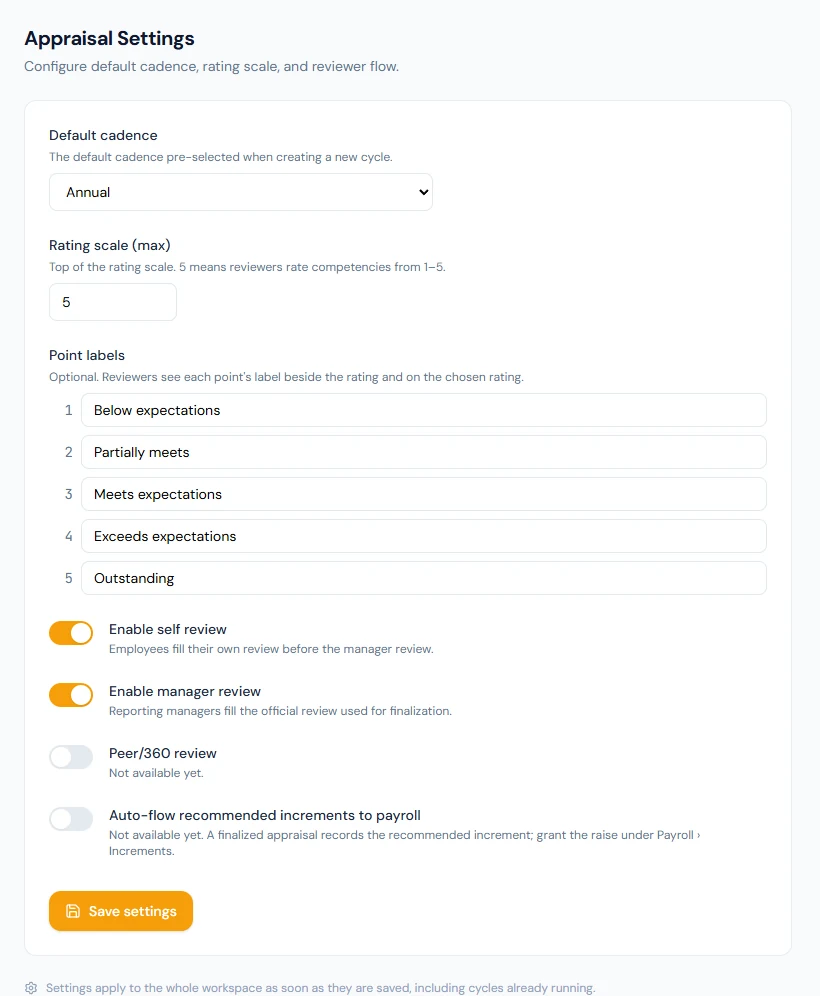
Enable self review asks each employee to rate themselves first. Enable manager review asks the reviewer, the employee's reporting manager, for the official rating. With both on, the employee writes, then the manager. With the self-review off, an appraisal starts with the reviewer and no "start your self review" email is sent. With the manager review off, a submitted self-review goes straight to HR and the final rating comes from it. At least one must stay on. Peer/360 review and Auto-flow recommended increments to payroll are not available yet; their switches are disabled. A recommended increment is granted as a salary increment (Chapter 57).
68.2 Templates and competencies (weights total 100)
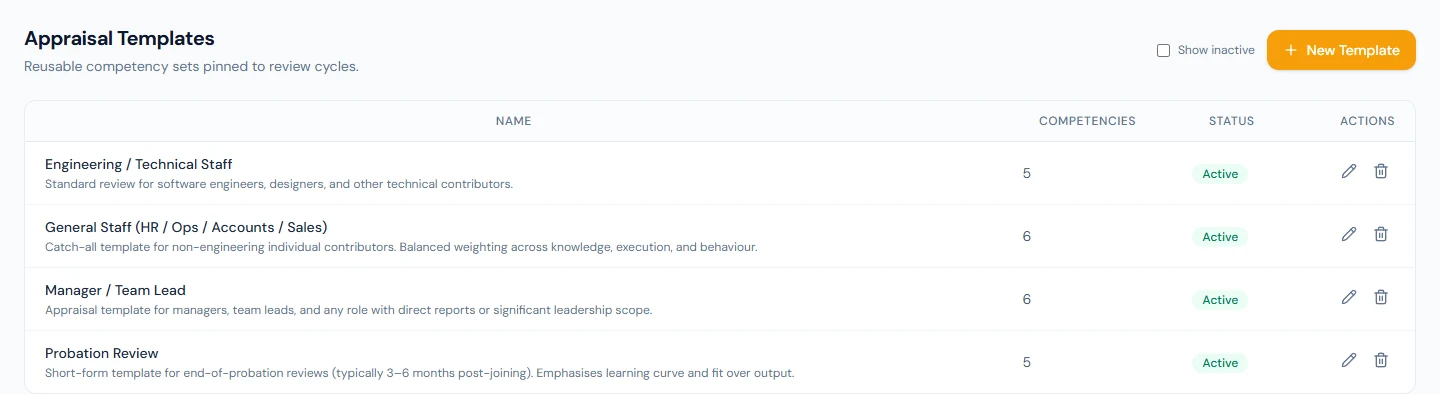
Templates lists each template with its number of competencies and whether it is active; Show inactive adds the ones taken out of use. New Template opens the editor: a name ("Annual Engineering Review"), an optional description, and the competencies. Each competency has a name, an optional description, which reviewers see while rating, and a Weight (%). Total weight shows the running sum, and the template cannot be saved until it is exactly 100. Order the competencies with Move up; reviewers rate them in that order.
A template not yet used by a cycle can be changed freely: removing a competency removes it. Once a cycle uses it, every running and closed cycle on it reads its competencies and weights, so they can no longer be added, removed or re-weighted; the name, the description and the competencies' wording can still be corrected. To change the substance, create a new template and use it for the next cycle. Delete removes an unused template; one in use is deactivated instead, which keeps its cycles intact and takes it out of the New Cycle list.
68.3 The seeded templates
Every workspace starts with four templates, each totalling 100:
| Template | Competencies (weight) |
|---|---|
| Engineering / Technical Staff | Technical Skills & Code Quality (30), Delivery & Productivity (25), Problem Solving & Innovation (15), Collaboration & Communication (15), Ownership & Initiative (15) |
| Manager / Team Lead | Team Leadership & Development (25), Delivery & Results (20), Decision Making & Judgment (15), Strategic Thinking (15), Stakeholder Communication (15), People Management (10) |
| General Staff (HR / Ops / Accounts / Sales) | Job Knowledge & Skills (25), Quality of Work (20), Productivity & Time Management (20), Communication (15), Reliability & Attendance (10), Teamwork (10) |
| Probation Review | Job Knowledge & Learning Curve (30), Quality of Work (20), Cultural Fit & Teamwork (20), Attendance & Punctuality (15), Initiative & Engagement (15) |
They are ordinary templates: edit them before their first cycle, or use them as they are. Probation Review has a second job: the automatic probation reviews (Chapter 69) use the oldest active template with "Probation" in its name, so keep one active under that name.
What happens next
- Chapter 69 creates a cycle on a template and runs it.
What the employee sees
Nothing until a cycle opens; then the template's competencies, with their descriptions and weights, and the scale's labels in their self-review.
Common mistakes
- No point labels. Every reviewer invents their own meaning of a 4.
- One template for every role. Build one per job family.
- Changing the scale mid-cycle. Ratings already given read against the new top; set it before the first cycle.
- Expecting to re-weight a template in use. Create a new one for the next cycle.
- Renaming the probation template. Without "Probation" in an active template's name, automatic probation reviews stop.
- Turning the manager review off by default. The self-review then becomes the final rating.
Practice
Use your own trial workspace, not a customer's.
- Set a five-point scale and write a label for every point.
- Create a template for one role with four competencies weighing 40, 30, 20 and 10; try saving at 90 first.
- Use it in a cycle (Chapter 69), then try to change a weight, and correct a typo in a competency instead.
- Delete a template no cycle uses, and one that a cycle uses; compare the results with Show inactive on.
Quiz
1. What do point labels do?
They name each point of the scale; reviewers see them beside the rating buttons and under the rating chosen.
2. What must a template's weights add up to?
Exactly 100.
3. What can still change once a cycle uses a template?
Its name, description and the competencies' wording; not the competencies themselves or their weights.
4. What happens when you delete a template in use?
It is deactivated: its cycles keep it, and new cycles cannot choose it.
5. What happens with the manager review switched off?
A submitted self-review goes straight to HR, and the final rating comes from the self-review.