Chapter 45 — Leave types and policies
Everything in Part 8 rests on two screens: the list of leave types, which is what employees pick from, and the policy behind each type, which is every rule from Chapter 44 as a form. A workspace starts with a sensible set already written; this chapter is how to read it, where each setting bites, and what to change for your own policy.
What this chapter covers
- 45.1 Leave types: code, colour, paid and pay share
- 45.2 Accrual mode: annual quota versus cyclic
- 45.3 Quota and maximum consecutive days
- 45.4 Carry forward, encashment, negative balance
- 45.5 Eligibility: gender, minimum service, employment types, pro-rata for joiners
- 45.6 Rules: documents after N days, accrual method, sandwich rules and scope
- 45.7 Effective periods
The concept
A policy editor is where a company's leave rules stop being a paragraph in a handbook and become arithmetic that runs on every request. Two habits keep it honest. One decision per setting: each field below answers one question, and a question answered "it depends" belongs in a second leave type, not in a clever value. Change by version, not by overwrite: a rule that changes in July should start a new policy effective in July, so that the year's earlier requests keep the rule they were judged by.
How Operentra handles it
- Leave › Leave Types lists the types with colour, code and paid flag; Add Leave Type takes a name, a code of up to ten characters, a colour, the Paid switch and, for a paid type, the Pay (%) each day of it is paid at. Deleting deactivates rather than erases, and is refused while the type has pending applications.
- Configure Policy on a type (or Leave › Leave Policies) opens the editor at the type's own address, in eight sections: Accrual Mode, Quota, Carry Forward, Encashment, Negative Balance, Eligibility, Rules, Effective Period.
- One active policy per type, by effective dates; Save updates the policy in force today, and a type with none is unusable until it has one.
- Every setting is enforced where it belongs: eligibility and pro-rata at allocation, the consecutive limit, the balance and the negative limit, the document rule and the sandwich day count at application, the rate at encashment, the cycle by a daily job.
- Who:
leave.configure(Super Admin, HR Manager).
Walkthrough
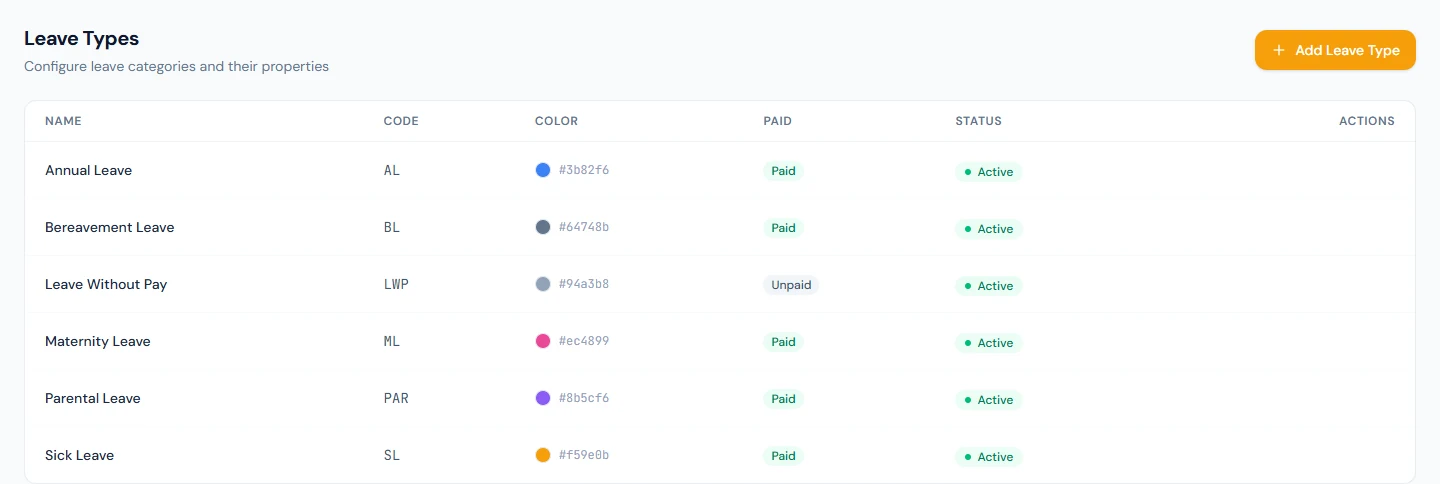
Northwind's six types and their policies, all effective from 1 January 2026, are the walkthrough: Annual Leave (AL, paid, 20 days released monthly, 20 consecutive at most, 5 carried, encashable, no negative balance, pro-rata on), Sick Leave (SL, 10, a document after 2 days), Maternity Leave (ML, 90, female employees), Parental Leave (PAR, 10), Bereavement Leave (BL, 3) and Leave Without Pay (LWP, unpaid, 365). No sandwich rule is on anywhere.
45.1 Leave types: code, colour, paid and pay share
Leave Types shows each type as employees will see it: the colour swatch, the name, the code, Paid or not, Active. Add Leave Type asks for the name ("Annual Leave"), the code ("AL", up to ten characters, unique like the name), a colour for the calendar and the balance chips, and Paid Leave. Edit changes any of them. Delete asks for confirmation and then deactivates the type so history keeps its label; a type with pending applications cannot be deactivated until they are decided.
Pay (%) shows while Paid Leave is on: "Share of a normal day's pay for each day of this leave: 100 is full pay, 50 is half pay. Payroll withholds the rest." It takes a whole number from 1 to 100 and starts at 100. A type below 100 reads "Paid at 50%" in the list and on its Leave Balances cards; payroll pays each day of it at that share and puts the rest on the Unpaid Leave Deduction line (Chapter 54), and the leave table in employment contracts prints the share instead of "Paid" (Chapter 31). Leave encashment and the final settlement do not use it: they pay out a balance at the policy's encashment rate (Chapter 49). Where a country's statutory set pays a stretch of sick or maternity leave at a reduced rate, that tier is a leave type of its own with its share already set, such as Sick Leave (Half Pay) at 50% or Sick Leave (75% Pay) at 75%, so each tier keeps its own balance. Every Northwind type pays in full.
A new type does nothing until it has a policy; the settings icon on its row, Configure Policy, is the next click.
45.2 Accrual mode: annual quota versus cyclic
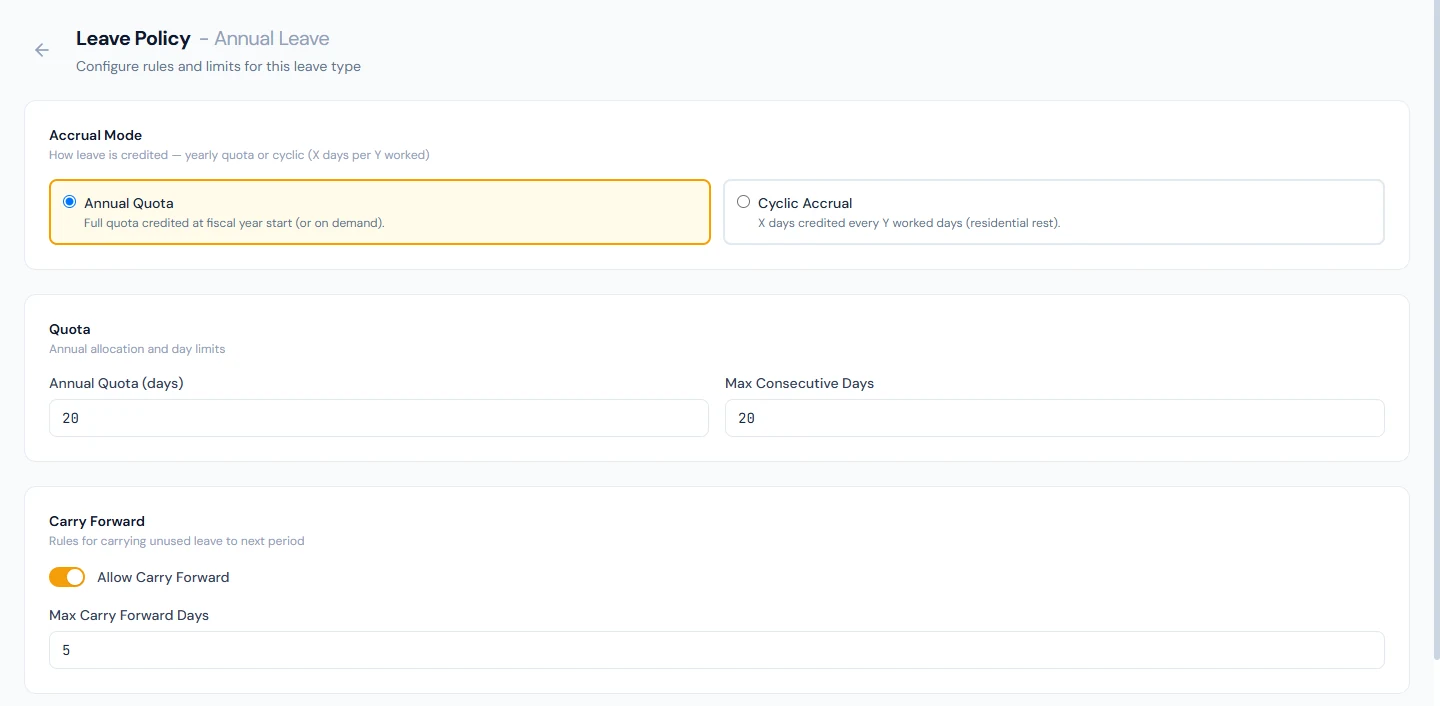
The first section chooses how days are credited. Annual Quota credits the yearly figure when leave is allocated for the fiscal year (or on demand), released all at once or gradually as the accrual method in 45.6 says. Cyclic Accrual earns rest from work: set Worked Days per Cycle, Leave Days Credited and an optional Max Accumulated cap, and a daily job counts each employee's qualifying worked days (Present or Half Day; rest days, holidays and paid leave do not count), credits the cycle's days when the count is reached, and carries the overflow into the next cycle (Chapter 47). Cyclic is for residential and rotational staff; every Northwind type is annual.
45.3 Quota and maximum consecutive days
Annual Quota (days) is the entitlement for the fiscal year in annual mode, in half-day steps. Max Consecutive Days is the longest single request the type allows; a request over it is refused on submission with the limit named. Northwind's Annual is twenty and twenty; Leave Without Pay has no limit.
45.4 Carry forward, encashment, negative balance
Allow Carry Forward and Max Carry Forward Days decide what the year-end allocation does with an unused balance: carried into the next year up to the cap, or lost. Northwind carries five days of Annual.
Allow Encashment lets unused days be cashed out (Chapter 49), and the Encashment Basis says how the rate beside it reads. On Days of basic pay the rate is a multiple of the employee's daily basic pay (monthly basic ÷ 30, the basic payroll pays from the salary structure): 1 pays one day's basic for each encashed day, 1.5 a day and a half, each employee at their own salary. On Fixed amount per day the rate is an amount in the workspace currency, the same for everyone. An encashment is refused while the rate is zero. Northwind's Annual is encashable at one day's basic.
Allow Negative Balance and Max Negative Days let an employee apply beyond their balance up to the limit; a request that would go further is refused with the limit named. Northwind allows none.
45.5 Eligibility: gender, minimum service, employment types, pro-rata for joiners
Applicable Gender restricts a type to all, male or female employees; Northwind's Maternity is female only, and an ineligible employee is not allocated the type and cannot apply for it. Min Service Months holds a type until the employee has served that long, and the balances page tells them how many months remain. Employment Types limits a type to the employment types ticked, for example Permanent and Probation but not Contract or Intern; none ticked means every type, which is how all of Northwind's policies are set. An employee of another type is neither allocated it nor able to apply for it. Pro-rata for New Joiners scales the quota for a mid-year joiner by the months left in the fiscal year; on for Annual at Northwind, off for the rest, so a new hire gets a full ten days of sick leave and a proportional share of annual.
45.6 Rules: documents after N days, accrual method, sandwich rules and scope
Requires Document After (days) makes an attachment mandatory on a request longer than the number; zero means never. Northwind's Sick Leave asks for one after two days, which is the certificate rule in most handbooks.
Accrual Method is how an annual quota becomes available: Annual releases it all at allocation; Monthly releases a twelfth per completed month of service in the fiscal year, so the balance shown is time-based; Quarterly releases a quarter per completed quarter. Northwind's Annual is monthly.
Sandwich Rule (Between) counts weekends, weekly-off days and holidays that fall between two leave days as leave, the Friday-plus- Monday that costs four. Sandwich Rule (Adjacent) counts the rest days next to a leave day too, with Adjacent Scope choosing Immediate (one day per side: a Monday consumes the Sunday) or All (the whole connected run of rest days and adjacent holidays: a Monday consumes Saturday and Sunday). The editor shows both examples. With neither on, only working days inside a request are counted.
45.7 Effective periods
Effective From and Effective To bound the policy. A type has one active policy at a time, the one whose period contains today; Save updates that policy, and a type whose only policy has ended behaves as if it had none until a new one is saved. To change a rule from a date, end the current policy on the day before and save the new rules effective from the date; requests already decided keep the rules they were judged by.
What happens next
- Leave groups (Chapter 46) bundle these policies for shifts and people; a policy not in anyone's group applies to nobody.
- Allocation (Chapter 47) writes the balances these numbers imply, once per fiscal year or on demand.
- Every request (Chapter 48) is checked against the active policy on submission.
- Payroll (Chapter 54) pays each day of approved leave in full, at the type's pay share when that is below 100%, or not at all for an unpaid type.
What the employee sees
The types and colours on their balances and calendar, the day count a request produces, the refusals (over the consecutive limit, beyond the balance, a document required) and the months remaining on a type they are not yet eligible for.
Common mistakes
- Adding a type without a policy. It appears in the list and nobody can use it.
- Editing the active policy to change a rule from next month. The change applies now; end the policy and save a new one.
- Mixing up the basis and the rate. On days of basic pay, 1 is one day's basic; on a fixed amount, 1 is one unit of currency per day, and an encashment pays exactly that.
- Leaving Max Consecutive Days blank on annual leave. A single request can take the whole year.
- Pro-rata off on a type that should scale. August joiners get the full quota.
- Reading Requires Document After as "from day one". Zero is never; one is from the second day.
- Switching sandwich rules on mid-year. Requests in flight are counted differently from the ones before.
- A female-only type with gender not set on employees. Nobody is eligible; the profile's gender is what the rule reads. The same goes for Employment Types and an employee with no type.
- Posting the unpaid share of half-pay leave as a payroll adjustment. Once the type's Pay is set, payroll withholds it; an adjustment as well docks the employee twice.
Practice
Use your own trial workspace, not a customer's.
- Open Leave Types, add "Study Leave" with code SDL, a colour and Paid on, and read the row. Edit it, set Pay to 50 and read the row again; set it back to 100. Try to delete Annual Leave.
- Open Configure Policy on Study Leave and set a quota of five, three consecutive at most, no carry forward, no encashment, no negative balance, pro-rata on, a document after one day, annual method, no sandwich rules, effective from the fiscal year's start. Save.
- Open Annual Leave's policy and read every section against the walkthrough figures; switch the accrual method to Quarterly and back without saving.
- Set Effective To on Study Leave's policy to yesterday, save, and read what the balances page says about the type.
- Open Leave Policies and read the list; then open Leave Groups (Chapter 46) to see which policies are in the default group.
Quiz
1. What makes a leave type usable?
An active policy whose effective period contains today; the type itself is only a name, code, colour, paid flag and pay share.
2. Where is each policy setting enforced?
Eligibility and pro-rata at allocation; the consecutive limit, the balance or negative limit, the document rule and the sandwich day count at application; the rate at encashment; the cycle by the daily job.
3. What does the accrual method change?
How an annual quota becomes available: all at once, a twelfth per completed month, or a quarter per completed quarter.
4. How do the two sandwich rules differ?
Between counts rest days that fall between two leave days; Adjacent counts rest days next to a leave day as well, one per side or the whole connected run depending on the scope.
5. How do you change a rule from a future date?
End the current policy the day before and save the new rules with that Effective From; decided requests keep the rules they were judged by.