Chapter 29 — Interviews
An interview is a meeting with four parties who all need the same facts: the candidate, who needs to know where and when; the panel, who need to know whom and why; HR, who need to know it happened and what the panel thought; and the record, which needs all of it later. This chapter is how one click from the application page tells everyone, how the candidate answers without a login, how nobody forgets, and how the panel's judgement comes back as a scorecard.
What this chapter covers
- 29.1 Scheduling: rounds, branch location, meeting link, interviewers, notes
- 29.2 The candidate's interview page: confirm, request reschedule, calendar file
- 29.3 Interview reminders
- 29.4 Interviewers in the portal: candidate details and scorecards
The concept
Chapter 25 set the standard: the same rounds for every candidate, questions written in advance, a scorecard before anyone talks. The logistics are the part of that standard people underrate. A candidate who had to guess the building, or who never got a reply to "can we move it", arrives rattled; an interviewer who finds out at lunch that they had an interview at eleven gives a worthless score. Good scheduling is a fairness measure.
The scorecard is the other half. Written down within the hour, by each interviewer separately, with a rating, a recommendation and the evidence, it is the only form of interview memory that survives a week. Everything the panel discusses afterwards should start from those cards, not replace them.
How Operentra handles it
- An interview is scheduled from the application at the Interview stage, one round at a time: a title, a date and time, a duration, a branch or a free-text location, a meeting link, one or more interviewers and notes for them. Scheduling from an earlier stage is not offered; move the application to Interview first.
- Three emails leave at once: the candidate's invitation with a calendar file and a confirm link; one to each interviewer with the same calendar file; and, later, the panel is told when the candidate confirms or asks to reschedule.
- The candidate answers on a public page, from the link in the email, with no login: confirm, request a reschedule with a message, download the calendar file.
- Reminders go out a day before, to the candidate and to each interviewer, once.
- Interviewers do not need recruitment access. Anyone put on a panel sees that interview under My Interviews in the portal, with the candidate's details, and submits a scorecard there: a rating out of five, a recommendation, strengths, concerns, notes. One scorecard per interviewer per round; resubmitting replaces it.
- Scorecards show on the application for whoever reads it.
Walkthrough
Northwind's DevOps Engineer search ran a two-round process: "Technical screen" (45 minutes) and "Team and system design" (90 minutes), with Callum Ferreira, Desmond Achterberg and Beatrix Nowakowska as the panel. Sixteen interviews sit on the four openings' applications, all in the past.
29.1 Scheduling: rounds, branch location, meeting link, interviewers, notes
Open an application at the Interview stage and click Schedule interview. The dialog is headed "Schedule Interview (Round N)", where N is one more than the rounds already held for this application.
| Field | Notes |
|---|---|
| Title | Defaults to "Technical interview". Name the round: "Technical screen", "Team and system design". |
| When | Required. Date and time in the workspace's time zone, named under the field, whatever zone your own computer is in. |
| Duration (mins) | Defaults to 60. |
| Branch | Defaults to the head office. Picking one fills Location with the branch's name, address and city; "None (off-site / remote)" clears it. |
| Location | Editable text. Add "Floor 3, Room B" after the branch address, or type a venue. |
| Meeting link | For remote rounds. Shown to the candidate and the panel. |
| Interviewers | Required, from the workspace's active users. Hold Ctrl or Cmd for several; the first selected is the primary interviewer. |
| Notes for interviewers | Optional. Shown to the panel in their portal, never to the candidate. |
Schedule & email candidate creates the round and sends:
- to the candidate, "Interview scheduled: DevOps Engineer at Northwind Labs, Inc.": the position, round and title, date and time in the workspace's time zone, duration, location with a "View on map" link when the branch has one, the meeting link, "You'll be meeting with Callum Ferreira, Desmond Achterberg", a Confirm or reschedule button, and a calendar file attached;
- to each interviewer, "You've been added as primary interviewer" (or "as an interviewer") with the candidate's name, the same details and the same calendar file, and a note that the candidate will confirm.
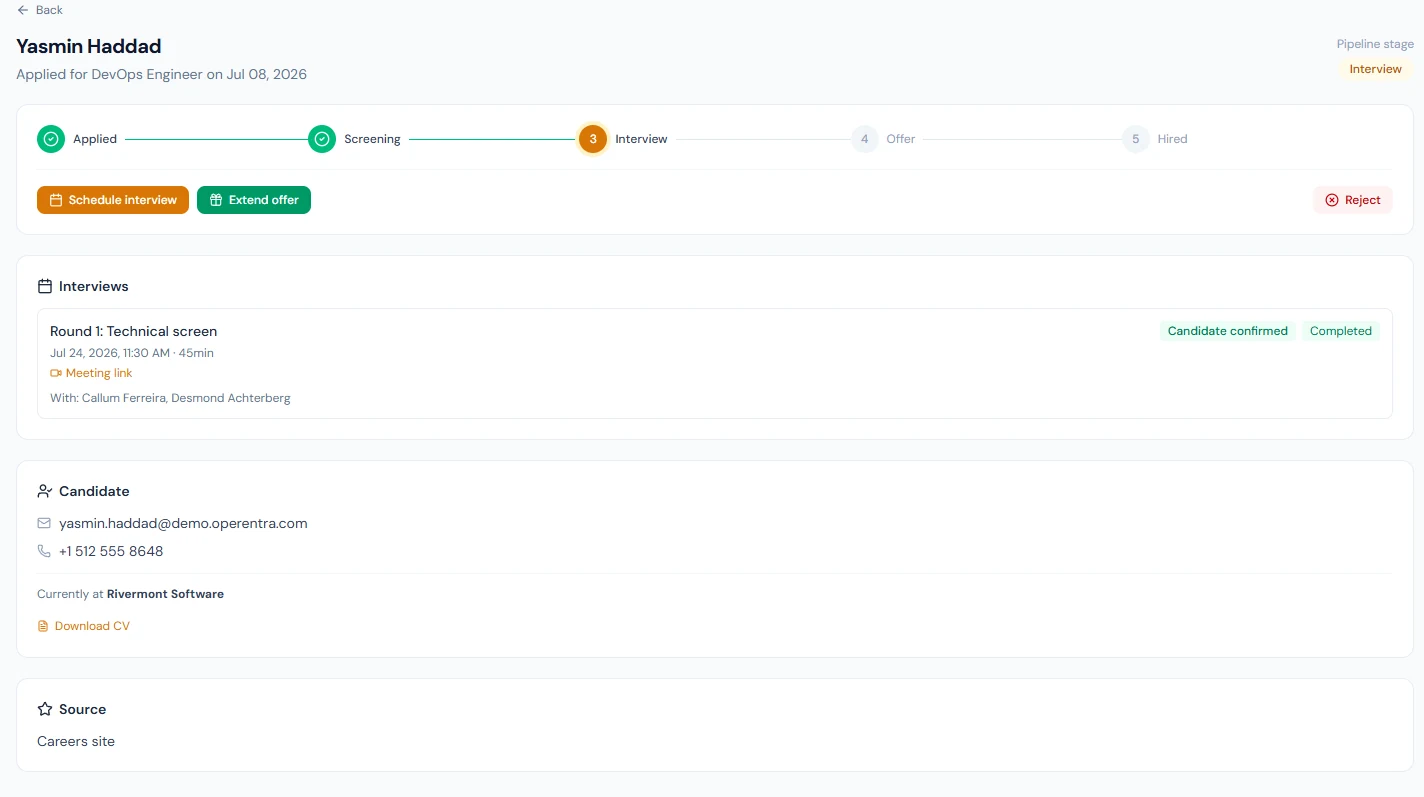
The application page gains an interview card: "Round 1: Technical screen", the time (in the workspace's zone) and duration, the location, map and meeting links, "With: Callum Ferreira, Desmond Achterberg", and a badge: Awaiting candidate, Candidate confirmed or Reschedule requested. Feedback appears under it as it arrives.
Once scheduled, a round cannot be edited, cancelled or marked complete from the screen; those exist in the API only. If the time changes, schedule a new round with the right details and tell the candidate the first email is superseded; the reminder for the old slot will still go out a day before it unless the old time has passed.
29.2 The candidate's interview page: confirm, request reschedule, calendar file
The candidate's button opens a page under /careers/interview/ with
its own secret token: a page in
your branding, no login, headed "Confirm your interview", with the
round, date and time, duration, location (and map link), meeting link
and the interviewers' names. Two actions:
- Confirm: the page turns to "You're confirmed for this interview — we've notified the panel", with an Add to calendar download and a link to request a reschedule after all. The badge on the application becomes Candidate confirmed, and each interviewer is emailed "Tamsin Everly confirmed for DevOps Engineer interview".
- Request reschedule: a message is required ("I have a conflict at that time — could we move it to Thursday afternoon?"). The page says the recruitment team will reach out; the badge becomes Reschedule requested with the candidate's note under it, and the interviewers are emailed the request with the note.
The page keeps working after the interview: a candidate who opens the old link sees the same details. The calendar file carries the title, time, duration, location and meeting link; a confirmed candidate can download it again from the page.
29.3 Interview reminders
Every hour, Operentra looks for scheduled interviews between 23 and 25 hours away that have not been reminded and sends two emails per interview: "Reminder: your interview tomorrow at Northwind Labs, Inc." to the candidate, with the details, the calendar file and the confirm link again if they have not confirmed; and "Reminder: interview with Tamsin Everly tomorrow" to each interviewer, with whether the candidate has confirmed and a link to their portal page. Each interview is reminded once; a server restart or a missed hour does not send twice.
An interview scheduled less than a day ahead gets no reminder, because the window has already passed when it is created. Tell the panel yourself.
29.4 Interviewers in the portal: candidate details and scorecards
An interviewer signs in as usual and opens My Interviews in the portal menu. The page lists the interviews they are on under Upcoming and Past, each with the candidate's name, "Round 1 · date · 45min", the badge for the candidate's response, and the candidate's details: current employer, LinkedIn, a CV link, the meeting link as Join meeting, and the organiser's notes.
Under each is Your feedback:
| Field | Notes |
|---|---|
| Overall rating | 1 to 5. |
| Recommendation | Strong no, No, Yes, Strong yes. |
| Strengths | What the candidate did well, with the evidence. |
| Concerns | What gave pause, with the evidence. |
| Notes | Anything else for the hiring team. |
Submit feedback saves it with the date; the button becomes Update feedback and a resubmission replaces the earlier one. There is one scorecard per interviewer per round. The form is reachable only by the people on that interview's panel: a manager with no recruitment permission at all sees and scores their own interviews, and nobody else's.
On the application page, each round's card lists the feedback as it comes in: "Callum Ferreira: 4/5 · strong_yes". HR and the hiring manager read the cards there before the panel meets. Feedback from an interviewer whose data was later erased (Chapter 92) stays, labelled "Former interviewer".
What happens next
- Another round is scheduled the same way, numbered 2, with its own emails, page and reminders; the earlier round's card and feedback stay on the application.
- The decision is one of Chapter 28's: Reject with a reason, or Extend offer (Chapter 30). Neither waits for feedback to be complete; the stepper does not check.
- The record keeps everything: rounds, who sat on them, what the candidate answered and when, and each scorecard, on the application and on the interviewer's Past list.
What the employee sees
| Who | What |
|---|---|
| The candidate | The invitation with the calendar file and confirm link; the confirmation page; the reminder the day before |
| Each interviewer | The invitation with the calendar file; "confirmed" or "reschedule request" emails when the candidate acts; the reminder the day before; My Interviews in the portal with the candidate's details and their scorecard |
| HR | The badge and the candidate's note on the application; the feedback under each round |
Common mistakes
- Scheduling before the application is at Interview. The button only shows at that stage. Move it, then schedule.
- Leaving the default branch on a remote round. The invitation sends the candidate to the head office. Pick "None (off-site / remote)" and paste the meeting link.
- Scheduling for tomorrow and expecting a reminder. The reminder window is 23 to 25 hours ahead; a round created inside it is never reminded.
- Putting the notes for the panel in the title. The title goes to the candidate. Panel-only text belongs in Notes for interviewers.
- Choosing the interviewers in the wrong order. The first chosen is the primary interviewer, named as such in the emails.
- Trying to edit a round. Not possible from the screen; schedule the right one and tell the candidate which to keep.
- Reading "Awaiting candidate" as a problem. Many candidates never click confirm and still turn up. Chase a reschedule request; do not chase silence the same day.
- Discussing before the scorecards are in. The form is there so each interviewer writes first. Read the cards on the application, then meet.
Practice
Use your own trial workspace, not a customer's.
- On a test application at Interview, schedule a round two days ahead with the head office, a meeting link and yourself as interviewer. Read the candidate's email (demo address) and the interviewer's.
- Open the candidate's link, request a reschedule with a message, and read the badge and note on the application. Open the link again and confirm the original time.
- Open My Interviews in the portal, find the round under Upcoming, and submit a scorecard. Reload the application and read it under the round.
- Edit the scorecard and resubmit. Confirm there is still one entry for you.
- The day after the interview time, find the round under Past and check the application still shows the feedback.
Quiz
1. Who is emailed when a round is scheduled, and what do they get?
The candidate: the details, a calendar file and a Confirm or reschedule button. Each interviewer: the details and the same calendar file, with "primary interviewer" for the first one chosen.
2. What does the candidate's confirm link let them do without a login?
Confirm the time, request a reschedule with a message, and download the calendar file. Each action updates the badge on the application and emails the panel.
3. When is the reminder sent, and why might one never arrive?
Between 23 and 25 hours before the interview, once, to the candidate and each interviewer. A round scheduled less than a day ahead is inside the window and is skipped.
4. Does a department head need recruitment permissions to score an interview?
No. Being on the panel is the only requirement; they see that interview under My Interviews and submit their scorecard there, and nothing else of the pipeline.
5. A scorecard is submitted twice by the same interviewer. What is on file?
One scorecard, the later one. Resubmission replaces the earlier entry for that interviewer on that round.