Chapter 92 — Data protection
An HR system holds the most sensitive data a company has about its people: identity numbers, bank accounts, salaries, health-related leave, disciplinary notes. Data protection laws in many places give employees rights over that data and put duties on the employer. This chapter covers what the law generally expects, the controls Operentra gives you, and the one screen where those rights are exercised: Data & Privacy.
What this chapter covers
- 92.1 Exporting all company data
- 92.2 One employee's data: export and erasure
- 92.3 Backups, download and restore
- 92.4 Day-to-day data protection habits
The concept
Most data protection laws rest on a few shared ideas. Collect only what you need, for a stated purpose. Let only the people who need it see it. Keep it accurate. Keep it no longer than necessary, but at least as long as the law requires (payroll and tax records often must be kept for years). Protect it against loss. And respect the person's rights: to see what you hold (a subject access request), to have it corrected, and in some cases to have it erased.
The employer, not the software, decides how these apply; the details vary by country and are a matter for your own legal advice. What the software must do is make each of them possible.
How Operentra handles it
- Access by role (Chapter 14): salaries, documents, logs and settings each sit behind their own permissions, and managers see only their direct reports (Chapter 89).
- Accuracy: employees propose corrections to their own details, which HR approves (Chapter 21).
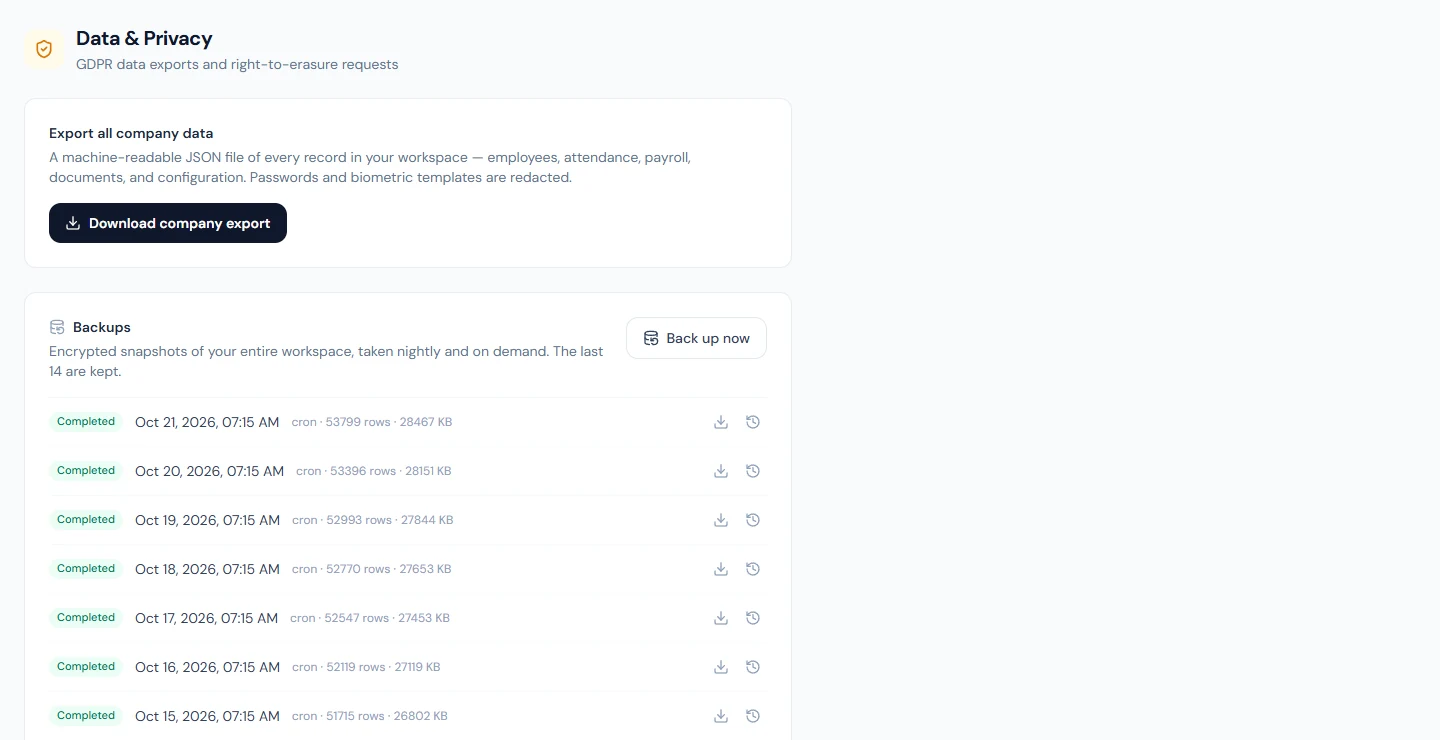
- Company › Data & Privacy ("GDPR data exports and right-to-erasure requests") holds the rest: a full export of the workspace, an export or erasure of one employee, and backups.
- Who:
company.settings(Super Admin, HR Manager). Backups need the plan's backups feature.
Walkthrough
Signed in to Northwind as the Super Admin. Nothing in this chapter should be tried on a workspace with real people in it: erasure and restore cannot be undone.
92.1 Exporting all company data
Export all company data downloads "a machine-readable JSON file of every record in your workspace — employees, attendance, payroll, documents, and configuration". Passwords, sign-in tokens, two-factor secrets, biometric templates, integration credentials and any setting whose name marks it as a secret are replaced with "[REDACTED]". Uploaded files themselves are not inside it; their records are.
Use it when you leave a provider, when an auditor asks for the raw data, or to keep your own archive. Treat the file as you would the system itself: it holds everyone's personal data.
92.2 One employee's data: export and erasure
Employee data requests works on one person: choose them, then either:
- Download employee export: every record linked to that person, in the same JSON form. This answers a subject access request; send it to the employee securely, not as an ordinary email attachment.
- Permanently erase this employee: "Deletes the employee and every related record — attendance, payroll history, documents, login account. What they wrote for others stays, without their name: announcements, interview feedback and the appraisals they reviewed. API keys they created keep working until you revoke them. This cannot be undone." You must type the employee's code to confirm. The person's stored files (photo, uploaded documents, receipts, generated slips and letters) are deleted too. Their login disappears from this workspace; someone who also works for another company keeps their login there (Chapter 15).
Before erasing, check what the law still requires you to keep: payroll and tax records usually must survive an employee's departure for years, and erasing them can leave you unable to answer a tax audit. For an ordinary leaver, the right step is the exit process (Part 13), not erasure. What the person wrote for others is kept: announcements they published then read "by a former employee" in the portal, and interview feedback they gave is labelled "Former interviewer" on the application. API keys they created keep working; revoke any that should stop (Chapter 96). The activity log keeps an entry recording that the employee was erased, by whom and when (Chapter 91).
92.3 Backups, download and restore
Backups: "Encrypted snapshots of your entire workspace, taken nightly and on demand. The last 14 are kept." Each row shows its status, time, how it was started, the number of rows and its size. Back up now takes one immediately, for example before a large import.
On a completed backup:
- Download decrypted backup gives the snapshot as JSON, with the same redactions as the company export.
- Restore workspace to this snapshot puts the workspace back as it was. "Everything changed since this backup will be REPLACED with the snapshot's data (billing and audit history are kept). A safety backup of the current state is taken first." Type the company name to confirm. The activity log records the restore.
A restore rewinds everyone's work, not just the mistake: leave applications, punches and approvals made since the backup are gone (the safety backup still holds them). Use it for a real disaster, such as a wrong bulk import over many records, and tell people before you do.
92.4 Day-to-day data protection habits
- Give each person the narrowest role that lets them work (Chapter 14), and review roles when people change jobs.
- Require two-factor sign-in for admins (Chapter 12).
- Keep documents in their records, not in email threads.
- Export or print only what you need, and store the files safely.
- Answer access requests from the employee export, and corrections through profile approvals (Chapter 21).
- Check the activity and login logs from time to time (Chapter 91).
What happens next
- Part 16 covers plans and billing.
What the employee sees
Their own data in the portal (Part 14), and the corrections they propose. Exports and erasure are done by HR on request.
Common mistakes
- Erasing a leaver instead of offboarding them. Erasure destroys payroll history you may be required to keep.
- Restoring to undo one small mistake. It rewinds everyone's work; fix the record instead.
- Emailing an export. It holds personal data; share it securely.
- Wide roles "to save time". Every extra permission is more people who can see salaries and documents.
- Assuming backups replace your own archive. Only the last 14 nightly snapshots are kept; export what you must keep longer.
- Forgetting the person's API keys. They keep working after the erasure, with no one's name on what they change; revoke the ones that should stop.
Practice
Use your own trial workspace, not a customer's.
- Download the company export and find a test employee's record and one "[REDACTED]" field.
- Download one test employee's export.
- Take a backup with Back up now and download it. Do not restore.
Quiz
1. Which roles can open Data & Privacy by default?
Super Admin and HR Manager (company.settings).
2. How do you answer an employee's subject access request?
Download the employee export for them and send it securely.
3. Why is erasure usually the wrong tool for a leaver?
It deletes payroll and tax history the law often requires you to keep; the exit process ends employment without destroying records.
4. How many backups are kept, and how often are they taken?
Nightly and on demand; the last 14 are kept.
5. What does a restore keep?
Billing and the audit history; a safety backup of the current state is taken first.