Chapter 34 — Attendance fundamentals
Attendance is where an HR system touches every employee every day, and where a bad rule costs the most trust. A person who arrived at 09:04 and is marked late, a night-shift worker whose Tuesday clock-out lands on Wednesday's row, a driver docked for a Sunday they were asked to work: each is a policy question wearing the clothes of a calculation. This chapter is the policy, with the vocabulary Operentra uses, before the next nine chapters walk through the screens.
What this chapter covers
- 34.1 Shifts, grace periods, lateness, early leaving
- 34.2 Overtime and rest-day work
- 34.3 Ways of capturing attendance: biometric, GPS, HR-marked
The concept
34.1 Shifts, grace periods, lateness, early leaving
A shift is the expected shape of a working day: when it starts, when it ends, how long the unpaid break is, and which days of the week are off. Everything else in attendance is measured against it. Two people clocking in at 09:30 are one on time and one half an hour late if their shifts start at 09:30 and 09:00.
Grace is the first policy decision. A few minutes of slack at the start absorbs the lift, the traffic and the clock drift that would otherwise make every morning a dispute. Grace is not a reward for lateness; it is the point at which lateness starts to be counted. Beyond it, lateness is measured in minutes, and the question is what those minutes mean. Most policies use a ladder: a small lateness is a late mark, a larger one costs half a day, a very large one is treated as absence. The ladder is published so that nobody discovers it on the payslip.
Early leaving is lateness at the other end of the day. The honest policies apply the same grace and the same ladder, so that leaving forty minutes early and arriving forty minutes late are the same offence.
Lateness also accumulates. A policy that marks a day Late and does nothing else teaches people that the mark is free. The usual answer is a monthly tolerance: a number of late or early-leaving incidents that are tolerated, after which every full multiple costs a day's pay.
34.2 Overtime and rest-day work
Overtime is time worked beyond the shift's net hours. Three policies matter. A floor keeps noise out: a person who leaves twelve minutes late has not worked overtime. Approval decides whether the extra time counts because it happened or because someone agreed to it in advance; trust-based teams credit the punch, most others credit only approved requests. And a rate states what an overtime hour is worth, typically a multiple of the ordinary hour, which is a contract term as much as a payroll one.
Rest days are the weekly-off days of the shift and the public holidays. They are paid, and the oldest rule about them is the sandwich: a rest day is earned by working the days on either side of it, so that a person absent on Friday and Monday is not paid for the weekend between. When someone works a rest day, the clean answer is a swap: the worked day becomes an ordinary working day and a substitute day becomes the rest day, with the record saying which.
34.3 Ways of capturing attendance: biometric, GPS, HR-marked
Every attendance record answers "was this person at work, from when to when", and the methods differ in who answers it.
- A biometric terminal at the door answers for office staff: objective, hard to delegate, and tied to one place.
- GPS from a phone answers for people whose workplace is a site, a client or a vehicle: the punch is accepted only within a fence and only when the phone's fix is good enough.
- HR marking, by hand or from a spreadsheet, answers for small teams and for the exceptions every other method leaves behind.
- Trust, for people whose presence is not the question (senior staff, residential staff, contractors): the day is marked present by rule, or not tracked at all.
Most companies use two or three at once, and the record keeps the source of each day so an auditor can tell a terminal punch from an HR correction.
How Operentra handles it
- Shifts (Chapter 35) carry start and end times, the break, the grace, the weekly-off days, an attendance mode and whether attendance affects salary. Every employee is on one shift at a time, dated, and a workspace has a default shift for anyone not placed explicitly.
- Grace is per shift, falling back to the company-wide value in Attendance Settings (Chapter 36). A punch past the grace marks the day Late with the minutes recorded; the same grace applies to leaving early, which marks Early Leave.
- The ladder lives in Attendance Settings: thresholds 2 and 3 each carry a minute value and an action, Mark as Half Day or Mark as Absent, applied to lateness and to early leaving alike, with the more severe outcome winning when both happen on one day. Threshold 1 is the warning tier; it changes nothing by itself and is printed in the employment agreement's attendance clause.
- The monthly tolerance is "Lates per month for Absent": payroll counts the month's Late and Early Leave days together, and every full multiple of the setting deducts one day's pay, on top of the statuses. A Late day is otherwise paid in full; a Half Day pays half; an Absent day pays nothing.
- Overtime is net time beyond the shift's hours, counted only when it reaches the minimum, and credited either from the punch (approval off), only up to approved requests (approval on), or from requests the system approves on submission (auto-approve). The credited hours appear on the attendance record and the salary slip. The rate multiplier is printed in the employment agreement; Operentra does not yet add overtime pay to the payroll run, so approved hours are paid through a payroll adjustment (Chapter 56).
- Rest days come from the employee's shift (its weekly-off days) and the holiday calendar (Chapter 43), and payroll pays them by the sandwich rule. A rest-day swap, recorded by HR on the monthly marking view (Chapter 38), makes the worked day a paid working day and the substitute the rest day. Working a rest day without a swap earns nothing extra; the day is paid as the rest day it was.
- Sources: Biometric (ZKTeco terminals, Chapter 40), Geo (GPS sites, Chapter 41), Manual (HR marking, Chapter 38), Import (the CSV upload), Auto (the trust-based mode and the calendar rows for weekends, holidays and leave), and Regularization (an employee's correction request approved by a manager, Chapter 39). A device can also be wired through the API.
- Missing punches: a check-in missing an hour after the shift start, or a check-out missing an hour after its end, earns the employee a reminder email; a day with no check-out is flagged once the checkout grace has passed, without changing its status or pay.
- Who:
attendance.view_allreads,attendance.markmarks and swaps,attendance.manageedits shifts,company.settingsedits the rules; employees see their own days withattendance.view_own.
Walkthrough
Northwind runs one shift, Office Shift, 09:00 to 17:00 with an hour's break, fifteen minutes' grace and Saturday and Sunday off, and all fifty people are on it. Its rules say a lateness past sixty minutes costs half a day and past a hundred and fifty the whole day, four late or early-leaving incidents in a month cost one day's pay, overtime starts at thirty minutes and needs approval, and the checkout grace is two hours. Attendance is captured at the Austin HQ main-entrance terminal and by HR. The record runs from September 2025: most days are terminal punches, with Late, Early Leave and Half Day days among them, calendar rows for weekends and holidays, leave days marked by HR, and a handful of overtime requests and corrections in every state.
Because this chapter is the policy rather than the screens, the walkthrough is a reading of that record with the vocabulary above; the screens follow in Chapters 35 to 43.
Reading one week
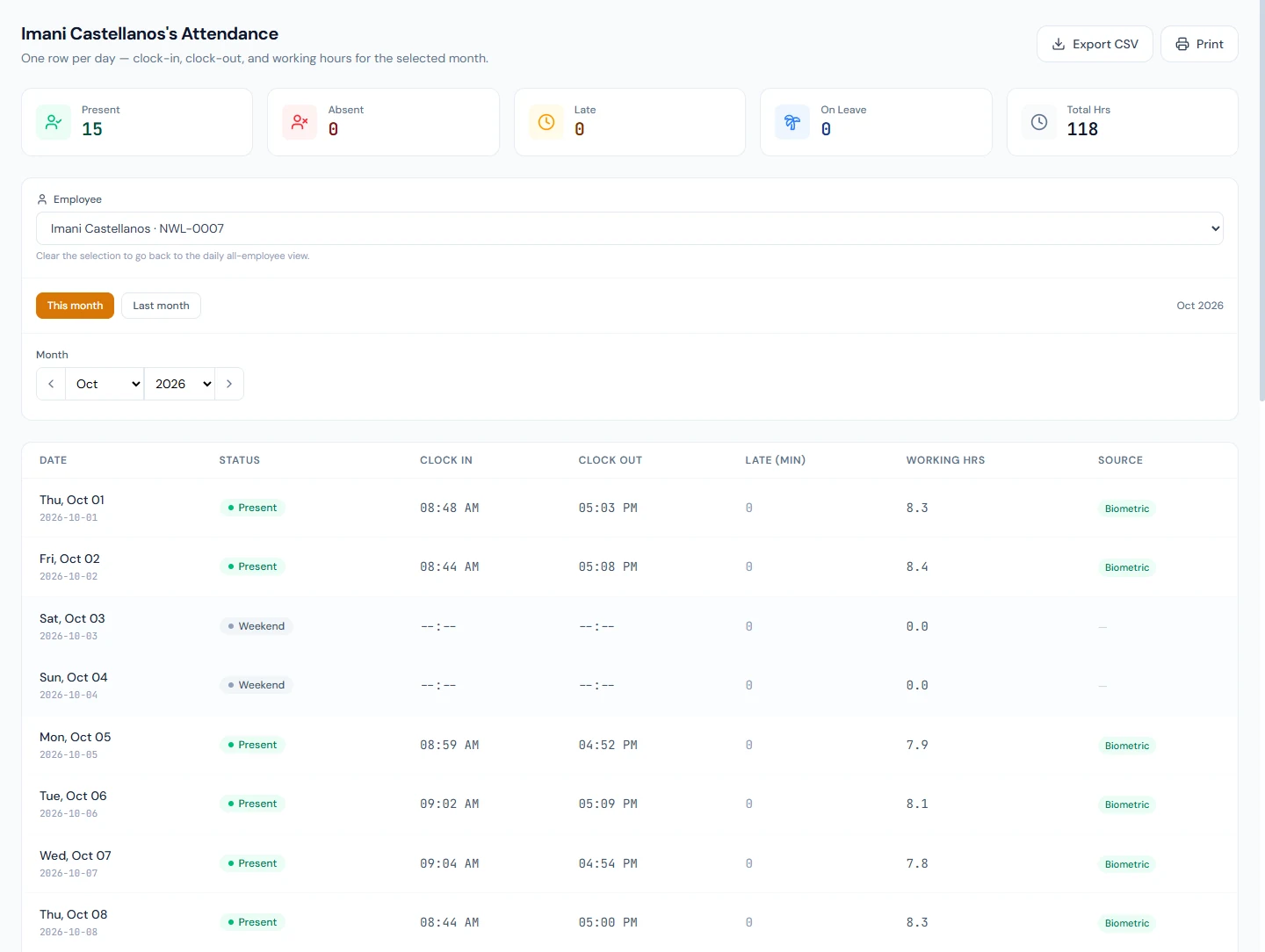
Pick any Northwind employee's week in Daily Attendance (Chapter 37). A Monday with clock-in 09:12 is Present: within the grace. A Tuesday with 09:40 is Late, 25 minutes recorded (the minutes past grace), still paid in full but counted toward the month's four. A Wednesday with 10:20 is Half Day: past the sixty-minute threshold with "Mark as Half Day" on it. A Thursday with clock-out 15:50 is Early Leave, by the same grace. Saturday is Weekend, written by the calendar, and paid if Friday and Monday were worked.
Reading the sources
The same week's Source column reads Biometric on the punched days, Auto on the weekend, Manual on a leave day HR marked, and Regularization on a day the employee asked to have corrected and the manager approved. Nothing in the column is a status; it says who answered the question.
What happens next
- Payroll reads the month's statuses, the late and early-leave counts, the overtime hours and the rest-day calendar; the proration and the lateness deduction come from these rules (Chapters 54 and 55). Payroll will not approve while any employee has no shift.
- Shifts and settings are the two places the rules live; the rest of Part 7 is capturing the days and correcting them.
What the employee sees
Their own calendar in the portal, with each day's status, times and source; the reminder emails when a punch is missing; and the request forms for a correction or for overtime (Chapter 85).
Common mistakes
- Setting grace to zero. Every clock drift becomes a Late day and the month's tolerance is spent by Wednesday.
- Expecting Threshold 1 to do something. It is the warning tier printed in the contract; the status changes start at Threshold 2.
- Reading "Late" as a pay cut. A Late day is paid in full; the deduction arrives only when the month's incidents reach the tolerance, one day per full multiple.
- Expecting overtime pay to appear by itself. Approved hours are recorded and shown; paying them is a payroll adjustment.
- Paying a worked Sunday by marking it Present. The payroll calendar still sees a rest day. Record a swap.
- Treating a missing clock-out as an absence. It is a flag; the day keeps its status, and a regularization fixes the time.
- Choosing one capture method for everyone. Office staff, field staff and trusted staff are three answers; Operentra lets a workspace combine them.
- Changing a rule mid-month without telling anyone. Thresholds apply as days are graded; publish the change first.
Practice
Use your own trial workspace, not a customer's.
- Write down, in one paragraph, your company's lateness policy: grace, the ladder, the monthly tolerance. Then open Attendance Settings and check each number against it.
- Open Shifts and read the one shift your workspace started with. Decide whether its hours, break and weekly-off days are yours.
- In Daily Attendance, find a Late day and a Half Day on Northwind and explain each from the minutes and the thresholds.
- Find a weekend row and a leave row, and name the source of each.
- Open Overtime Requests and Regularizations and read one approved request of each kind: who asked, who decided, what changed.
Quiz
1. What is grace, and where does Operentra take it from?
The minutes after a shift's start before a punch counts as late. It is per shift, with the company-wide value in Attendance Settings as the fallback, and it applies to early leaving as well.
2. Which thresholds change a day's status, and to what?
Thresholds 2 and 3, each to Half Day or Absent as its action says, applied to lateness and early leaving alike, with the more severe outcome winning. Threshold 1 is informational.
3. How does a Late day affect pay?
Not by itself. Payroll counts the month's Late and Early Leave days together and deducts one day's pay for every full multiple of the monthly tolerance.
4. How is overtime credited, and is it paid automatically?
Net time beyond the shift, from the minimum upwards, credited from the punch, from approved requests or from auto-approved ones depending on the settings. It is recorded and shown, not added to pay; approved hours are paid as a payroll adjustment.
5. What does a rest-day swap change?
The worked rest day becomes an ordinary paid working day and the substitute day becomes the rest day, so payroll's calendar matches what happened.