Chapter 94 — The integrations hub
No HR system works alone. Punches come from a fingerprint terminal, salaries leave through a bank file, codes go out by SMS, and engineering evidence comes from the code host. Each connection was covered where it is used; this chapter puts them on one map, so you know what can be connected, where to set it up, and what is not yours to set up at all.
What this chapter covers
- 94.1 The Integrations page
- 94.2 Connections that live on their own pages
- 94.3 Services the platform operator runs
- 94.4 Looking after connections
The concept
Every integration is a trade: less typing and fewer errors, in exchange for a dependency and a credential to look after. Three questions decide whether one is worth it: what data flows and in which direction, who in your company owns the outside account, and what happens when the connection breaks (an expired password, a renamed account, a revoked token). An integration nobody owns becomes the silent cause of "missing" data months later.
How Operentra handles it
- Settings › Integrations ("Connect external services. Credentials are stored encrypted in the database.") holds four cards, each with its state (Configured, Not configured or Available):
| Card | What it connects | Chapter |
|---|---|---|
| SMS Providers | Gateways that send verification codes and SMS notices | 80 |
| GitHub | Pull-request reviews and merges as performance evidence | 74 |
| WHMCS | Support-ticket response and quality as performance evidence | 74 |
| Identity Reconciliation | Matching GitHub and WHMCS accounts to employees | 74 |
- Elsewhere in the admin: biometric terminals, bank payment-file formats, the custom domain, and API keys and webhooks.
- Run by the platform operator: the email server, AI, the public holiday calendar source and file storage, the same for every workspace.
- Who:
company.settings(Super Admin, HR Manager) opens the page; GitHub, WHMCS and identities need the plan's performance feature.
Walkthrough
Settings › Integrations, as the Super Admin.
94.1 The Integrations page
Each card opens its own page. SMS Providers is where you add a gateway account, test it and set the default that sends; with none, the phone and emergency-contact verifications stay off (Chapter 80). GitHub connects with an access token (and optionally an organisation) and the repositories whose reviews count; WHMCS connects a helpdesk with API credentials; Identity Reconciliation links each GitHub login or WHMCS agent to an employee, and activity from accounts not yet linked is held until they are (Chapter 74).
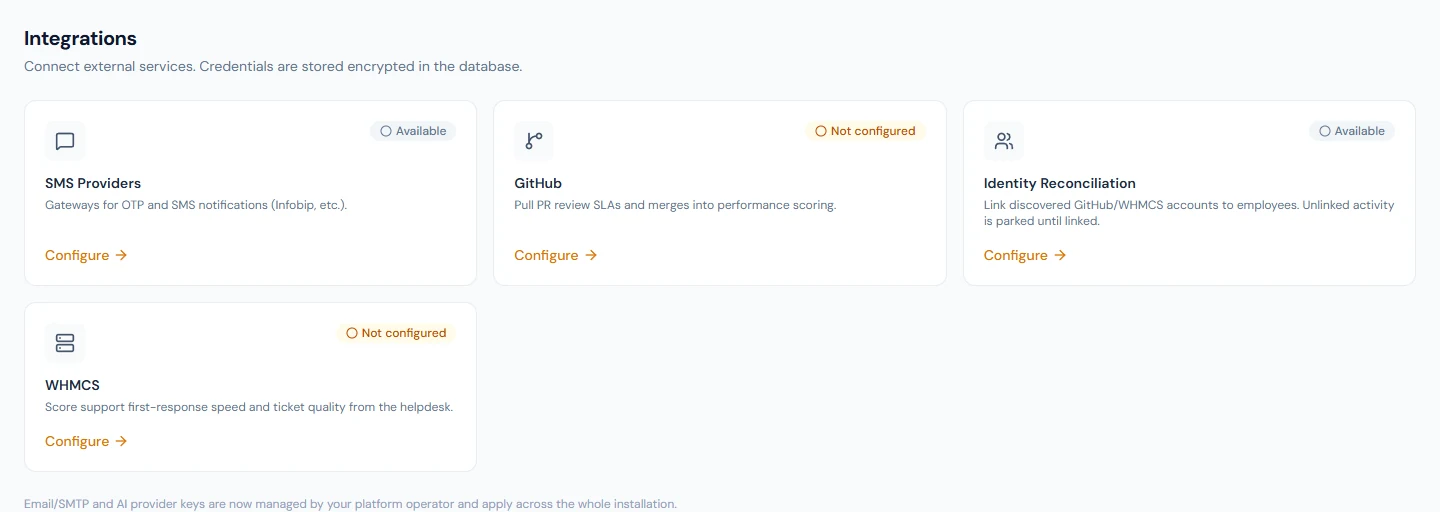
A card reads Configured only once its connection is saved and switched on. Keys and passwords are stored encrypted and never shown back in full.
94.2 Connections that live on their own pages
| Connection | Where | Chapter |
|---|---|---|
| Biometric terminals (fingerprint and face) | Attendance › Biometric Devices | 40 |
| Bank payment-file formats | Company › Bank Accounts, per account | 11, 58 |
| Your own web address | Settings › Workspace, Custom domain | 13 |
| Careers site | Recruitment | 27 |
| API keys and webhooks | Settings › API Keys, Webhooks | 96 |
94.3 Services the platform operator runs
Some services are set once for the whole installation by the operator of your Operentra platform, not by each workspace: the mail server that sends every email, the AI model behind task weights and report checks, the source of public holiday suggestions, and file storage. The Integrations page says so: "Email/SMTP and AI provider keys are now managed by your platform operator and apply across the whole installation." What each workspace controls is how it uses them: its sender name and reply-to (Chapter 13), which emails are switched on (Chapter 79), whether AI features are on (Chapter 75) and which holiday suggestions to accept (Chapter 43).
94.4 Looking after connections
- Name an owner for every connection, and record which outside account and token it uses.
- Use an account created for Operentra (a dedicated GitHub token, a WHMCS API user), not someone's personal login, so a leaver does not break it.
- When a token is about to expire, replace it on the card before it does.
- After any change, test (SMS has a test send) and check the evidence arrives (Chapter 74) or the logs (Chapter 91).
What happens next
- Chapter 95 covers what Operentra does on its own: the scheduled jobs behind reminders, accruals and emails.
What the employee sees
The results: codes by SMS, punches from the terminal, performance points from GitHub or the helpdesk.
Common mistakes
- Connecting with a personal account. When that person leaves, the connection breaks.
- Leaving accounts unlinked in Identity Reconciliation. Their activity waits there and never reaches anyone's score.
- Looking for the email server on the Integrations page. It is the operator's; your part is the sender identity and the triggers.
- Turning on phone verification before an SMS provider works. Test the provider first.
Practice
Use your own trial workspace, not a customer's.
- Open Settings › Integrations and note each card's state.
- Write down, for your company, who would own each connection you plan to use and which account it would run under.
Quiz
1. Which four cards does the Integrations page hold?
SMS Providers, GitHub, WHMCS and Identity Reconciliation.
2. Where do you connect a fingerprint terminal?
Attendance › Biometric Devices (Chapter 40), not the Integrations page.
3. Who sets up the email server?
The platform operator, once for the whole installation; the workspace sets its sender identity and which emails are on.
4. When does a card read Configured?
Once its connection is saved and switched on.
5. Why use a dedicated account for a connection?
So that a person leaving does not break it.