Chapter 47 — Allocation and year-end
Policies and groups are rules; a balance is a number on an employee's record, and something has to write it. Allocation is that step, once per fiscal year, and it is where pro-rata, eligibility and carry forward are actually applied. Most of the year it runs itself; this chapter is what it does, when, how to run it by hand, how cyclic balances grow instead, and how to read the balances page.
What this chapter covers
- 47.1 Allocating leave for the fiscal year
- 47.2 Automatic allocation, rollover and carry forward
- 47.3 Cyclic accrual credits
- 47.4 The leave balances page
The concept
An allocation turns a policy into a per-person entitlement for one period. The period is the fiscal year (Chapter 10): a workspace whose year runs January to December allocates in January; one whose year starts in July allocates in July. Doing it at the boundary, with last year's leftover carried in, is what makes January balances right on the first morning. Doing it idempotently, so that running it twice adds nothing, is what makes it safe to run by hand whenever a balance is missing.
How Operentra handles it
- Leave › Allocations: pick the fiscal year, read the four rules, press Allocate for All Employees. It grants every active employee the quota of each annual-quota policy in their resolved leave group, applies pro-rata and eligibility, carries forward last year's leftover up to the cap, and never duplicates an allocation that already exists for the year.
- The fiscal-year rollover allocates the new year as soon as it opens it, just after midnight in the workspace's time zone. A nightly safety net (02:20 UTC) allocates any workspace whose current fiscal year still has no allocations, and a boot-time check does the same when the server was down over the boundary.
- Cyclic policies are not allocated; a daily job, shortly after 01:00 in the workspace's time zone, counts each employee's worked days and credits the cycle's days when the count is reached, up to the policy's cap.
- Leave › Balances shows an employee's cards per type for a chosen fiscal year (Allocated, or Accrued so far for a monthly or quarterly type, then Used, Carried Fwd, Encashed and Balance) and an Allocate Leaves button for one employee or everyone in a chosen year.
- Who:
leave.configure(Super Admin, HR Manager) allocates;leave.view_allreads balances.
Walkthrough
Northwind has three fiscal years, 2024 to 2026, with 2026 current, and allocations only in 2026: forty-eight rows of Annual Leave, one for everyone but the two hires awaiting activation, totalling 949 days (pro-rata for the mid-year joiners, 178 used) and forty-eight of Sick Leave (480, 44 used); nothing carried forward, because 2025 had no allocations to carry from; nothing cyclic.
47.1 Allocating leave for the fiscal year
Leave › Allocations has a fiscal-year selector (the current year marked) and a How it works card with the four rules: allocation is based on each type's policy; pro-rata applies to mid-year joiners when the policy allows; carry-forward from the previous year is calculated automatically; existing allocations for the year are not duplicated. Allocate for All Employees runs it and confirms "Leave allocation completed for all eligible employees."
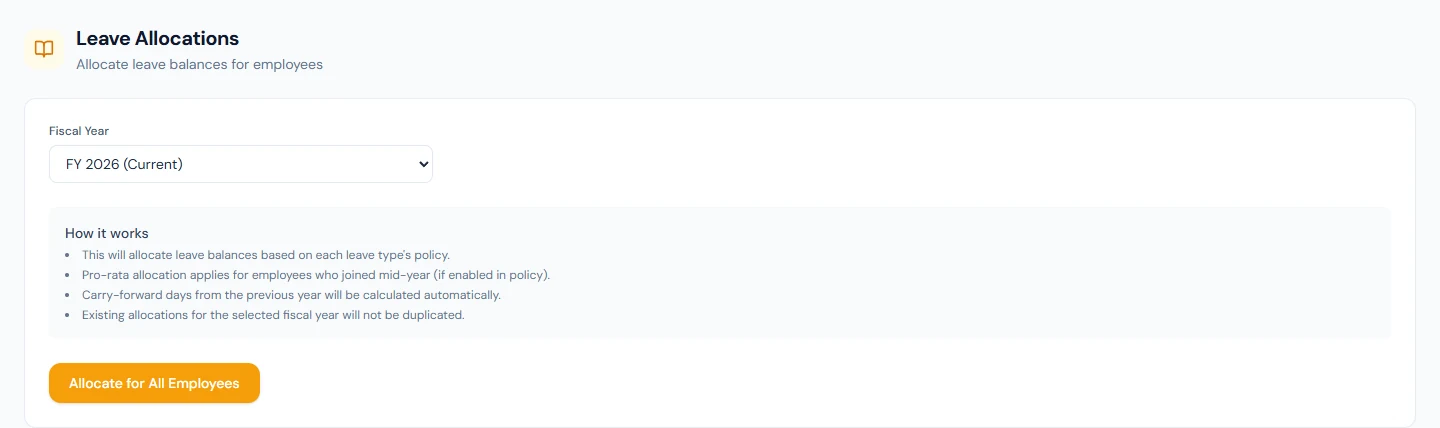
For each active employee it resolves the leave group (Chapter 46), takes every annual-quota policy in it, skips the ones the person is not eligible for (gender, minimum service, employment type), scales the quota by the months left in the year when pro-rata is on, adds the carry-forward, and writes one allocation per type. An allocation that already exists for that person, type and year is left exactly as it is, so re-running after adding a policy to a group allocates the new type and touches nothing else. A person with no resolved group gets nothing, which is the first thing to check when a balance is missing.
47.2 Automatic allocation, rollover and carry forward
The year boundary is automated in one run. The fiscal-year rollover (Chapter 10) opens the new year just after midnight on its first day, in the workspace's time zone, and straight away, finding no allocations, allocates everyone, carrying forward each person's unused balance from the year just closed up to the policy's cap when carry forward is allowed. A year that already has allocations is left alone. A separate allocation job runs every night at 02:20 UTC and does the same for any workspace whose current year still has none, so a workspace whose allocation failed at the rollover is allocated by its next run. The same check runs when the server starts, so a boundary that passed while it was down is caught up.
Carry forward is computed at that moment from the previous year's allocation: allocated plus carried minus used minus encashed, capped. A manual re-run of Allocate for All Employees after the job has run adds nothing; it is the tool for a year the job could not allocate (no current fiscal year, for instance) and for a policy added later.
47.3 Cyclic accrual credits
A cyclic policy (Chapter 45) is never allocated a quota. Instead, a daily job shortly after 01:00 in the workspace's time zone, after the Auto-Present job (00:30) has written yesterday, keeps a counter per employee and policy: each day whose attendance status is Present or Half Day adds one; rest days, holidays and paid leave add nothing, because the rest is earned by work. Each run counts the workspace's yesterday, and makes up a day an earlier run missed, up to three days back; no day is counted twice. When the counter reaches Worked Days per Cycle, the policy's Leave Days Credited are added to the employee's current-year allocation, the counter resets, and any overflow carries into the next cycle; the Max Accumulated cap stops the balance growing past it. The balances page shows the result as an ordinary allocation that grows during the year. The job counts everyone whose leave group holds the policy and does not apply the eligibility settings (gender, minimum service, employment types), so give a cyclic policy its own group of the people it is for (Chapter 46). Northwind has no cyclic policy; a residential shift is where one belongs.
47.4 The leave balances page
Leave › Balances opens with a search by name or employee code and a fiscal-year selector; picking an employee shows a card per leave type in their group: Allocated, Used, Carried Fwd, Encashed and Balance, which is accrued plus carried forward minus used minus encashed. Accrued is the allocation for an annual method, and the months or quarters released so far for a monthly or quarterly one; for those types the first figure reads Accrued so far, with the year's allocation beside it ("15 of 20 this year"), so the card adds up. An August joiner's Annual card shows a balance that grows a twelfth a month. "No leave balances found" means no allocation for that year, and the hint says so.
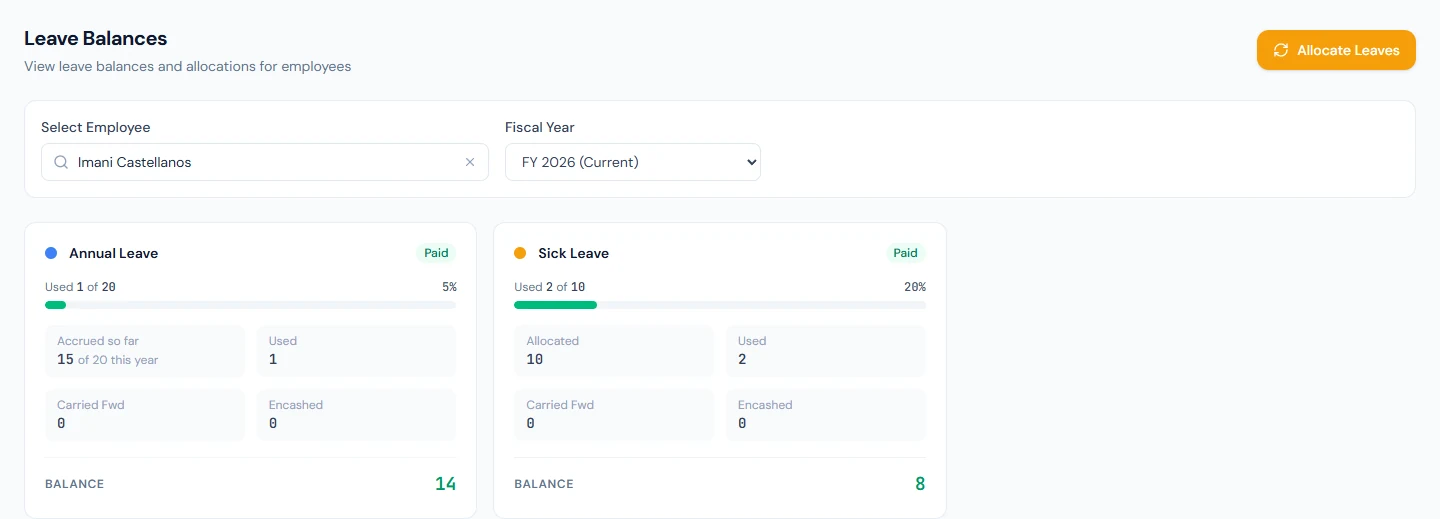
Allocate Leaves, for holders of the configure permission, opens a dialog with the fiscal year and an optional employee: one person, or everyone when left blank. It is the quickest fix for a new hire who joined after the year's allocation and has no cards yet.
What happens next
- Applications (Chapter 48) draw on these balances, and the apply form shows them to the employee.
- Encashment (Chapter 49) reduces a balance and raises Encashed.
- The next year is allocated by the job with this year's leftover carried as the policies allow.
What the employee sees
Their balances per type in the portal, with the same five figures, and the apply form refusing a request beyond them.
Common mistakes
- Allocating before the policies are right. Existing allocations are never rewritten; fix the policy first, then allocate.
- Expecting a quota change to reach existing balances. It does not; the year's rows are already written.
- Reading "no balances" as a bug. The person has no allocation: a missing group, a mid-year joiner, or a year nobody allocated.
- Re-running to fix one person's wrong figure. The re-run skips existing rows; correct the allocation on the balances page.
- Waiting for January to allocate a new hire. Allocate Leaves for that one person today.
- Expecting carry-forward without last year's allocation. The first allocated year carries nothing in.
- Allocating a cyclic policy. It is credited by the daily job from worked days, not by allocation.
- Leaving no current fiscal year. The job has nothing to allocate into; open the year first (Chapter 10).
Practice
Use your own trial workspace, not a customer's.
- Open Leave › Allocations, read the four rules, and run Allocate for All Employees for the current year; run it again and read the message.
- Open Leave › Balances, pick an employee, and read the five figures on each card against the policies in Chapter 45.
- Add a new employee who joined this month (Chapter 16), open their balances, then use Allocate Leaves for them alone and read the pro-rata Allocated figure.
- Open Fiscal Years (Chapter 10) and read when the next year starts; note the date the allocation job will run.
- Set one policy to Cyclic Accrual on a test group, assign a test employee, and read their balances after the next night.
Quiz
1. What does Allocate for All Employees write, and what does it skip?
One allocation per employee and annual-quota policy in their resolved group, with pro-rata, eligibility and carry forward applied; it skips ineligible policies and any allocation that already exists for the year.
2. When does a new fiscal year get allocated without anyone pressing a button?
The night it opens: the rollover opens the year just after midnight in the workspace's time zone and allocates it straight away; the nightly 02:20 UTC job and a boot-time check catch any workspace whose current year is still without allocations.
3. How is carry forward calculated?
From the previous year's allocation at allocation time: allocated plus carried minus used minus encashed, capped by the policy's maximum.
4. How does a cyclic balance grow?
A daily job counts worked days (Present or Half Day) per employee and policy and credits the cycle's days when the count is reached, up to the cap; no quota is allocated.
5. What is the balance formula on the balances page?
Accrued plus carried forward minus used minus encashed, where accrued is the allocation for an annual method and the months released so far for monthly or quarterly.