Chapter 70 — Merit scoring and the scoreboard
The merit score is the continuous half of performance management: every piece of graded work leaves a line in a ledger, and the lines add up to a number from 0 to 100. A number invites two questions, how it was made and whether it is fair, and this chapter answers the first so that HR can answer the second: what goes in, how it is weighed for each role, where to read it, and how every point traces back to the work that earned it.
What this chapter covers
- 70.1 Quality, volume and the composite score
- 70.2 Scorecard profiles and assignments
- 70.3 The scoreboard and employee score detail
- 70.4 The merit ledger
- 70.5 Badges and achievements
The concept
A single number for performance fails in two familiar ways. Count only output and people race through work badly; count only quality and someone who does one perfect task a month looks like a star. A fair score measures both, how well (points earned against points possible) and how much (points earned against what the role is expected to deliver), and lets each role weigh its sources differently: an engineer's code reviews matter, a receptionist's do not exist. Every point must come from a dated, attributable piece of evidence, or the score is just another opinion.
How Operentra handles it
- Sources: graded tasks (Chapter 71), daily reports (Chapter 72), attendance, and where connected, GitHub reviews and WHMCS tickets (Chapter 74). Each scored event writes a line to the merit ledger with points earned and points possible.
- Quality blends each source's earned ÷ possible by the source weights; volume is all points earned against the role's expected points for the period, counting up to 100%; the composite blends quality and volume by the weights in performance settings (half each by default) into a score from 0 to 100.
- Scorecard profiles set the source weights and the expected points per month; every workspace starts with Standard.
- Performance › Scoreboard ranks everyone for a period; each name opens the employee's score with its sources and ledger.
- Badges recognise attendance and tenure milestones on the employee's portal home.
- Who:
performance.view_allfor the scoreboard and scores (Super Admin, HR Manager, HR Officer);performance.managefor profiles (Super Admin, HR Manager); every employee sees their own score under My Performance (performance.view_own).
Walkthrough
Northwind scores tasks, daily reports and attendance on the Standard profile: it is the default, and it is also assigned to eight designations.
70.1 Quality, volume and the composite score
Each source earns points with points possible beside them. A task worth 60, graded 4 out of 5 and done on time, earns 48 of 60. A daily report judged "ok" earns its full value, 5 of 5. Attendance counts 2 points per working day: full for present or working from home, 1.4 for late, 1 for a half day, nothing for an absence. A penalty, a missed report or a missed recurring task, takes points away without adding any possible.
Take an engineer over thirty days on the Standard profile (tasks 0.6, daily reports 0.1, attendance 0.3, 100 points expected a month):
| Source | Earned | Possible | Quality | Weight |
|---|---|---|---|---|
| Tasks | 45 | 60 | 0.75 | 0.6 |
| Daily reports | 81 | 90 | 0.90 | 0.1 |
| Attendance | 39.2 | 42 | 0.93 | 0.3 |
Quality is 0.6 × 0.75 + 0.1 × 0.90 + 0.3 × 0.93 = 0.82. Volume is 165.2 earned against 100 expected, 165%, counted as 100%: beyond the expectation, more output does not drown out quality. The composite with equal weights is 100 × (0.5 × 0.82 + 0.5 × 1.00) = 91. A colleague with the same quality who earned 60 points would have volume 60% and a composite of 71.
70.2 Scorecard profiles and assignments
Performance › Scorecard Profiles lists each profile with its source weights, Expected / mo and how many people it is assigned to. New Profile takes a name, a description, a weight for each source (GitHub and WHMCS appear when connected), the Expected points / month (volume baseline), and whether it is the Default profile and Active. Weights are relative: 0.6 / 0.1 / 0.3 and 6 / 1 / 3 weigh the same. A source with weight 0 still adds its points to volume but not to quality. While GitHub or WHMCS is connected, a profile that does not mention it gives it a weight of 0.4.
Profile assignments attach a profile to a Designation (the default for that role) or to one Employee (an override). An employee's profile is their own assignment, else their designation's, else the workspace default. Set the expected points from what the role really earns in a normal month, after a few months of evidence, or volume will read as 100% for everyone or for no one.
70.3 The scoreboard and employee score detail
Performance Scoreboard ranks active employees for a period (the last 30d by default, 90d, This month or any dates), with Quality, Volume, Earned and Score, coloured green from 75, blue from 50, amber from 30, red below. A volume above 100% shows the true figure beside it, with the reason it counts as 100%.
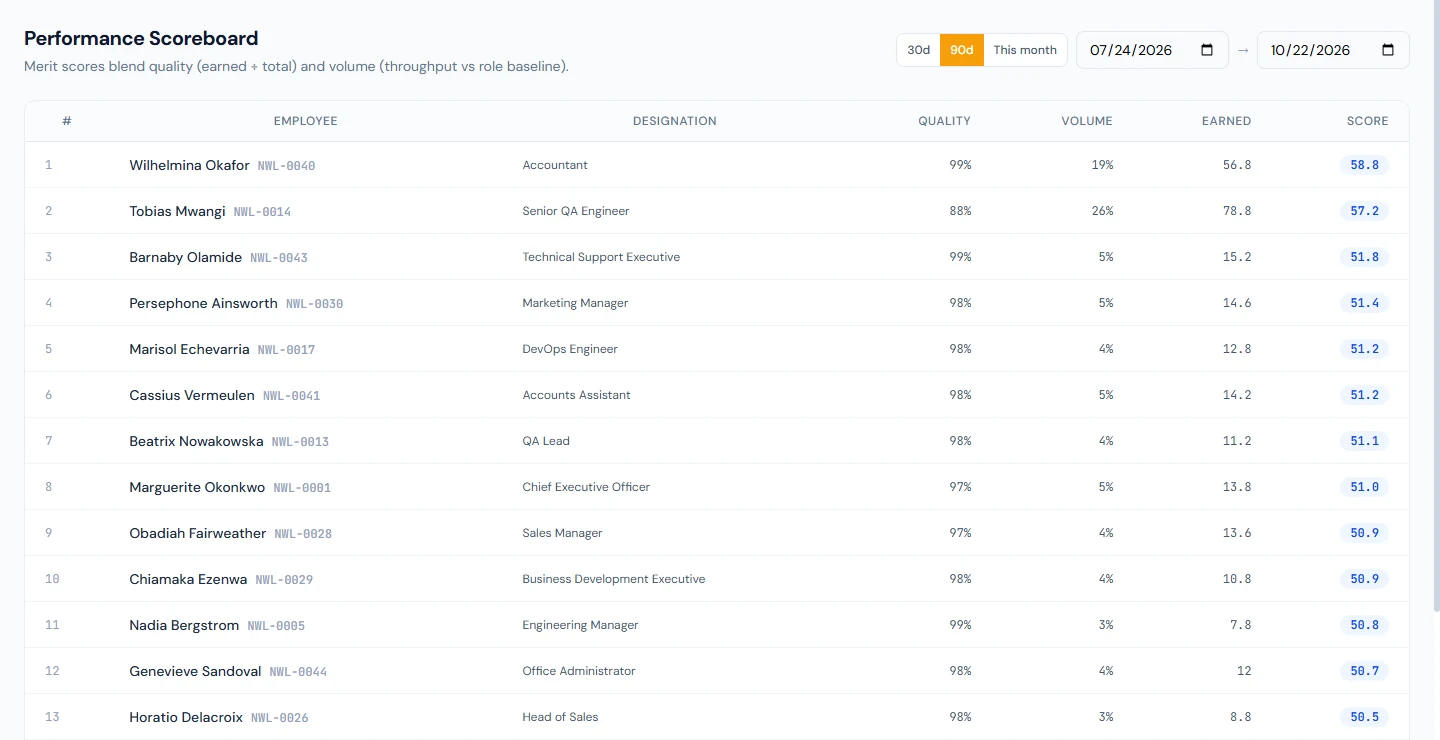
Each name opens the score detail: Composite Score, Quality, Volume and Total Earned for the period; the Source breakdown, each source's earned, possible, quality and weight; the Merit ledger; and the period's Daily reports. Employees see the same figures for themselves under My Performance for the last 30 days, with where their points came from.
70.4 The merit ledger
The ledger is the evidence: one line per scored event, with When, Source, Earned / Total, the multiplier (×, for work on an off day), By (rule, AI or manager) and Rationale ("missed daily report on a working day", a task's grade, a review's speed and depth). Lines are never edited or deleted. A correction is a new line: writing a missed report late adds a reversal of its penalty; changing a daily report's verdict adds the difference; voiding a GitHub score adds its negative. The score for any period is the sum of the lines in it, so every point can be traced to the work that earned or cost it.
70.5 Badges and achievements
Badges recognise milestones, not merit points:
| Badge | Awarded for |
|---|---|
| First Day | Accepting the contract |
| Perfect Month | A month with no absences (at least 15 marked days) |
| Early Bird | A month with no late arrivals (at least 15 marked days) |
| Punctuality Pro | Three months in a row without a late arrival |
| Iron Attendance | Three perfect months in a row |
| Iron Will | Six perfect months in a row |
| Leave Saver | Using under 30% of the leave allowance in the last fiscal year |
| 1 Year Club, 3 Year Veteran, 5 Year Legend, 10 Year Legacy | Years of service |
| Star Performer | A promotion |
They are worked out on the 1st of each month, shortly after 03:00 in the workspace's time zone, for the month just closed; Evaluate Badges for All Employees under Admin Actions runs it on demand. Employees see theirs on the portal home under Badges & Achievements.
What happens next
- Chapters 71 to 74 are the sources; Chapter 75 the settings and the increment recommendations built on the score.
What the employee sees
My Performance: the score, quality and volume for the last 30 days, where the points came from and the recent ledger lines; badges on the portal home.
Common mistakes
- Ranking people on different profiles. A score is relative to its profile's weights and baseline; compare like with like.
- An expected-points baseline from guesswork. Set it from a few months of real evidence.
- Weight 0 to "switch off" a source. Its points still count towards volume; stop recording it instead.
- Reading a score without the ledger. The lines say why.
- Using the score as the appraisal. It is evidence for the review (Chapter 69), not a replacement.
- Short periods. Thirty days of evidence for a yearly decision is too little; widen the range.
Practice
Use your own trial workspace, not a customer's.
- Open the scoreboard for the last 90 days and open the top employee's score detail.
- Work their composite by hand from the source breakdown.
- Create a profile for one role with its own weights and baseline, assign it to the designation, and compare the scoreboard before and after.
- Find a reversal line in a ledger and the line it reverses.
Quiz
1. What are quality and volume?
Quality: points earned against points possible, blended by source weights. Volume: points earned against what the role is expected to earn, counting up to 100%.
2. Why is volume capped at 100%?
So sheer output beyond the expectation cannot drown out quality.
3. Which profile applies to an employee?
Their own assignment, else their designation's, else the workspace default.
4. How is a ledger line corrected?
By a new line that reverses or adjusts it; lines are never edited or deleted.
5. Do badges change the score?
No; they recognise attendance and tenure milestones on the portal home.