Chapter 72 — Daily reports
A daily report is a few lines at the end of the day: what I worked on, what I finished, what is blocked. For a manager it is the cheapest way to know what a remote or busy team is doing; for the employee it is a record that the day's work happened, even when it produced nothing visible. Asked of everyone and judged by no one, it becomes a ritual of copied text, so Operentra checks each report and counts the days nobody wrote one.
What this chapter covers
- 72.1 Settings and exemptions
- 72.2 The employee's daily report
- 72.3 AI verdicts and admin overrides
- 72.4 Missed reports and penalties
The concept
Daily reporting works when three things hold. It is asked only of roles whose work benefits from it: a driver or an office assistant gains nothing by writing one. It is short and specific: tasks moved, outcomes, blockers, links. And it is read: someone notices the empty or repeated ones, and the employee knows it. A report that costs ten minutes and is never read is a tax on everyone.
How Operentra handles it
- Daily reports are off in a new workspace; HR turns them on in Performance › Settings with the value of a submitted report and the penalty for a missed one.
- Exemptions come from the designation ("Exempt from daily reports") and can be overridden per employee: use the designation's default, Required or Exempt.
- The employee writes one report a day in the portal's Daily Report, at least 20 characters, with the tasks and tracked work it covers; once submitted it is locked.
- The AI gives each report a verdict (OK, Low effort, Duplicate or Mismatch), which scales its points; HR can override it.
- A report not written by one hour after the shift ends, on a working day, is marked missed, costs the penalty and is emailed; writing it within seven days reverses the penalty.
- Who:
performance.view_allreads reports (Super Admin, HR Manager, HR Officer);performance.managechanges a verdict and the settings (Super Admin, HR Manager); every employee writes their own (performance.view_own).
Walkthrough
Northwind has daily reports on. Seven people write them; most of the rest are not exempt, so Northwind's missed reports show what that setup does to a scoreboard (Chapter 70).
72.1 Settings and exemptions
In Performance › Settings, Daily reports enabled turns the feature on for the workspace. Submitted-report value (5 points by default) is what an OK report earns; Missed-report penalty (5 by default) is what a missed one costs. They are separate, so softening one does not change the other. Submission recipient email gets a copy of every submitted report, as does the employee's reporting manager.
Exemptions are by role first: Company › Designations has "Exempt from daily reports" for each designation. On an employee's record, Daily Reports overrides it: Use designation default, Required or Exempt. An exempt employee sees "You're not required to submit daily reports" and is never penalised. Before switching the feature on, exempt every role that should not write reports; everyone else starts owing one that day.
72.2 The employee's daily report
The portal's Daily Report asks "What did you work on today?" (at least 20 characters: "name the actual work you did"), offers the employee's open tasks to tick under Tasks you touched, and, where GitHub or WHMCS is connected, their tracked activity of the day to attach as evidence. Submit Report sends it to the reporting manager and the recipient email and locks it: "It can't be edited or resubmitted." Below the form, the employee's recent reports show their status and any AI note.
When a working day was missed in the last week, the page lists those days under "Missed reports you can still write"; choosing one writes that day's report, which cancels its penalty.
72.3 AI verdicts and admin overrides
When AI scoring is on (Chapter 75), the AI reads each report against the previous one, the tasks it names and the tracked activity, and gives a verdict: OK, Low effort (too vague to say what was done), Duplicate (a near-copy of the last report) or Mismatch (it claims work the evidence contradicts). It is told to prefer OK unless something is clearly wrong. The verdict scales the report's value: OK 100%, Low effort 50%, Duplicate 30%, Mismatch 20%. With AI off, reports are "Not graded" and earn their full value. Northwind's demo reports were written with AI off, so they all read Not graded.
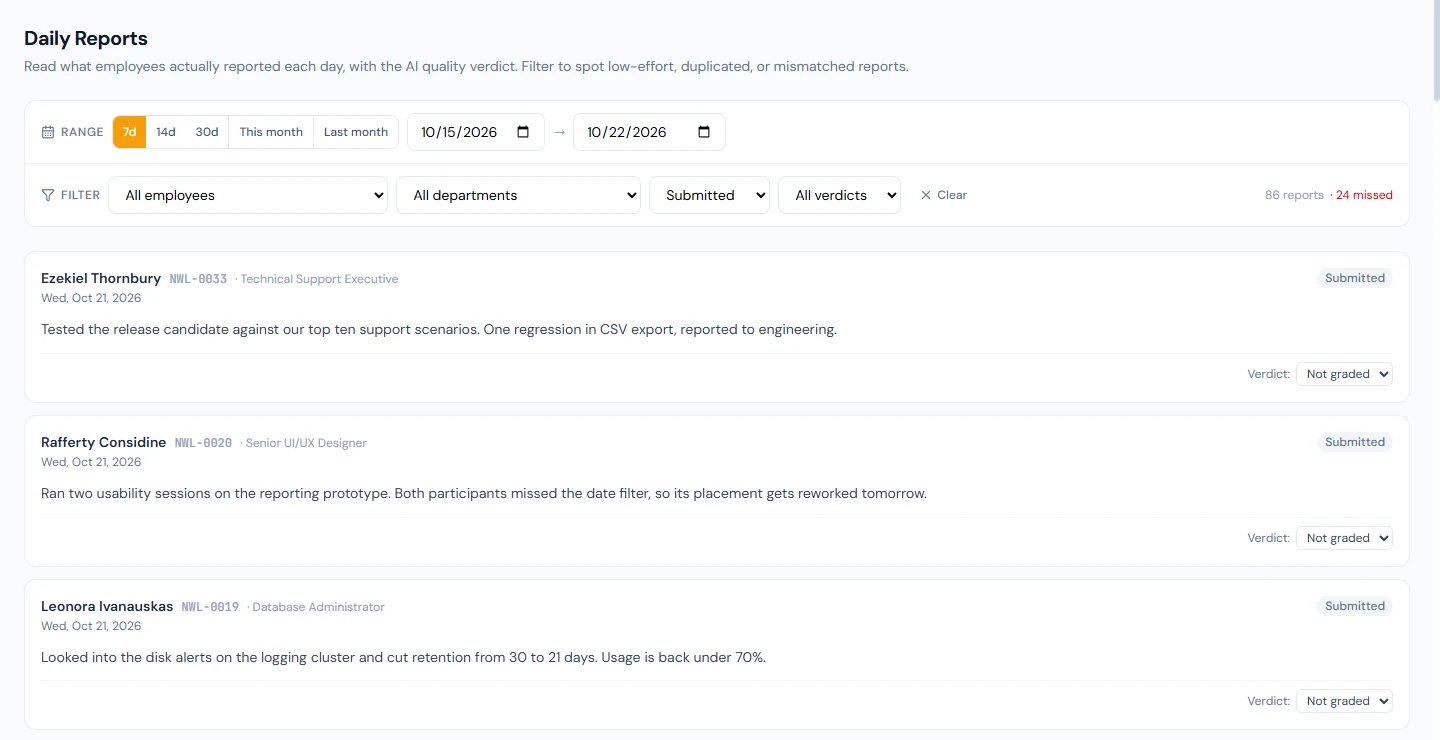
Performance › Daily Reports shows each report as a card with the employee, the date, the text, the verdict and the AI's note, filtered by date (7d, 14d, 30d, This month, Last month or any range), employee, department, status and verdict (Any flagged for everything the AI did not clear). Counts of flagged and missed reports sit above the list. Where the AI is wrong, Verdict: on the card changes it: "Change this report's verdict to … ? The employee's points will be corrected to match." The card then shows Overridden and what the AI originally said, and the ledger gains a line for the difference.
72.4 Missed reports and penalties
A report is due one hour after the employee's shift ends, in the workspace's time zone (a shift ending at 23:00 or later is judged just after midnight, for the day before). Every hour, Operentra checks who owes a report and has none: not exempt, on a working day (not their weekly off or a holiday), and not on approved full-day leave. Each is marked Missed ("No report submitted on this working day."), loses the missed-report penalty and is emailed. A missed report subtracts points without adding any possible, so it lowers volume and, for someone who also writes reports, their daily-report quality.
Writing the report late, within seven days, turns the day into a submitted report and reverses the penalty with its own ledger line; after seven days the day stays missed. A long run of missed reports for someone who was never expected to write them is a setup mistake: exempt the role, then reverse the penalties.
What happens next
- Chapter 73 is the weekly sales report, for sales departments.
- Chapter 70 shows where the report points land.
What the employee sees
The Daily Report page with today's form or the locked report, the missed days still writable, recent reports with their verdicts, an email when a day is missed, and the points in My Performance.
Common mistakes
- Switching reports on before setting exemptions. Every role starts owing reports, and missing them, that evening.
- Reading verdicts as final. The AI prefers OK and can still be wrong; override where it is.
- Penalties set higher than the value. One missed day then cancels several good ones.
- Never reading the reports. People notice, and the reports become copies.
- Forgetting late shifts. Their reports are due after midnight; check the shift end time is right.
Practice
Use your own trial workspace, not a customer's.
- Exempt one designation, override one employee to Required, and turn daily reports on.
- As the employee, submit a report that names two tasks.
- As HR, open Daily Reports, find it, and change its verdict; find the correction line in the ledger.
- Let a working day pass without a report, then write it late from the portal and check the penalty is reversed.
Quiz
1. Who is exempt from daily reports?
Employees whose designation is exempt, unless their own record says Required, and anyone whose record says Exempt.
2. When is a report due?
One hour after the employee's shift ends, in the workspace's time zone.
3. What do the AI verdicts do?
They scale the report's value: OK full, Low effort half, Duplicate 30%, Mismatch 20%.
4. Which days are never penalised?
Weekly offs, holidays, approved full-day leave, and every day for exempt employees.
5. How is a missed day put right?
By writing that day's report within seven days, which reverses the penalty.