Chapter 53 — Payroll settings
Five settings sit above every run. None of them is dramatic, and two of them are the kind that are set once at go-live and never looked at again, which is exactly why they are worth a short chapter: a wrong rounding precision shows on every slip for years, and a pay day nobody set shows on every contract.
What this chapter covers
- 53.1 Rounding, precision, pay day
- 53.2 Allowing "skip attendance deductions"
The concept
Rounding is a policy, not a detail. A payroll that rounds each line and then adds them reconciles on the slip; one that adds exact values and rounds the total shows lines that do not sum to it, and the employee notices. Precision should match what the currency and the bank actually pay: cents where cents are paid, whole units where the convention is whole units. The pay day is a promise in the contract, so the system should know it. And a switch that lets a run ignore attendance is a control that belongs with the people who configure payroll, not with everyone who can process it.
How Operentra handles it
- Payroll › Settings holds Rounding Method (round to nearest, floor, ceil), Rounding Precision (0 to 4 decimal places), Pay Day (1 to 28), Allow skipping attendance deductions, and Cheque validity (months).
- Rounding is applied per component line at the chosen precision, and subtotals are summed from the rounded lines, so the slip's breakdown reconciles exactly.
- Pay day is read by the dashboard's next-payday card and by the employment contract's pay-day clause; it does not move money or schedule the run.
- Allow skipping reveals a per-run checkbox on Process Payroll; the server refuses a skip while the setting is off.
- Seeded values: rounding to nearest, pay day 7, and a precision that follows the workspace currency's minor units (two for a currency with cents), whole units where the country's convention is whole units.
- Who:
payroll.configure(Super Admin, HR Manager).
Walkthrough
Northwind's settings read Round, precision 0, pay day 7. The zero is the older seed, from before the precision followed the currency, so every Northwind payslip is in whole dollars; a real US workspace sets 2 before its first run, and Northwind's own repair is a one-field change.
53.1 Rounding, precision, pay day
Rounding Method chooses what happens to the fraction below the precision: Round (nearest) is the usual choice, Floor always rounds down and Ceil always up; floor and ceil exist for payrolls whose policy is never to over- or under-pay by a fraction. Rounding Precision is the number of decimal places, zero meaning whole units. Each component line is rounded at that precision as it is computed, the absence and late deductions too, and the totals are sums of the rounded lines. Changing either setting affects runs processed afterwards; a locked run is unchanged, and an unlocked one takes the new rounding when it is reprocessed.
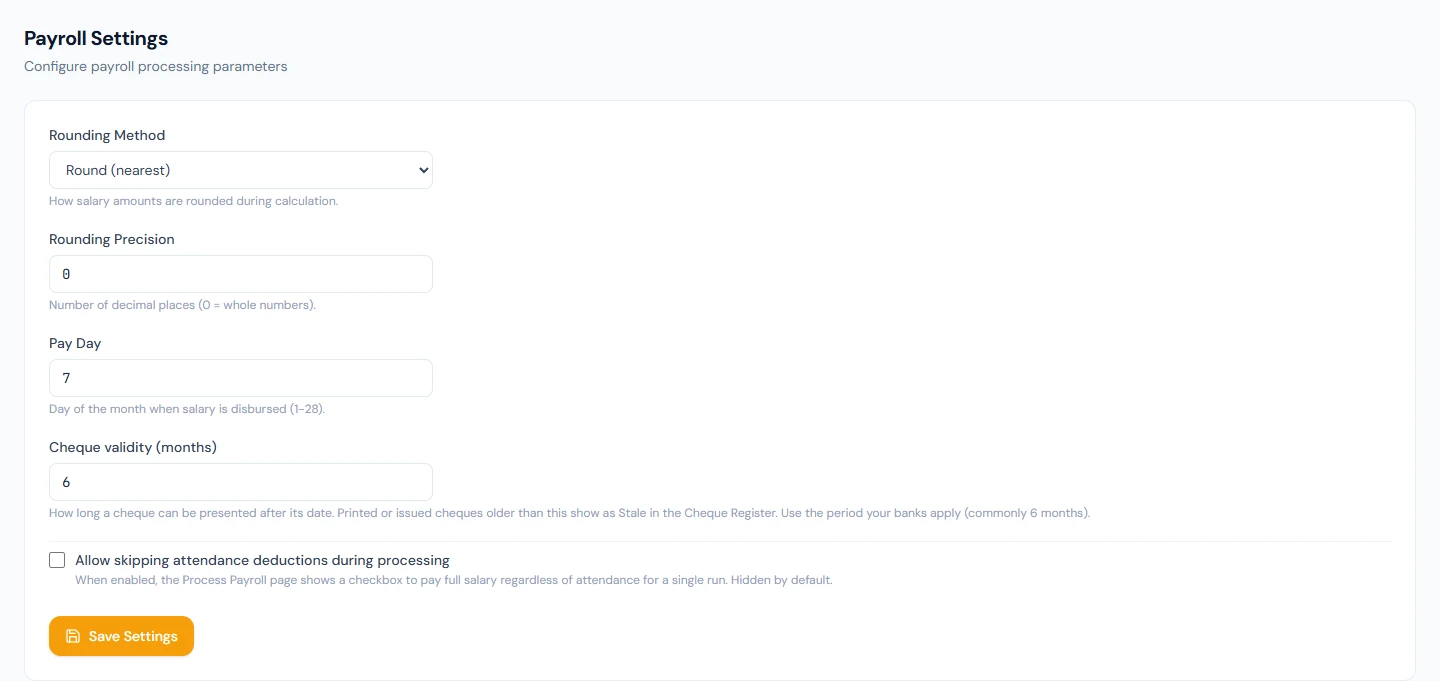
Pay Day is the day of the month, 1 to 28, on which salary is paid. The dashboard counts down to it, and the employment contract template prints it in the pay clause (Chapter 31), so set it before the first contract is generated. It does not trigger anything: the run is processed, approved, locked and paid by people (Chapters 55 and 58).
53.2 Allowing "skip attendance deductions"
Off by default, Allow skipping attendance deductions during processing makes a checkbox appear on Process Payroll: "Skip attendance deductions", which pays every employee in full for that run, with absences, late days and unpaid leave not reducing salary, and the confirmation says so in capitals. The checkbox is per run; a workspace with the switch off cannot skip, and the server refuses a skip request that arrives without the setting. It is for the months a company has decided not to dock, a transition month, a strike of the biometric device, a first run before attendance was captured, and the decision should be recorded somewhere other than the run.
Cheque validity (months) is how long a printed cheque can be presented; cheques older than it show as Stale in the Cheque Register (Chapter 58). Six is the common period.
What happens next
- Every run (Chapter 55) applies the rounding and, if allowed and ticked, the skip; the slips (Chapter 59) show the rounded lines.
- Contracts (Chapter 31) print the pay day.
What the employee sees
Payslip amounts at the workspace's precision, the pay day in their contract, and, in a skipped month, a full salary with no absence deduction lines.
Common mistakes
- Precision 0 in a currency with cents. Every line is a whole unit; set 2 before the first run.
- Changing precision mid-year. Earlier slips keep their rounding; the year-to-date figures mix two precisions.
- Expecting pay day to pay anyone. It is a date on the dashboard and the contract.
- Leaving the skip switch on. Every processor then has a checkbox that waives attendance; switch it on for the month and off again.
- Skipping deductions to fix one person. The skip is for the whole run; correct the one attendance record instead (Chapter 38).
- Floor or ceil chosen by accident. Every line rounds the same way, and the totals drift from what employees compute.
Practice
Use your own trial workspace, not a customer's.
- Open Payroll › Settings and read the five fields and their hints.
- Set the precision to 2 and the pay day to the day your company pays; save and read the dashboard's payday card.
- Switch on Allow skipping, open Process Payroll and find the checkbox; switch it off and confirm the checkbox is gone.
- Open an employee's contract preview (Chapter 31) and find the pay day.
Quiz
1. Where is rounding applied?
To each component line at the chosen precision as it is computed; subtotals are sums of the rounded lines, so the slip reconciles.
2. What reads the pay day?
The dashboard's next-payday card and the employment contract's pay clause; nothing is paid or scheduled by it.
3. What does the skip switch do?
Reveals a per-run checkbox on Process Payroll that pays full salary regardless of attendance; with the switch off the server refuses a skip.
4. What precision does a new workspace get?
The currency's minor units, two for a currency with cents, or whole units where the country's convention is whole units.
5. What does cheque validity change?
How long a printed cheque counts as presentable; older ones show as Stale in the Cheque Register.