Chapter 56 — Bonuses, adjustments and reimbursements
Salary is the steady part of pay; this chapter is the rest. A bonus for a quarter, an allowance for one weekend on call, an advance recovered, a fine charged back, an exam fee reimbursed: each belongs to one month, each needs a reason a reader of the slip can follow, and each has to reach the run before it is locked or it will not be paid at all. Operentra keeps two lists for them, bonuses and adjustments, and a third source, approved expense claims, that feeds the second.
What this chapter covers
- 56.1 Bonuses and bonus types
- 56.2 Adjustments: additions, deductions, taxable
- 56.3 Settled items; edit, cancel, delete
- 56.4 Expense reimbursements arriving as adjustments
- 56.5 Adding items to a month that is already approved or locked
The concept
One-off amounts need three facts recorded with them: the month they are paid in, the reason, which ends up on the slip, and the tax treatment. Tax is where most mistakes hide. In some countries a bonus is simply pay and is taxed like salary; in others a one-off payment sits outside the payroll tax calculation. A reimbursement repays money the employee spent for the company and is not income at all; an allowance for extra work usually is. Record the amount once, in the right month, with the treatment the law gives it, and the slip explains itself.
How Operentra handles it
- Payroll › Bonuses lists every bonus with type, amount, month and status; Award Bonus takes the employee, a type (Performance, Festival, Annual, Signing, Spot or Custom), the amount, the payroll month and a reason, records it as approved and emails the employee.
- The page says how bonuses are taxed in the workspace: in US, UK and Canadian workspaces as pay, through income tax and the social contributions; elsewhere paid on top of net pay with nothing taken from them.
- Payroll › Adjustments lists additions and deductions; New Adjustment takes the employee, the direction, the amount, the month, a reason and, for an addition, Tax applicable, which folds it into taxable pay.
- Both reach the run for their month as their own slip lines and are marked paid when that run is locked; until then they can be edited or cancelled, and an adjustment can be deleted.
- An approved expense claim becomes a non-taxable addition in the current month, or the next month whose payroll is still open.
- A locked or paid month takes nothing new; an item added while the month's run is approved is paid only after the run is sent back, reprocessed and approved again, and locking is refused until then.
- Who:
payroll.salary_assignto award, record, edit and cancel (Super Admin, HR Manager, Accountant);payroll.adjustment_deleteto delete an adjustment (Super Admin).
Walkthrough
Northwind has ten bonuses, all approved, none paid yet. Three were awarded for August after the August run was approved, so that run is out of date (Chapter 55) and cannot be locked until it is sent back and reprocessed (56.5). The other seven, and five adjustments, belong to September, whose run in Review has picked them all up; they are marked paid when that run is locked.
56.1 Bonuses and bonus types
Award Bonus opens a short form: employee, Bonus Type, amount, Payroll Month and a reason ("Exceeded every objective set for the quarter" is Imani's September performance bonus of 3,200). The type is a label for reports and the slip, with the same tax treatment whatever it is. Saving records the bonus as approved and emails the employee that it was awarded, with the amount and the month. The list shows each bonus's employee, type, amount, month and status: Approved until its month's run is locked, then Paid, or Cancelled.
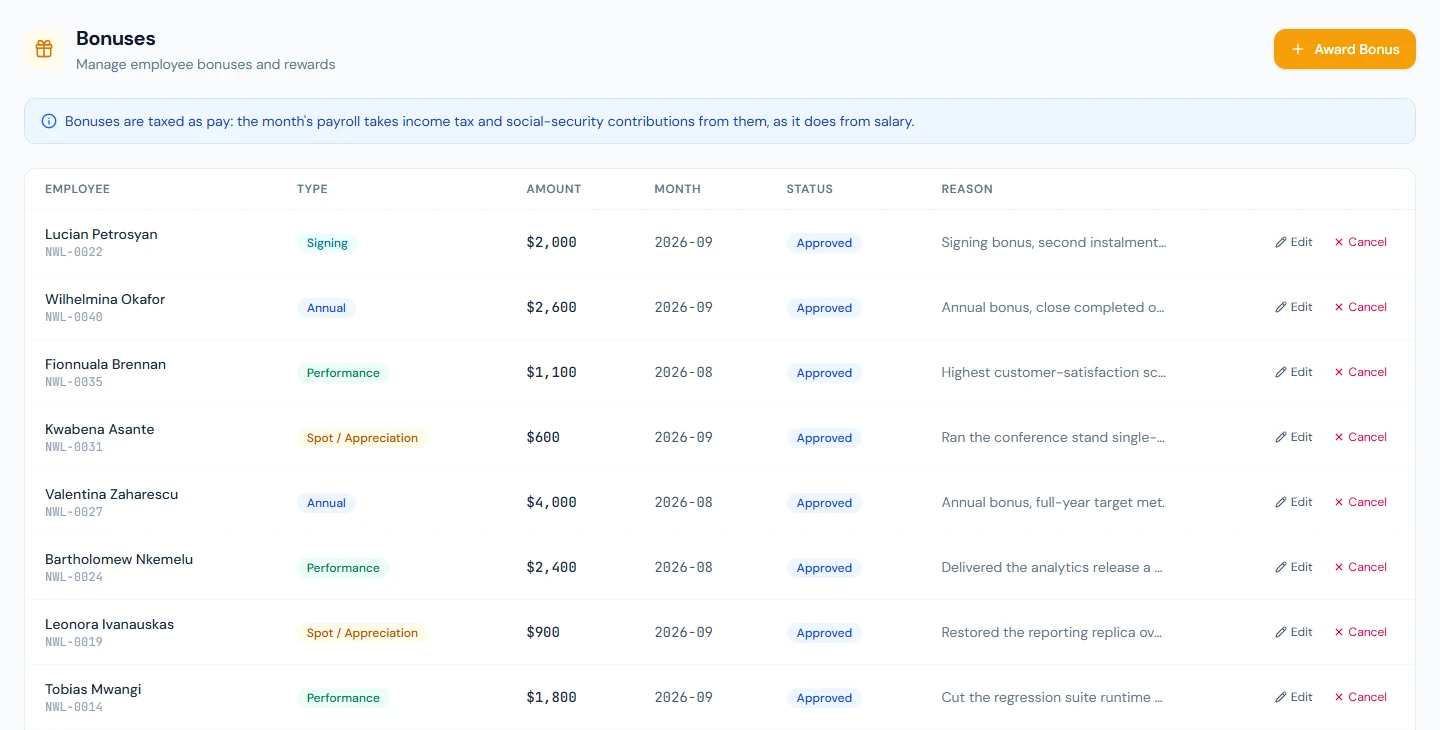
Because Northwind is a US workspace, its bonuses are taxed as pay: the September run takes federal withholding and FICA from the 3,200 as it does from salary, at the rate a month with that pay would carry for the whole year (Chapter 63). In a workspace where bonuses are not wages, the same bonus is added after tax; to tax a one-off payment as pay there, record it as a taxable adjustment instead.
56.2 Adjustments: additions, deductions, taxable
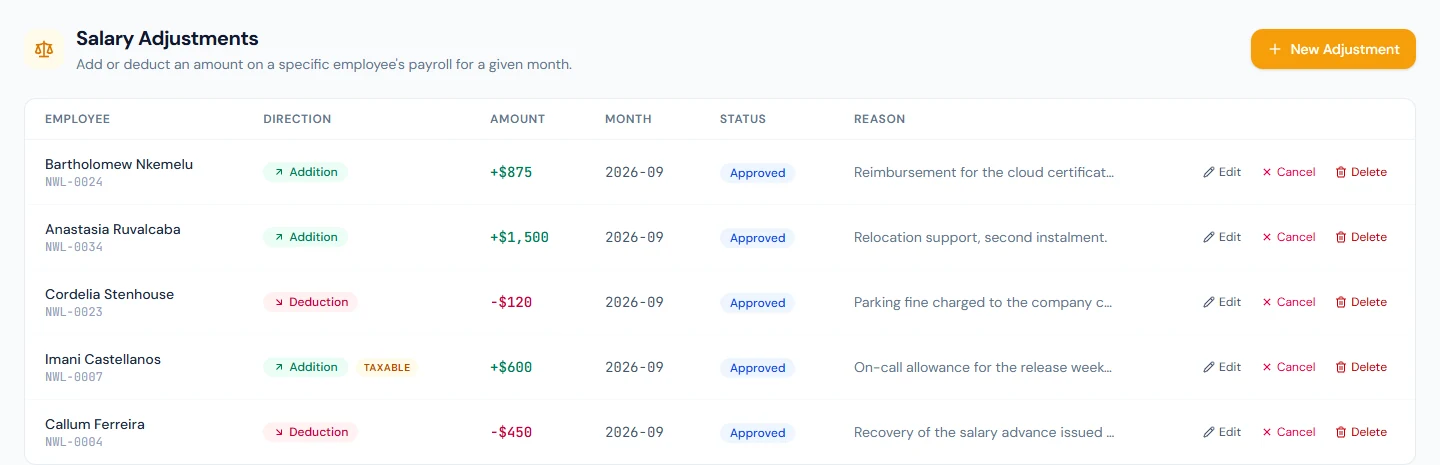
New Adjustment records any other one-off amount. Direction is Addition or Deduction. Tax applicable, offered for additions, folds the amount into taxable pay before tax is worked out ("a 10,000 taxable adjustment on a 90,000 basic produces tax on 100,000"); leave it off for reimbursements and other payments that are not income. A deduction never changes taxable pay. Northwind's September list shows the range: an on-call allowance of 600, taxable; relocation support of 1,500 and a certification-exam reimbursement of 875, not taxable; a salary-advance recovery of 450 and a parking fine of 120, deductions. On the slip each appears as its own line with its reason.
56.3 Settled items; edit, cancel, delete
Until its month's run is locked, a bonus or adjustment can be edited (amount, type or direction, tax flag, reason; the employee and the month are fixed, so a wrong month is a cancel and a new item) and cancelled, which keeps the record and pays nothing. An adjustment can also be deleted outright, with "Permanently delete this adjustment? This cannot be undone.", by someone holding the delete permission. Prefer cancel: it leaves the reason on record.
When the run that includes an item is locked, the item is settled: its status becomes Paid and the row's tooltip says it is settled and can no longer be edited or cancelled. A settled item is history; a mistake in it is corrected by an opposite adjustment in a later month.
If a run in Review has already included an item and the item is then edited or cancelled, the run's banner counts the change and a reprocess applies it.
56.4 Expense reimbursements arriving as adjustments
When HR gives an expense claim its final approval (Chapter 66), the claim's total becomes an addition for the employee, not taxable, with the reason "Expense reimbursement:" and the claim's title, in the workspace's current month, or the next month whose run is not yet locked or paid. It then travels like any other adjustment: on the slip as its own line, settled when the run is locked. The claim keeps a link to the adjustment and its payroll month, and reads Paid once that run is locked or paid. Northwind's demo claims were written without this step, so none of its approved claims has an adjustment yet; in your trial workspace, approving a claim shows the addition appear on the Adjustments page.
56.5 Adding items to a month that is already approved or locked
The Payroll Month field tells you the state of the chosen month as you pick it. For a month whose run is locked or paid, the form says "Bonuses can no longer be added to it — award it in next month's payroll instead", and the server refuses; there is no reopening a locked month, so the correction goes in the next one. For a month whose run is approved, the item is accepted with a warning that it is paid only if the run is sent back to review and reprocessed, and locking that run is refused until it has been, so the item cannot be left behind. For a month in Review or not yet processed, the item simply waits for the next processing; if the run already exists, its banner counts the new item until it is reprocessed.
What happens next
- The run (Chapter 55) folds the month's approved items in when it is processed or reprocessed; locking marks them paid.
- Slips (Chapter 59) show each bonus and adjustment on its own line; tax (Chapter 63) treats them as above.
What the employee sees
The bonus email when a bonus is awarded, and on their slip a Bonus line and an Adjustment line for each item with its reason, the addition or deduction it made, and the tax on it where tax applies.
Common mistakes
- Recording a reimbursement as taxable. It is not income; leave Tax applicable off.
- Expecting a bonus to be tax-free everywhere. In US, UK and Canadian workspaces it is pay; read the note on the Bonuses page.
- Picking the wrong month. The month cannot be edited; cancel and record a new item.
- Adding to an approved month and locking anyway. Locking is refused; send the run back and reprocess.
- Deleting instead of cancelling. The reason disappears with the row.
- Correcting a settled item. It is locked; record an opposite adjustment next month.
- A vague reason. It is printed on the slip; write what the employee needs to read.
- Paying overtime as a bonus. Use an adjustment with Tax applicable on, so it is taxed as pay in every country.
Practice
Use your own trial workspace, not a customer's.
- Read the tax note on Payroll › Bonuses, then award a Spot bonus for next month with a reason.
- Record a taxable addition and a non-taxable addition of the same amount for one employee, process the month (Chapter 55) and compare the tax line.
- Edit the bonus's amount, then cancel the non-taxable addition; reprocess and read the run.
- Approve an expense claim (Chapter 66) and find its adjustment.
- Approve the month, add one more bonus, and try to lock; send it back, reprocess, approve and lock, then read the items as Paid.
Quiz
1. How is a bonus taxed?
As pay in US, UK and Canadian workspaces; elsewhere it is paid on top of net pay with nothing taken from it, and a taxable adjustment is the way to tax a one-off payment as pay.
2. What does Tax applicable do on an addition?
Folds the amount into taxable pay before tax is worked out; a deduction never changes taxable pay.
3. When is a bonus or adjustment settled, and what changes then?
When the run that includes it is locked: it becomes Paid and can no longer be edited, cancelled or deleted.
4. Where does an approved expense claim's money go?
Into a non-taxable addition in the current month, or the next month whose run is still open, paid with that month's run.
5. Can you add a bonus to a month whose run is locked?
No; the form says so and the server refuses. Award it in the next month.