Chapter 77 — Document verification with QR codes
A salary certificate is only useful if the bank believes it. Edited PDFs and forged letters are common enough that banks, embassies and employers phone HR to confirm, and HR answers the same question many times a month. A verification code on the document lets the reader check it themselves, against the company's own record, in seconds.
What this chapter covers
- 77.1 Which documents carry a QR code
- 77.2 The public verification page
- 77.3 Managing verification: link, scan count, revoke, restore
The concept
A verifiable document carries a code that leads to the issuer's own record of it. The reader compares the paper in front of them with what the issuer says, so an altered figure or a forged letterhead shows at once. Two rules keep it honest: the record must come from the issuer, not from the document, and the issuer must be able to withdraw a document that should no longer be relied on, with the withdrawal visible to anyone who checks.
How Operentra handles it
- HR letters, salary slips, tax certificates and finalized appraisal PDFs carry a QR code and a short code, created the first time the document is downloaded or emailed.
- The QR leads to a public page on the workspace's address: the company, the document type, who it was issued to and when, and an official copy produced from the company's records at that moment.
- HR can revoke a document: the page then shows a red "revoked" banner with the reason, and the copy can no longer be downloaded. Revoking can be undone.
- Who: revoking a letter needs
hr_letters.manage; a salary slipsalary_slips.generateorpayroll.manage; a tax certificatetax.certificates.
Walkthrough
Northwind's tax certificates and appraisal PDFs already carry codes, created when they were first rendered.
77.1 Which documents carry a QR code
An HR letter or an appraisal PDF ends with an Authenticity check card: the QR code, "Scan to verify this document … and view the official copy issued by us", the verification address and "Code:" with a twelve-character code. A salary slip has a "Verify this salary slip" strip and a tax certificate a "Verify Authenticity" block. The texts follow the document's language.
The code is created the first time the document is produced, by a download, an email or a check, and stays the same afterwards. The address uses the workspace's own domain when one is connected, otherwise the platform's; an installation without either prints no code at all. Contracts and recruitment offers carry no code.
77.2 The public verification page
Scanning the code opens Document Verification, "Authenticity check & original copy", with a language switcher. For a valid document, a green banner reads "Authentic document" with the type, "This document was issued by … on …", followed by the company's logo, name and address, and the facts to compare: the document type, Issued to (name and employee code), the reference number (letters), the certificate number and fiscal year (tax certificates) or the pay period (salary slips), and the issue date. The Official copy panel shows the PDF produced from the records "just now", to open or download, so the reader can lay it beside the copy they were given.
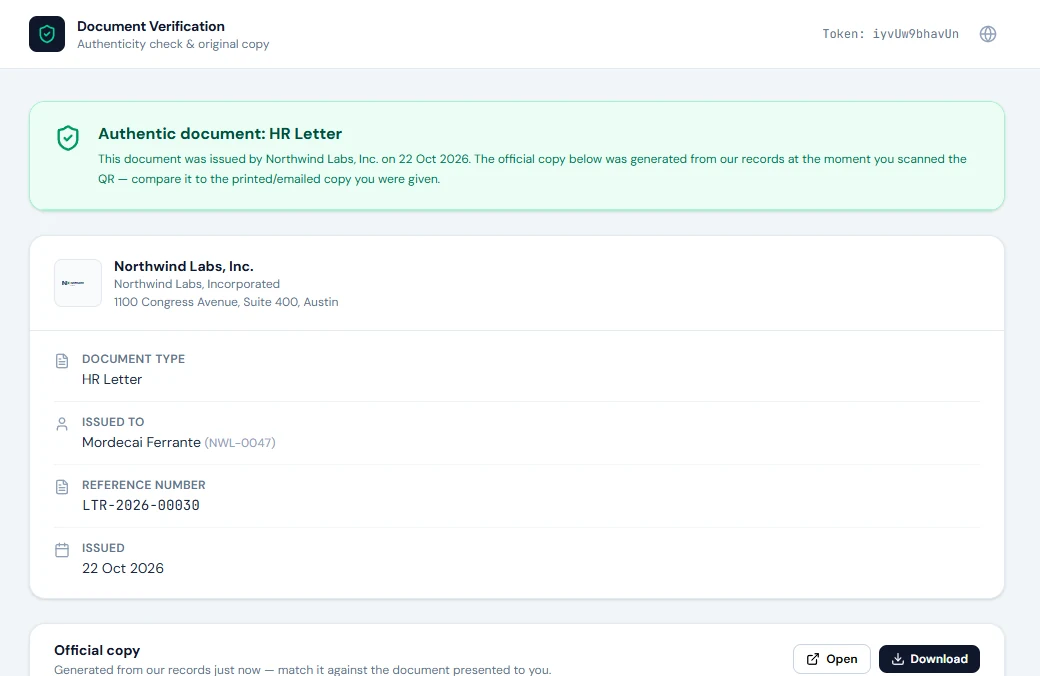
A revoked document shows a red banner, "This document … has been revoked", with when it was issued and revoked, "Do not rely on the printed or emailed copy — treat it as invalid", and the reason HR gave; there is no copy to download. A code that matches nothing shows "Verification failed". The page never shows salary figures or the letter's text outside the official copy, and it is rate-limited against guessing.
The official copy is produced from today's data and template, so a template changed since the letter was issued shows the new wording; the facts, reference and date are the letter's own. For an appraisal the page confirms the record but offers no copy.
77.3 Managing verification: link, scan count, revoke, restore
On Issued Letters (Chapter 76) and the admin Salary Slips page, the shield icon opens Document verification: Active ("Anyone with the QR can verify and download this document") or Revoked with the date and reason, the Verification URL to copy or open, the code, and the number of scans, which counts every check including HR's own. A document never yet downloaded or emailed shows "No verification token yet".
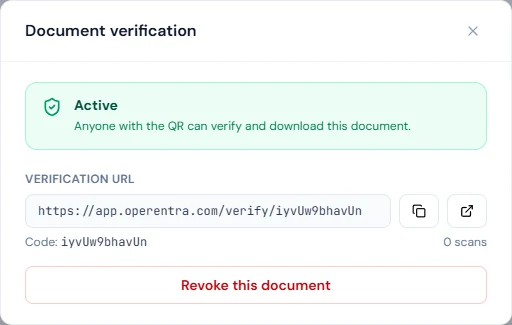
Revoke this document asks "Why are you revoking this? (shown on the public verification page)" and Confirm revoke; from then on every check shows the revoked banner and the copy cannot be downloaded. Revoke a letter issued in error, one superseded by a corrected version, or a salary certificate whose figures have changed in a way that matters to its reader. Restore verification reverses it. Write the reason for the reader: "Superseded by a corrected version" helps them; anything about the employee does not belong there.
What happens next
- Chapter 78 turns from documents to announcements.
What the employee sees
The code on their letters, slips and certificates; anyone they hand a document to can check it without calling HR.
Common mistakes
- Sending a document before the workspace address is set. Without one, no code is printed; set it up before issuing in bulk.
- Editing templates casually. The official copy follows the current template; keep wording stable once letters are out.
- Private details in a revocation reason. It is public.
- Revoking instead of correcting. Revoke, then issue the corrected document, so the reader has something valid to rely on.
- Reading the scan count as distinct readers. It counts every check, HR's included.
Practice
Use your own trial workspace, not a customer's, with its address set.
- Download an issued letter, scan its QR with a phone, and compare the page with the PDF.
- Open the letter's verification dialog and note the scan count.
- Revoke it with a neutral reason, scan again, and read the banner; then restore it.
Quiz
1. Which documents carry a verification code?
HR letters, salary slips, tax certificates and finalized appraisal PDFs.
2. When is a document's code created?
The first time the document is produced: downloaded, emailed or checked.
3. What does the public page show for a valid document?
The company, the document type, who it was issued to and when, its reference details, and an official copy from the records.
4. What changes when a document is revoked?
Every check shows a revoked banner with the reason, and the official copy can no longer be downloaded; HR can restore it.
5. Why keep revocation reasons neutral?
They appear on the public page to whoever scans the code.