Chapter 60 — Loans and advances
A salary advance before a holiday, an emergency loan after a burst pipe, help with a course fee: lending to employees is common, and the cheapest way to recover the money is from the salary it was lent against. Done badly, it is also a common source of disputes: an instalment taken twice, a balance nobody can explain, a loan still "active" years after it was repaid. This chapter sets up loan types, takes an application through approval, and follows the instalments through payroll until the loan completes.
What this chapter covers
- 60.1 Loan types: limits, interest, maximum active loans
- 60.2 Employee applications and eligibility
- 60.3 Approving and rejecting
- 60.4 Instalment schedules and how payroll deducts them
- 60.5 Loan statuses; pausing and resuming
- 60.6 Loan register and loan reports
The concept
An employee loan is an agreement with three numbers (amount, interest, number of instalments) and one rule: the instalment comes out of pay until the balance is zero. The policy around it decides who may borrow, how much, how often, and whether the company charges interest, which in many places creates tax or consumer-credit obligations of its own. Two disciplines keep it clean: the schedule is fixed when the loan is approved, so the employee knows every deduction in advance, and each instalment is recorded as paid only when the payslip that deducted it is final.
How Operentra handles it
- Loans › Loan Types defines each kind of loan: name and code, maximum amount, maximum instalments, an annual interest rate, the maximum active loans one person may hold, and whether it is active.
- Employees apply from the portal (My Loans › Apply for Loan): type, amount, instalments, start month and purpose, with the estimated instalment shown. An employee whose record has loans blocked sees that applications are not available.
- Applications are checked against the type's limits and the person's active loans, and the start month cannot be in the past.
- Loans › Pending Approvals approves (the loan becomes Active and the employee is emailed) or rejects with a required reason (emailed too).
- The schedule is written at application: equal instalments of amount plus flat interest, one per month from the start month.
- Payroll deducts each month's instalment, and any earlier one no run has deducted, as a Loan Repayment line; locking the run marks the instalments paid and moves the loan's balance; the last one completes the loan.
- Pause and Resume on the loan's page stop and restart repayment; resuming moves the instalments of the months that passed while the loan was paused to the end of the schedule.
- Who:
loans.configurefor types (Super Admin, HR Manager);loans.approve(approve, reject, pause and resume) andloans.view_all(Super Admin, HR Manager, Accountant); every employee may apply and see their own.
Walkthrough
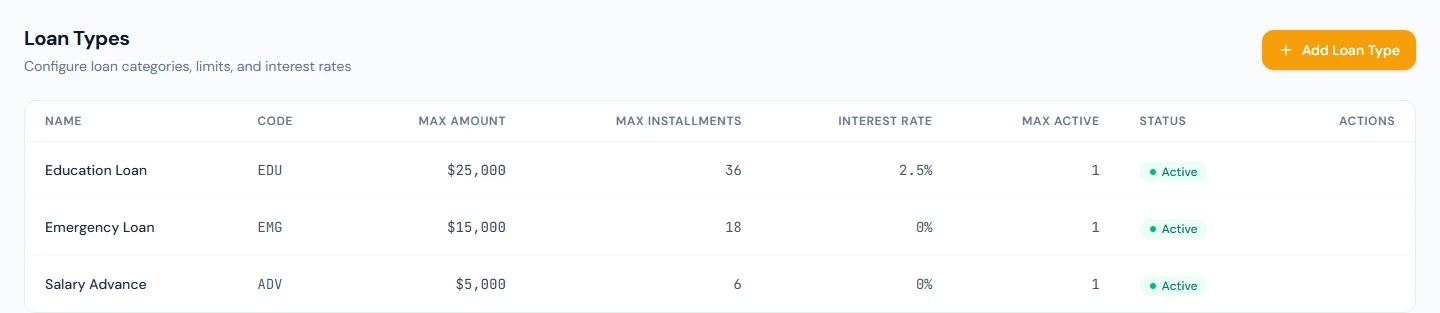
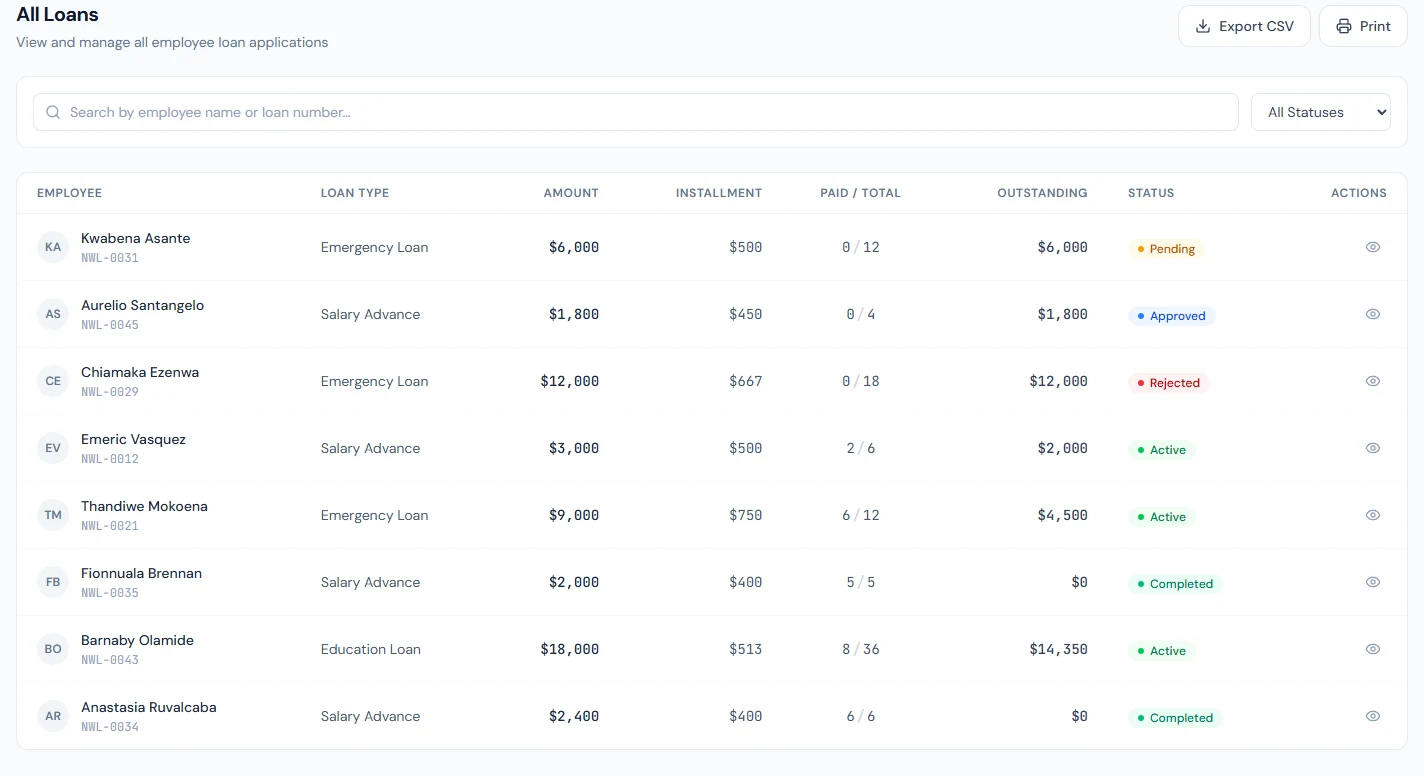
Northwind offers three loan types: a Salary Advance (up to 5,000 over six instalments, no interest), an Emergency Loan (up to 15,000 over eighteen, no interest) and an Education Loan (up to 25,000 over thirty-six, 2.5% interest), one active loan of each type per person. It has eight loans: three active, two completed, one pending, one rejected and one shown as Approved, which the demo wrote directly; a loan approved through the screens goes straight to Active. Its runs have deducted the instalments month by month since October 2025, when the first loan began (60.4).
60.1 Loan types: limits, interest, maximum active loans
Add Loan Type asks for a Name ("Personal Loan"), a Code ("PL"), Max Amount, Max Installments, Interest Rate (%), Max Active Loans and Active. The limits are checked on every application. Max Active Loans counts the person's loans of that type that are pending, approved, active or paused, so an employee with one Salary Advance outstanding cannot apply for a second while the cap is one. The interest rate is applied flat: amount times rate, spread evenly over the instalments. Delete deactivates the type, which stops new applications and keeps it on existing loans; it is refused while any loan of the type is pending, active or paused.
60.2 Employee applications and eligibility
Every employee can apply unless their record says otherwise: Add and Edit Employee carry a loan setting, allowed by default, and an employee set to blocked sees "Loan applications are not available". My Loans shows their loans and Apply for Loan: the type (with its maximum), the amount, the number of instalments, the start month and year, and the purpose, with the estimated monthly instalment computed as they type. The application is refused, with the limit named, when the amount or the instalments exceed the type's maximum, when they already hold the maximum active loans of that type, or when the start month is already past. A successful application is Pending and appears in HR's queue with a loan number (NWL-LN-0005 is Kwabena's).
60.3 Approving and rejecting
Loans › Pending Approvals lists each application with the employee, type, amount, instalments, instalment amount, purpose and when it was applied. Approve ("Approve this loan application?") makes the loan Active from its start month and emails the employee. Reject opens a dialog that requires a reason, stores it on the loan, shows it on the employee's My Loans and emails it. Nobody decides their own application while another approver exists. The money itself is paid outside Operentra, by transfer or cheque, on the day the company chooses; the system records the loan and its recovery.
60.4 Instalment schedules and how payroll deducts them
The loan page shows the Installment Schedule: each due month with its principal, interest, total due, the amount paid and the date, and the count paid. Barnaby Olamide's Education Loan of 18,000 at 2.5% carries 450 of interest, so thirty-six instalments of 512.50 from December 2025; eight are paid, December to July.
Each month's run deducts the instalment due that month, and any earlier instalment of an active loan that no run has deducted, as a Loan Repayment line on the slip. Processing only claims the instalment; locking the run (or paying it, which locks it first) marks it paid, adds it to the loan's paid amount, lowers the outstanding balance, and completes the loan when the last one is paid. Reprocessing a run in Review releases its claims and takes them again, so nothing is deducted twice. A month that is skipped entirely is recovered with the next month's instalment, two on one slip. On Northwind's slips it is the Loan Repayment line: Barnaby's 512.50 appears every month from December 2025. July's run is locked, so July's instalment is paid; August's and September's are claimed by the approved August run and the September run in Review, and stay Upcoming until those runs are locked.
60.5 Loan statuses; pausing and resuming
| Status | Means |
|---|---|
| Pending | Applied, waiting for a decision |
| Active | Approved; instalments are being deducted |
| Paused | Repayment stopped by HR until the loan is resumed |
| Completed | Every instalment paid |
| Rejected | Refused, with the reason on record |
Pause, on an Active loan's page, asks "Pause this loan? Payroll stops deducting its installments until you resume it." Once paused, the loan's Upcoming instalments are marked Skipped and no run deducts them. An instalment that a processed run has already claimed stays with that run: it is still deducted on that slip and is marked paid when the run is locked.
Resume, on a Paused loan, makes it Active again and rebuilds the rest of the schedule. An instalment whose month passed while the loan was paused moves to the end: one month after the last remaining instalment, one month each, with the same amount, so the whole balance is still recovered. A month has passed when it has ended in the workspace's time zone, or when its payroll has already been processed. Every other skipped instalment returns to Upcoming in its own month, and the instalments are renumbered to follow the months. A loan paused in November and resumed in January, with November and December already processed, has those two instalments moved to the two months after its last one; January's run deducts January's instalment only. If this month's payroll was processed while the loan was paused, this month's instalment moves to the end as well, so resume before you process the month. Neither button sends an email; the employee sees the new status and schedule on My Loans.
The list's filter also offers Approved and Written Off. The screens never set them: approval goes straight to Active, and there is no write-off button. There is no early settlement either: a loan runs its schedule to the last instalment.
60.6 Loan register and loan reports
Loans › All Loans is the register: loan number, employee, type, amount, instalment, paid out of total and outstanding, with a status filter, a search, a CSV of the current filter and a printed Loan Register with totals. Loan Reports totals what was disbursed, recovered and outstanding, and lists active loans with a progress bar each; it is the figure finance asks for at a month end.
What happens next
- The run (Chapter 55) deducts the instalments; locking settles them; offboarding (Chapter 82) recovers a leaver's outstanding balance in the final settlement.
What the employee sees
My Loans with each loan's schedule, the apply form, the approval or rejection email with its reason, and the Loan Repayment line on each slip.
Common mistakes
- A type with no maximum. One application can take a year's salary; set Max Amount and Max Installments.
- Interest without advice. A rate above zero can carry tax and lending obligations; check before charging it.
- Approving after the start month's run is locked without telling the employee. The missed instalment comes out with the next month's, two on one slip.
- Paying the money before approval. Approve first; the record is what recovery runs on.
- Leaving a leaver's balance to payroll. Their last run may not cover it; the final settlement recovers it.
- Resuming after the month's run is processed. That month's instalment then moves to the end of the schedule; resume first, then process.
- Deleting a type to tidy the list. Delete only deactivates, and is refused while loans of the type are open.
Practice
Use your own trial workspace, not a customer's.
- Add a loan type with a maximum of 3,000 over six instalments, no interest, one active loan.
- As an employee, apply for 3,500 and read the refusal; apply for 3,000 over six instalments starting this month.
- As HR, open Pending Approvals, reject a second application with a reason, and approve the first; read the schedule.
- Process this month's payroll and find the Loan Repayment line; lock the run and read the loan's paid count and outstanding balance.
- Pause the loan from its page and read the schedule; then Resume it and read the schedule again.
- Open Loan Reports and the printed register.
Quiz
1. What does Max Active Loans count?
The person's loans of that type that are pending, approved, active or paused.
2. How is interest applied?
Flat: amount times the rate, spread evenly over the instalments.
3. When is an instalment marked paid?
When the run that deducted it is locked, or paid, which locks it first; processing only claims it.
4. What happens to an instalment whose month was already processed when the loan was approved?
The next run deducts it with that month's instalment.
5. What is required to reject an application?
A reason, which is stored, shown on the employee's My Loans and emailed.