Chapter 52 — Salary structures and assignments
Components are the vocabulary; a structure is a sentence, the set of lines a kind of employee is paid with. An assignment attaches a structure and a gross figure to one person from a date, and that assignment is what a payroll run reads. This chapter builds a structure, assigns it, and shows why the assignment, once made, is history rather than a form to edit.
What this chapter covers
- 52.1 Building a structure and per-component overrides
- 52.2 Assigning a salary; why assignments cannot be edited
- 52.3 Changing an employee's structure
The concept
A payroll needs two things to be true at once: the same kind of employee is paid by the same rules, and every change to one person's pay has a date and a reason. Structures give the first, templates that make "the standard package" a single definition. Dated assignments give the second: an employee's pay is a sequence of assignments, each effective from a date and closed by the next, so that any month can be reconstructed and no figure is quietly overwritten. An editable assignment would break that; a new one with a date keeps it.
How Operentra handles it
- Payroll › Salary Structures lists each structure with its component count and status; a row opens the breakdown. Add Structure takes a name, a description and a component list built from the active components, each row with its own calculation type, value and Mandatory mark.
- Edit rewrites the component list; Delete is refused while any employee is assigned to the structure and otherwise deactivates it.
- Payroll › Employee Salaries lists every current assignment (employee, structure, gross, effective from). Assign Salary takes the employee, the structure, the gross and the effective date, with a reason; it closes the employee's open assignment the day before. Nothing on an assignment is edited afterwards: a change of pay is an increment (Chapter 57), a change of template is Change Structure.
- Change Structure opens a new assignment on the chosen structure from the date given, with the same gross carried over, and closes the old one the day before.
- The run reads the assignment in force for the month; an employee with none is skipped and named in pre-flight (Chapter 55).
- Who:
payroll.configure(Super Admin, HR Manager) for structures;payroll.salary_assign(Super Admin, HR Manager, Accountant) to assign;payroll.salary_view_allto see the list.
Walkthrough
Northwind has one structure, "Standard US (Federal Withholding)": Basic as 100% of gross, Income Tax and FICA computed by payroll, and the description says plainly that state and local tax are not withheld. All fifty employees on record, the two new hires awaiting activation included, are on it; the history holds sixty-eight assignments, the extra eighteen closed by increments over the year, with monthly gross figures from 3,600 to 25,440.
52.1 Building a structure and per-component overrides
Add Structure asks for a Structure Name ("Standard Employee"), a description, and components. The picker lists the active components; each added row shows the component's name and type and lets you set the row's own calculation type and value, or shows "Computed by payroll" for a line the engine works out, a Mandatory checkbox pre-set from the component, and a remove control. A row's calculation and value override the component's defaults for this structure only, which is how one Housing Allowance component can be 25% of Basic in one structure and a fixed 500 in another. A structure with no components is refused at assignment, so add at least Basic.

The structure page shows each structure's breakdown: component, calculation, value, mandatory. Edit replaces the whole component list with what the form holds; assignments on the structure read the live structure, so a change applies to every employee on it from the next run. Delete is refused while anyone is assigned and otherwise deactivates the structure, which keeps it on old assignments and out of the pickers.
52.2 Assigning a salary; why assignments cannot be edited
Employee Salaries lists current assignments; Assign Salary opens the form: Employee (active employees only; a separated one is refused), Salary Structure (active ones with components), Gross Salary ("e.g. 6500", monthly in the workspace currency), Effective From and a Reason ("Annual increment"). The notice above the form says it before you save: salary assignments cannot be edited once created, so check the gross and the date; to change pay later, use Increments, which records the change with a date and keeps the history.
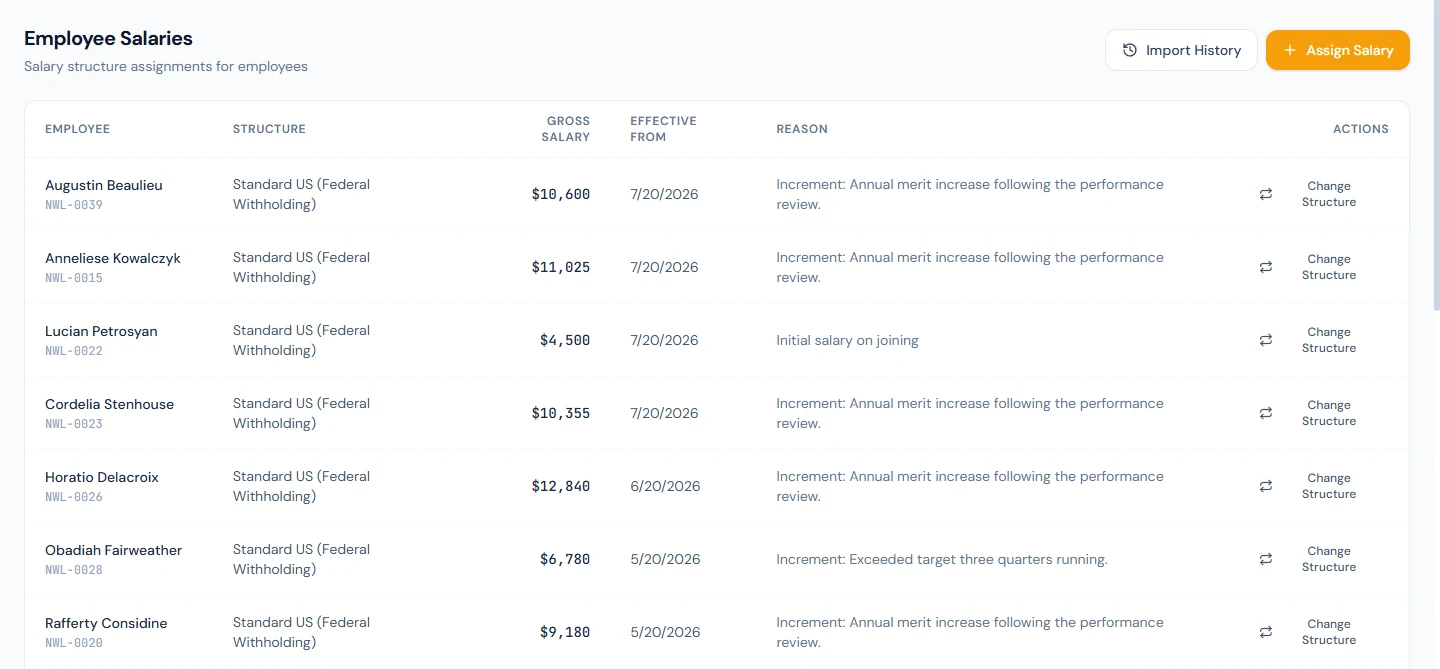
Saving closes the employee's open assignment, if any, on the day before the new effective date and opens the new one. The row records who assigned it. From the run's point of view, the assignment whose dates contain the month is the one that pays; a month before the first assignment pays nothing, which is what the pre-flight warning about employees without a salary is pointing at.
52.3 Changing an employee's structure
Change Structure on a row opens the same form in change mode: the structure picker, an effective date and a reason, with the gross shown as carried over. The notice explains the mechanics: the existing assignment is end-dated the day before, and a fresh one is created on the new structure with the same gross; to change the gross as well, use Increments afterwards. The history keeps both, and a payslip from before the change keeps the old structure's lines.
What happens next
- The run (Chapter 55) resolves each current assignment into lines; increments (Chapter 57) are how the gross moves.
- Salary history import (Chapter 57) can backfill assignments and old slips for employees who were paid before the workspace existed.
What the employee sees
Their payslip lines, and the contract or increment letter that quotes the gross; the structure's name is HR's, not theirs.
Common mistakes
- Editing a structure to change one person's pay. Every employee on the structure changes; use Increments or a second structure.
- A structure with no Basic. Percentage-of-Basic lines read zero and the pre-flight has nothing to warn about.
- Assigning with the wrong effective date. It cannot be edited; assign again from the right date and the wrong one is closed the day before.
- Expecting Change Structure to change the gross. It carries the gross over; the increment is a separate step.
- Deleting a structure that is in use. Refused; move the employees first.
- Entering an annual figure as the gross. The run pays it monthly.
- Leaving a new joiner unassigned. The run skips them and pre-flight warns; the onboarding checklist's salary task is the reminder.
- Copying a structure by hand for a small difference. Per-row overrides exist so that one component serves both.
Practice
Use your own trial workspace, not a customer's.
- Open Payroll › Salary Structures, open the seeded structure and read its breakdown.
- Add "Sales" with Basic at 80% of gross and the seeded allowances, one of them overridden to a fixed value; read the breakdown.
- Open Employee Salaries, assign a throwaway employee to Sales with a gross and today's date, and read the notice before saving.
- Change the employee's structure back to the standard one from next month, and read both rows in the history.
- Try to delete Sales while the employee is on it, then after.
Quiz
1. What does a structure row override?
The component's calculation type and value for that structure only, and whether the row is marked mandatory.
2. Why can an assignment not be edited?
So every change to pay has a date and a reason and any month can be reconstructed; a new assignment, or an increment, closes the old one the day before.
3. What does Change Structure do with the gross?
Carries it over unchanged to the new assignment; a change of gross is an increment.
4. When is deleting a structure refused?
While any employee is assigned to it; otherwise it is deactivated, not erased.
5. Which assignment does a run use?
The one whose effective dates contain the month; an employee with none is skipped and named in pre-flight.