Chapter 43 — Holidays
Every rest-day rule in Part 7 reads one list: the company's holidays. A date on it is a paid rest day in payroll, a Holiday row in attendance, a day the reminders skip and leave does not count. The list is small and consequential, and it has a year's worth of maintenance built in: a feed that proposes the country's public holidays for review, a CSV for the rest, and a weekly job that keeps next year filling in. This chapter is the four pages and the job.
What this chapter covers
- 43.1 Holiday calendar and holiday types
- 43.2 Adding, editing and recurring holidays
- 43.3 Importing holidays by CSV
- 43.4 Public-holiday suggestions: sync, accept, dismiss, weekly check
- 43.5 What employees see
The concept
A holiday list has two failure modes. The first is a missing day: a public holiday nobody entered becomes a day the whole company is marked absent, and payroll docks it. The second is a day entered twice or on the wrong date, which pays people for a Tuesday they worked and confuses the leave calendar. The remedies are dull and effective: take the public holidays from a maintained source and review them rather than typing them; enter company days once with a recurring flag rather than every December; and publish the year before it starts, so that leave is planned around it.
How Operentra handles it
- Holidays › Holiday Calendar shows a year's holidays by month with their type and the branch they are marked for, with year arrows and a banner when suggestions await review.
- Four types: Public, Company, Optional and Half Day. Today the type is a label: every holiday on the list is a full rest day in attendance, leave and payroll, whatever its type.
- Manage Holidays adds, edits and deletes entries: name, date, type, Recurring every year, and Applies to (all branches or one). The branch too is a label today; the engines read holidays company- wide.
- Recurring holidays are copied into the following year by the weekly holiday job, on the same month and day.
- Import Holidays takes a CSV (name, date, type, recurring, branch), checks every row before writing anything, and skips a date that already has a holiday for the same branch. Up to 500 rows.
- Holiday Suggestions syncs the country's public holidays from the Calendarific feed into a review queue; accepting adds a holiday, dismissing hides it for good. A weekly job syncs the current year for any workspace with no suggestions and copies recurring holidays forward.
- Who:
holidays.view(every role, and the portal page);holidays.manage(Super Admin, HR Manager, HR Officer).
Walkthrough
Northwind has twelve holidays in each of 2025, 2026 and 2027, the US federal days from New Year's Day to Christmas Day plus the day after Thanksgiving, typed Public and Company, none recurring and none for a single branch, and no suggestions yet.
43.1 Holiday calendar and holiday types
Holiday Calendar opens on the current year: a card per month with the month's count and each holiday's date, name, type and branch ("All Branches" for most). The arrows step through years; an empty year says so and points at Manage Holidays. When suggestions are waiting, a banner at the top counts them ("3 holiday suggestions pending review") with a Review link to the queue.
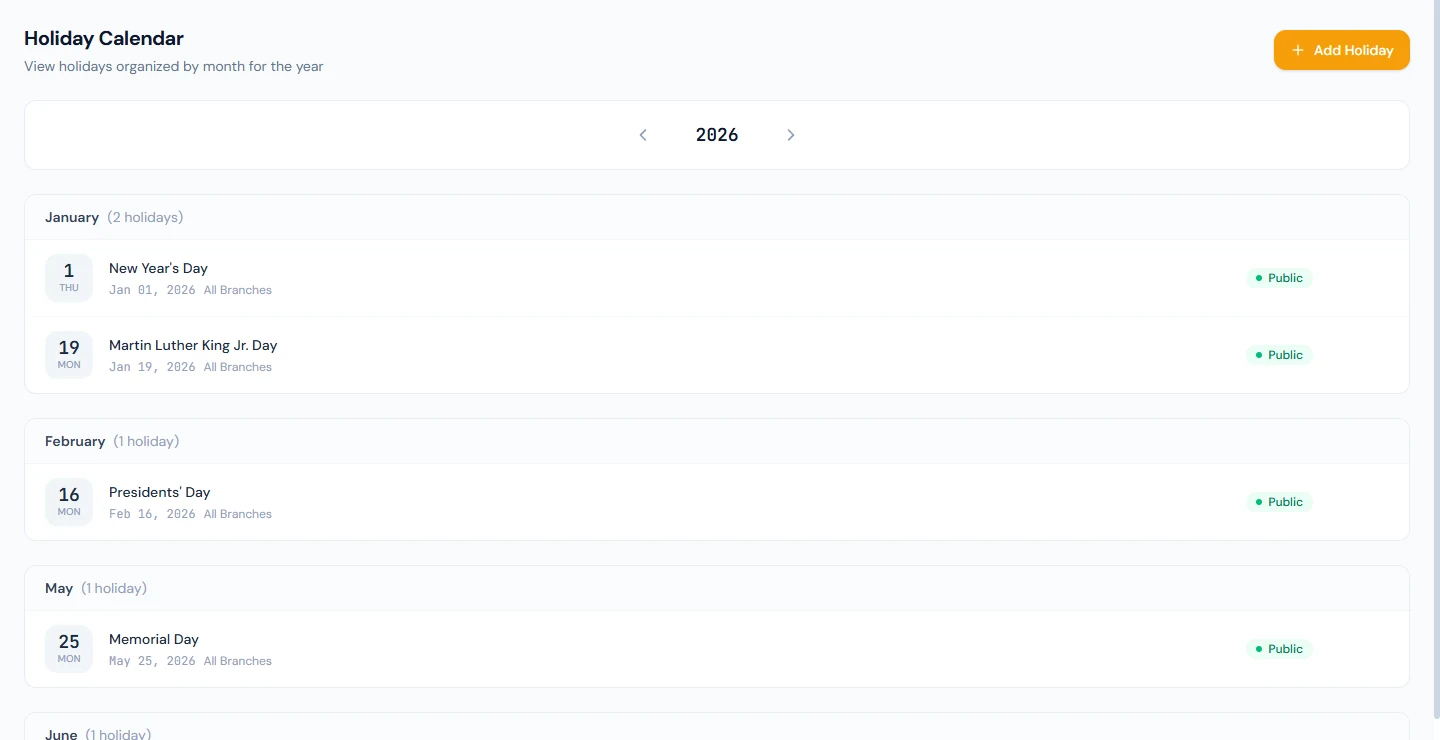
The four types read Public, Company, Optional and Half Day, and the honest thing to say about them is that they are labels. The attendance, leave and payroll engines take every row on the list as a full rest day; an Optional holiday is not optional to the sandwich rule, and a Half Day holiday is not half of anything in payroll. Use the types to tell people what kind of day it is, and expect the calendar to treat them alike.
43.2 Adding, editing and recurring holidays
Manage Holidays lists the year with Name, Date, Type, Recurring (Recurring or One-time), Branch and the edit and delete icons, with a year selector and the count. Add Holiday opens the form: Holiday Name ("Independence Day" is the placeholder), Date, Type, Recurring every year, and Applies to, whose hint says to choose a branch only if the holiday is observed there alone. A second holiday on the same date for the same branch is refused.
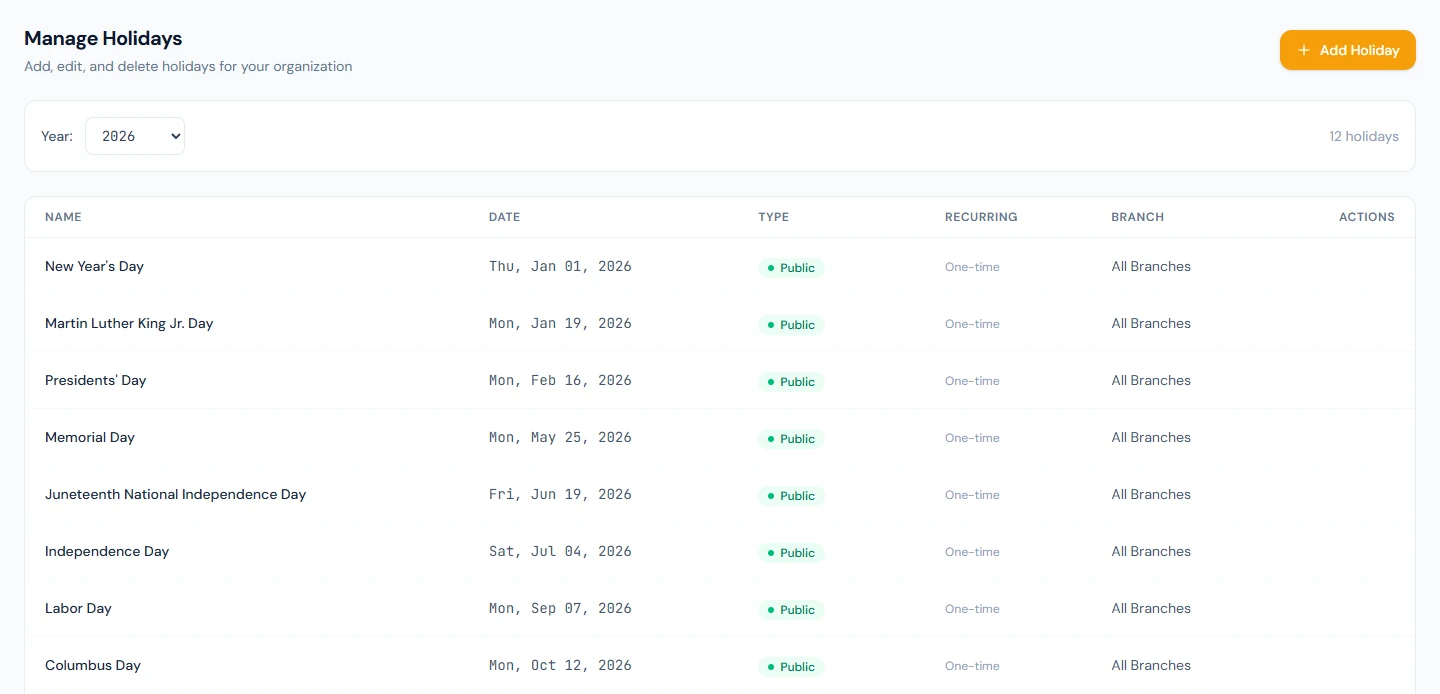
Recurring every year is kept by the weekly holiday job: each Monday, every recurring holiday of the current year that has no counterpart in the next is copied there on the same month and day (29 February becomes the 28th). Mark the fixed-date company days recurring and enter the movable ones, Thanksgiving and the like, by hand or from the feed. Deleting a holiday asks for confirmation and removes only that row; a recurring holiday's copies in other years stay.
The branch on a holiday is, today, what the calendar shows. Every engine that reads the list, attendance's synthesized days, the Auto-Present job, the missing-punch reminders, leave's day count, payroll's rest days, reads it company-wide, so a holiday marked for one branch is observed by everyone. A workspace with sites in two countries should keep that in mind until the branch filter exists.
43.3 Importing holidays by CSV
Import Holidays takes a file with five columns, name, date (YYYY-MM-DD), type (public, company, optional or half_day), recurring (yes or no, blank for no) and branch (a branch code or name, blank for all), and Download Template gives you one with three sample rows. Choosing the file shows the Preview: every row with its line number, the five values and a verdict, Ready or the reason (name missing or over 200 characters, date not YYYY-MM-DD, type not one of the four, recurring not yes or no, no branch with this code or name). Nothing is written until every row is Ready; the file holds at most 500 holidays.
Import N holidays then writes the rows, and the result says how many were imported and how many skipped, the skip being a date that already has a holiday for the same branch. A year's calendar for a workspace that keeps its own list is one file.
43.4 Public-holiday suggestions: sync, accept, dismiss, weekly check
Holiday Suggestions is the review queue for the feed. Sync Public Holidays fetches the chosen year's public holidays for the company's country from Calendarific (the operator configures the key; a workspace whose country has no feed code is told so) and stores the ones not already in the queue as Pending suggestions, each typed National, Religious or Observance with the holiday it would become ("Will be added as: Public Holiday"). Only a day the feed marks as a national holiday becomes a Public holiday, a paid day off; a day tagged only with a faith (Orthodox Christmas, Tu Bishvat, Diwali in a country that does not gazette it) is Religious, and it and every observance become Optional holidays. A festival the country gazettes, such as Eid in Pakistan or the UAE, carries the national tag and is public. A sync also corrects the type of any suggestion still pending, so one filed under an older reading is right after the next sync; accepted and dismissed ones are left as they are. A suggestion for a day that already has a company-wide holiday is filed as Dismissed and linked to that holiday, so the queue holds only days still to decide. The toast says how many were new and how many already existed.
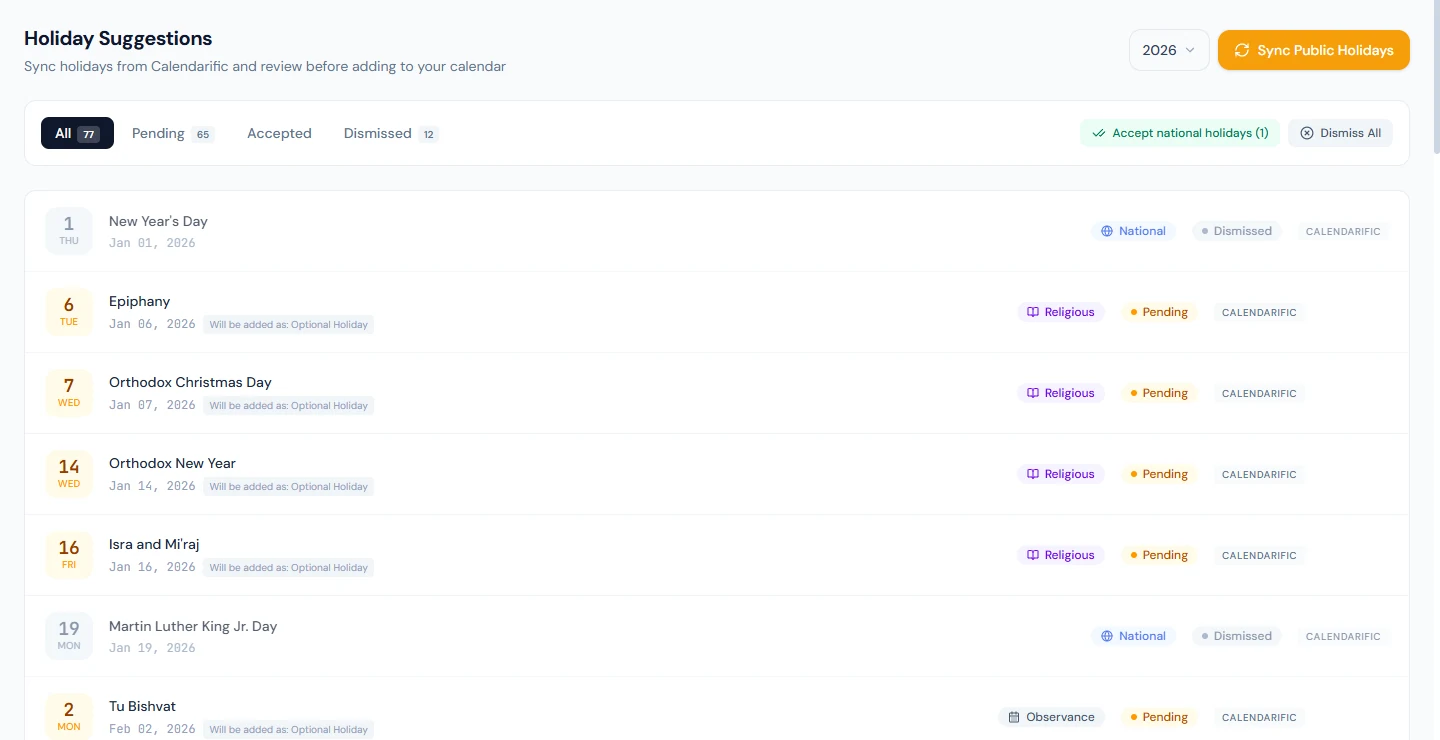
Each suggestion has Accept, which adds the holiday to the calendar (as a one-time holiday for that year), and Dismiss, which hides it and will not suggest it again. Accept national holidays accepts every pending suggestion typed National in one go and leaves religious days and observances for a decision one at a time, because every holiday on the calendar is a full rest day whatever its type; Dismiss All dismisses the year's whole pending list. The tabs show Pending, Accepted, Dismissed or All.
A weekly job runs on Monday mornings, shortly after 09:00 in the workspace's time zone: for a workspace with no suggestions for its current year it syncs them, so a new workspace finds its country's holidays waiting without anyone pressing the button; it then copies recurring holidays forward (43.2) and logs any suggestion whose date is within the next seven days and still unreviewed. The calendar's banner is the reminder the job leaves.
43.5 What employees see
Holidays in the portal lists the year's holidays by month with the total ("Holiday calendar for 2026 · 12 total holidays"), the same list as the calendar page without the branch column or the suggestions. An empty year says the schedule has not been published yet, which is the cue to accept the suggestions before December.
What happens next
- Attendance writes Holiday rows for the dates and skips the reminders (Chapters 36 and 37); payroll pays them as rest days by the sandwich rule (Chapter 34); leave does not count them inside an application (Chapter 48).
- The dashboard's setup checklist counts the public holidays step done once the year has holidays (Chapter 7).
- Next year fills in from the feed and the recurring copies over the course of this one.
What the employee sees
The portal Holidays page, the Holiday status and tag on their attendance days, and holidays skipped in their leave applications. They are not told when a holiday is added.
Common mistakes
- Typing the public holidays by hand. Sync and review; the feed has the dates right and the queue keeps the decision.
- Marking Thanksgiving recurring. It moves; the copy would land on the wrong Thursday. Recurring is for fixed dates.
- Expecting a Half Day holiday to pay half. The type is a label; every holiday is a full rest day in payroll.
- Marking a holiday for one branch and expecting the others to work. The engines read holidays company-wide today.
- Importing a file with a wrong type. The preview refuses the row; fix the file rather than guessing a type.
- Dismissing a suggestion to postpone it. Dismissed is permanent; leave it Pending instead.
- Publishing next year in December. The feed and the recurring copies make the year available much earlier; let staff plan leave around it.
- Deleting a holiday that payroll already paid. The month was closed with it as a rest day; the deletion changes the calendar, not the payslip.
Practice
Use your own trial workspace, not a customer's.
- Open Holiday Calendar, step to next year, and read what is there. Open Manage Holidays for next year.
- Add a company holiday on a fixed date, tick Recurring every year, and read its row. Edit it to a single branch and read the Branch column.
- Download the import template, add a row with a bad date and one with an unknown branch, upload it, read the preview, fix the file, and import.
- Open Holiday Suggestions, Sync Public Holidays for next year, read the types and the "Will be added as" lines, accept two and dismiss one. Read the calendar's banner before and after.
- Sign in as an employee and read the portal Holidays page for both years.
Quiz
1. What do the four holiday types change in attendance and payroll?
Nothing today. They are labels on the calendar; every holiday on the list is a full rest day.
2. What does Recurring every year do, and when?
The weekly holiday job copies the holiday into the following year on the same month and day, skipping any date that already has a holiday for the same branch.
3. When is an imported row written?
Only when every row in the preview is Ready; a date that already has a holiday for the same branch is then skipped and counted.
4. Where do suggestions come from, and what does accepting one do?
From a Sync Public Holidays request to the Calendarific feed for the company's country, or from the weekly job for a workspace with none; accepting adds a one-time holiday of the mapped type to the calendar.
5. Does a holiday marked for one branch exempt the others?
Not today. The branch is shown on the calendar, but attendance, leave and payroll read every holiday company-wide.