Chapter 98 — Final assessment
These questions are situations you will meet at work, not definitions. Answer each one before opening its answer, and write down the chapter to revisit whenever you were wrong. If you can answer twenty of the twenty-five without looking, you are ready to run HR in Operentra on your own.
What this chapter covers
- 98.1 Setting up and people (questions 1–7)
- 98.2 Time and leave (questions 8–12)
- 98.3 Pay (questions 13–18)
- 98.4 Performance, communication and exits (questions 19–22)
- 98.5 Portal, data and the platform (questions 23–25)
- 98.6 The graded exam and your certificate
- 98.7 After the course
The concept
An assessment is useful when it shows you what to study next. Each answer names the chapter that explains it; that list is your revision plan.
How Operentra handles it
The questions assume the default roles and settings described in the course. Your own workspace may differ where someone changed them.
Walkthrough
98.1 Setting up and people
1. A new HR officer needs to add and edit employees but must not see payroll. Which role, and what do you check?
HR Officer; check its permissions before assigning it, and add no payroll role (Chapter 14).
2. Your company changes its fiscal year from January to April. What must exist before April's leave and payroll?
A fiscal year starting in April set as current, so allocation, accrual and payroll fall in the right year (Chapter 10).
3. A new hire's portal shows nothing and they cannot accept a contract. What status are they in, and what activates them?
New; accepting their contract in the portal, an uploaded signed copy, or a manual activation makes them Active (Chapter 18).
4. An employee changed their phone number in the portal, but HR still sees the old one. Why?
The change is a submission waiting for HR's approval (Chapter 21).
5. You import 200 employees from a spreadsheet and some rows fail. Are the others imported?
Yes: rows are imported one by one and failures are listed; fix and re-import only those (Chapter 17).
6. A manager approves leave for someone in another department. Should that be possible?
No: a Department Head approves only their direct reports. Check the person's reporting manager (Chapters 19, 89).
7. A candidate accepted an offer. How do they become an employee without retyping their details?
Convert the candidate to an employee from the application (Chapter 30).
98.2 Time and leave
8. An employee forgot to clock out and the day shows Missing Clock-out. How is it fixed properly?
The employee requests a regularisation with the right time and the manager approves it (Chapters 37, 39).
9. A day HR corrected by hand changed back the next morning. Can a nightly job do that?
No: approved and overridden days are protected; look for a second manual change in the activity log (Chapters 39, 91).
10. Leave applied for over a weekend counts fewer days than the calendar range. Why?
Leave counts working days under the policy; weekends and holidays are skipped unless a sandwich rule applies (Chapters 44, 48).
11. Mid-year, an employee's monthly-accrual balance is lower than the annual quota. Is that a bug?
No: monthly accrual releases the quota month by month (Chapters 45, 47).
12. Public holidays for next year are missing. What do you check?
Holiday suggestions waiting for review and recurring holidays rolled forward (Chapter 43).
98.3 Pay
13. A new joiner is missing from this month's payroll run. What two things do you check first?
That they are Active and that a salary assignment is in force for the month (Chapters 52, 55).
14. The pre-flight shows a warning and a blocker. Which stops approval?
The blocker; warnings never block (Chapter 55).
15. A one-off bonus must be paid this month only. Where is it recorded?
As a bonus or adjustment for that month before the run is locked (Chapter 56).
16. An employee says the slip's net is lower than last month. Where do you look?
The slip's lines: absences and late deductions, loan instalments, tax and adjustments, against last month's slip (Chapters 54, 59).
17. A loan instalment was not deducted in March. What happens in April?
The missed instalment is caught up in the next run along with the current one (Chapter 60).
18. Finance asks for payroll totals while this month's run is still in review. What do you tell them?
The figures can change until the run is approved; the report shows a notice saying so (Chapters 55, 90).
98.4 Performance, communication and exits
19. An employee's merit score dropped. How do you explain it?
Open My Performance with them and read the ledger lines behind the change (Chapters 70, 87).
20. An announcement for the sales team reached everyone. What went wrong?
Its audience was not set to the sales department (Chapter 78).
21. A leaver still holds a laptop. Can the settlement be completed?
Not yet: the clearance checklist keeps "Assets returned" open until the asset's return is recorded, as returned, damaged or lost (Chapters 33, 82).
22. A bank asks to confirm a salary certificate is genuine. How do they check?
By scanning its QR code, which opens the verification page for that document (Chapter 77).
98.5 Portal, data and the platform
23. An employee asks for every record you hold about them. How do you answer?
Download their employee export from Data & Privacy and send it securely (Chapter 92).
24. Payroll and recruitment show a lock. What does that mean?
They are not in your current plan; the billing page shows which plans include them (Chapter 93).
25. The finance system needs read-only payroll data. What do you give it?
Its own API key with only payroll:read, an expiry and, if possible, an
IP allowlist (Chapter 96).
98.6 The graded exam and your certificate
The questions above are practice: their answers are on the page. When you are ready, take the graded exam in Operentra itself:
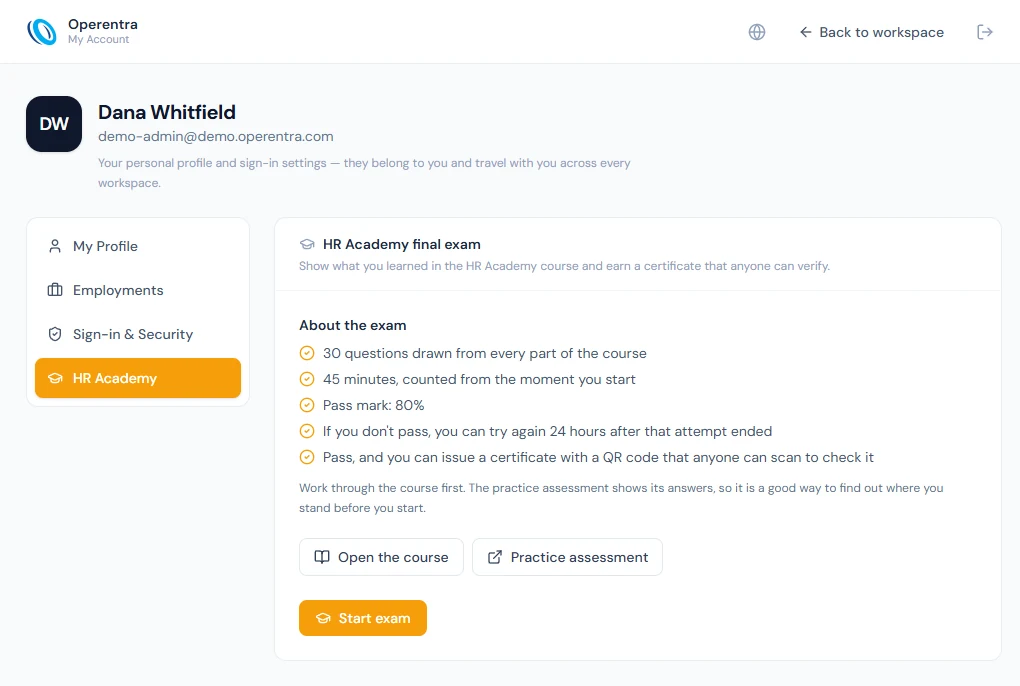
- Sign in and open My Account from the user menu (your avatar, top right).
- Open the HR Academy tab and select Start exam.
The exam draws 30 multiple-choice questions from a larger bank covering the whole course, at least one from every Part, so no two sittings are the same. You have 45 minutes from the moment you start; if time runs out, the exam submits the answers you have given. The pass mark is 80%, 24 of 30. The result shows your score and how you did in each Part, with a link back to each Part. It does not show which answers were wrong.
If you do not pass, you can sit the exam again 24 hours after that attempt ended. When you pass, confirm your name as it should be printed and issue your certificate. It is a PDF with a certificate number and a QR code. Anyone who scans the code, or opens its link, sees whether the certificate is valid, the name on it, the score and the date it was issued.
The certificate belongs to your account, not to a workspace, so you can sit the exam from a trial workspace. An administrator who has signed in as someone else cannot sit it on their behalf.
98.7 After the course
Keep your capstone workspace notes (Chapter 97): they are a record of what you did with your own hands. To keep learning, revisit the chapters behind any question you missed, and use the appendices as reference while you work.
What happens next
- The appendices collect reference material: a glossary, country notes, every email trigger, template variables, permissions, plan features, statuses, shortcuts and troubleshooting.
What the employee sees
Nothing; this chapter is for you.
Common mistakes
- Reading the answer first. You learn from the attempt.
- Ignoring the chapter references. They are the revision plan.
Practice
Redo any capstone stage (Chapter 97) behind a question you missed.
Quiz
This chapter is the quiz.