Chapter 74 — Engineering and support evidence
Engineers and support agents leave a precise trail of their work in the tools they use: who reviewed which pull request and how quickly, whose change was merged, who answered which ticket first and how well. That trail is better evidence than any report about it, because nobody had to write it for HR. This chapter connects GitHub and WHMCS to the merit score, explains what is scored and what the AI reads, and covers the checks HR keeps on it.
What this chapter covers
- 74.1 GitHub: repositories, review grading, flagged reviews, voiding a score
- 74.2 WHMCS: ticket polling and grading
- 74.3 Identity reconciliation
The concept
Activity data is tempting and dangerous. Counted naively it rewards volume (many tiny pull requests, one-word replies) and punishes the person who does the hard review nobody sees. Useful scoring looks at responsiveness (how quickly a requested review or a new ticket is answered), depth (a review with comments and a written verdict, a reply that resolves the problem) and difficulty (a large change counts for more than a typo). And it needs a human check: a person must be able to look at a score, disagree, and take it back.
How Operentra handles it
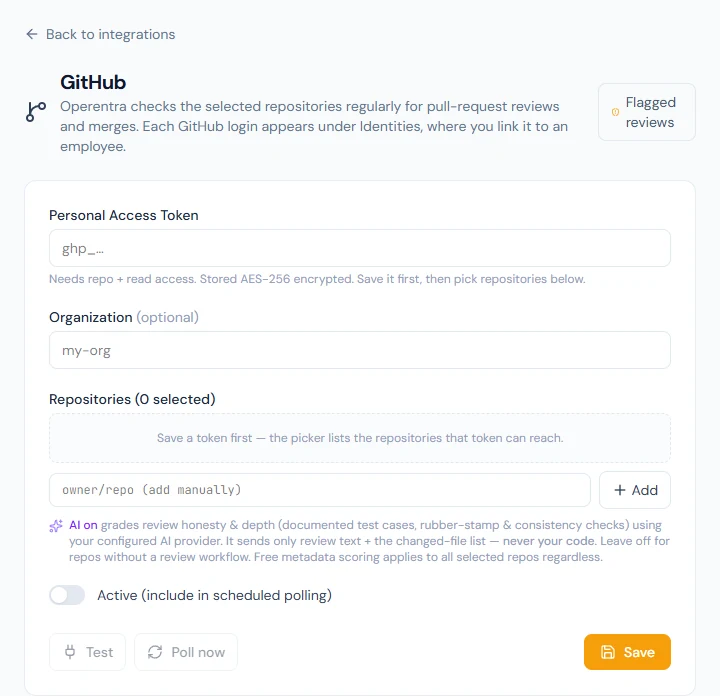
- Settings › Integrations › GitHub: a personal access token, an optional organization, the repositories to watch, and per repository whether the AI grades reviews. Every hour, reviews and merges are pulled and scored.
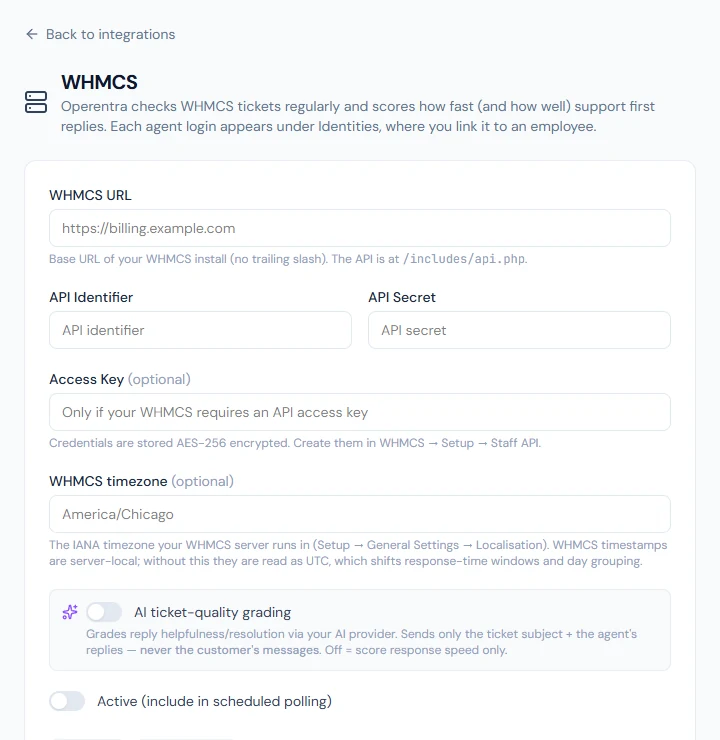
- Settings › Integrations › WHMCS: the WHMCS address, API credentials and time zone, and whether the AI grades replies. Every hour, first responses and agents' replies are pulled and scored.
- Identity Reconciliation links each GitHub login or WHMCS agent to an employee; activity from an unlinked account waits until it is linked, then is scored.
- Flagged Reviews lists reviews the AI judged thin or dishonest; Void score takes a review's points back.
- While an integration is connected, its source counts in every scorecard profile that does not set a weight for it, at 0.4 (Chapter 70).
- Who:
company.settingsto connect and poll (Super Admin, HR Manager);performance.managefor identities, flagged reviews and voiding (Super Admin, HR Manager).
Walkthrough
Northwind has neither integration connected. The figures below are the scoring rules, with examples of the kind an engineering team sees once connected.
74.1 GitHub: repositories, review grading, flagged reviews, voiding a score
Paste a Personal Access Token with read access to the repositories (it is stored encrypted), optionally an Organization, save, then pick the Repositories to watch; a repository can also be added as owner/repo. For each repository, AI on or AI off decides whether reviews there are graded by the AI. Active includes the connection in the hourly poll; Test checks the token, Poll now runs a poll at once. The first poll looks back thirty days.
What is scored, for logins linked to employees:
| Event | Points |
|---|---|
| A review | 10 × timeliness × depth |
| A merged pull request | 8 × difficulty (0.5 to 2, from the size of the change) |
| A rescue: reviewing, unasked, a pull request whose requested reviewers missed it, or merging it for someone else | 5 |
| A requested review never given | −5 for each requested reviewer |
Timeliness counts from the review request, half credit at the Review SLA (24 hours by default, Chapter 75) and none at twice it; a review nobody asked for never falls below half. Depth without AI comes from the review itself: "changes requested" counts in full; a review with comments and a written verdict counts more than an approval with nothing written, which counts as 0.3. With AI on, the AI reads the pull request's description, its list of files and the reviewer's text, never the code, and judges how substantial and how honest the review is. A missed review is booked when a requested reviewer has not reviewed within the SLA, or the pull request closed after that without their review; reviewing later reverses it.
Flagged Reviews lists reviews the AI marked Rubber stamp (an approval with no real reading), Unsubstantiated (claims of testing with nothing to back them) or Inconsistent (a verdict that does not match the change), with the AI's note and the points scored. Void score asks "Void this review's merit score? A reversing ledger entry will be appended (this cannot be undone)." The review then shows Voided.
74.2 WHMCS: ticket polling and grading
Enter the WHMCS URL, the API Identifier and API Secret (created under Setup › Staff API in WHMCS), an Access Key if your WHMCS requires one, and the WHMCS timezone the server runs in, so reply times are read correctly. AI ticket-quality grading decides whether the AI judges replies; it reads only the ticket subject and the agent's replies, never the customer's messages. Test shows how many tickets are visible.
Two things are scored. The first response on a ticket earns 10 × timeliness (half at the WHMCS first-response SLA, 8 hours by default) × depth, with the off-day multiplier for answering on a day off. Agent replies earn the WHMCS reply credit (4 points by default) × depth for each agent and ticket per day, once the day has ended, so everyone who works a ticket is credited, not only whoever answered first; a credit of 0 scores first responses only. Without AI, depth is
- WHMCS scores have no flagged list and no void.
74.3 Identity reconciliation
Identity Reconciliation lists every GitHub login and WHMCS agent the polls have seen, with the Source, Account, Last seen and Linked to; filter by all, unlinked or linked. An unlinked account shows "Parked — needs linking": its activity is kept but not scored. Link to employee… attaches it, and the parked activity is scored at once ("Linked — parked activity has been scored"). Unlink stops future scoring; points already scored stay in the ledger. Link accounts carefully: a login linked to the wrong person gives them someone else's work.
What happens next
- Chapter 75 covers the settings that tune these rules, the AI switch, and the increment recommendations built on the evidence.
What the employee sees
Their GitHub and WHMCS lines in My Performance, and today's tracked activity offered for attaching to their daily report (Chapter 72).
Common mistakes
- A token with access to everything. Give it read access to the repositories you score, nothing more.
- Forgetting to link accounts. Parked activity scores nothing until it is linked.
- Treating missed-review penalties as final. A late review reverses them; a reviewer who was wrongly requested should be removed from the request in GitHub.
- Never opening Flagged Reviews. The AI's flags are suggestions; a person decides.
- The wrong WHMCS time zone. Response times are then off by hours.
Practice
Use your own trial workspace, not a customer's, and a test repository.
- Connect GitHub with a token for one test repository, AI off, and poll now.
- Link your GitHub login to your employee record and see the parked activity scored.
- Request a review from a colleague, let them review, and find the review's line in their ledger.
- Turn AI on for the repository, approve a pull request with no comment, and look for it under Flagged Reviews.
Quiz
1. What does the AI read when grading a GitHub review?
The pull request's description, its list of files and the reviewer's text; never the code.
2. What does a requested review that is never given cost?
5 points for each requested reviewer, reversed if they review later.
3. What does voiding a review score do?
It appends a ledger line that reverses the review's points; it cannot be undone.
4. Which WHMCS work is scored?
The first response on each ticket, and each agent's replies on a ticket per day.
5. What happens to activity from an unlinked account?
It is parked and scored once the account is linked to an employee.