Chapter 81C — Company events and recognition
An announcement tells people something. An event asks them to be somewhere, at a time, and to say whether they will be. Recognition is the other half of a company that talks to itself: one person thanking another, where everyone can see it. Both live on the portal's Home page, and both are small things that, done every week, change how a workplace feels.
What this chapter covers
- 81C.1 Publishing an event
- 81C.2 Replies and the roster
- 81C.3 Changing and cancelling
- 81C.4 Recognition and the company values
The concept
A company event has four parts: when it is, where it is (a room, a link, or both), who it is for, and whether those people are asked to reply. The reply, usually called an RSVP, is what turns a notice into planning: a town hall with forty people coming needs a different room from one with four hundred.
Recognition is praise given by a colleague rather than by a manager at review time. It works when it is specific (what the person did), timely (this week, not at year end), public (others see it and learn what good looks like) and tied to something the company says it values. A company's values are the short list of behaviours it wants more of; recognition is how that list stops being a poster.
How Operentra handles it
- Announcements › Company Events holds every event; employees see theirs under Events in the portal. Events are on every plan.
- An audience is everyone, or chosen departments, locations, roles or named people: the same audience an announcement has (Chapter 78). A person outside it never sees the event.
- Times are entered and shown in the company's time zone.
- Replies are Going, Maybe and Can't go, one per person, changeable until the event is over. They can be switched off for an event that needs no answer.
- The people invited are told by email and in the bell when the event is published, when its time, place or link changes, and when it is cancelled, unless that is switched off for the event.
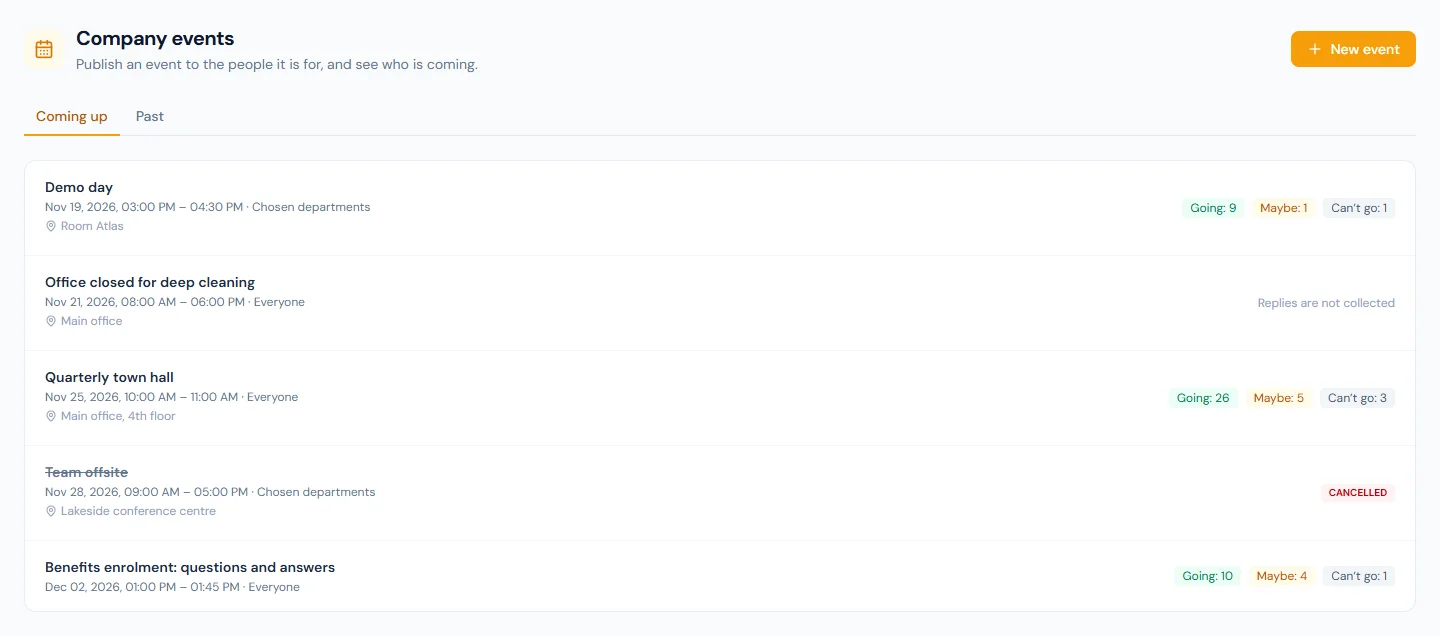
- A cancelled event is kept, marked cancelled with its reason. Nothing about an event is ever deleted.
- Announcements › Recognition holds the company's values and the feed; employees recognise each other under Recognition in the portal. Recognition comes with Performance, on the Growth and Enterprise plans (Appendix F).
- Who:
events.viewandrecognition.givefor everyone;events.manageandrecognition.managefor Super Admin, HR Manager and HR Officer (Appendix E).
Walkthrough
Northwind holds a town hall every quarter and a demo day in engineering every month. This month an offsite had to be cancelled.
81C.1 Publishing an event
Announcements › Company Events opens on what is coming up.
New event asks for a title, the day, a start time and, if you like, an end time; a place, a link to join, or both; details in plain text; and who is invited.
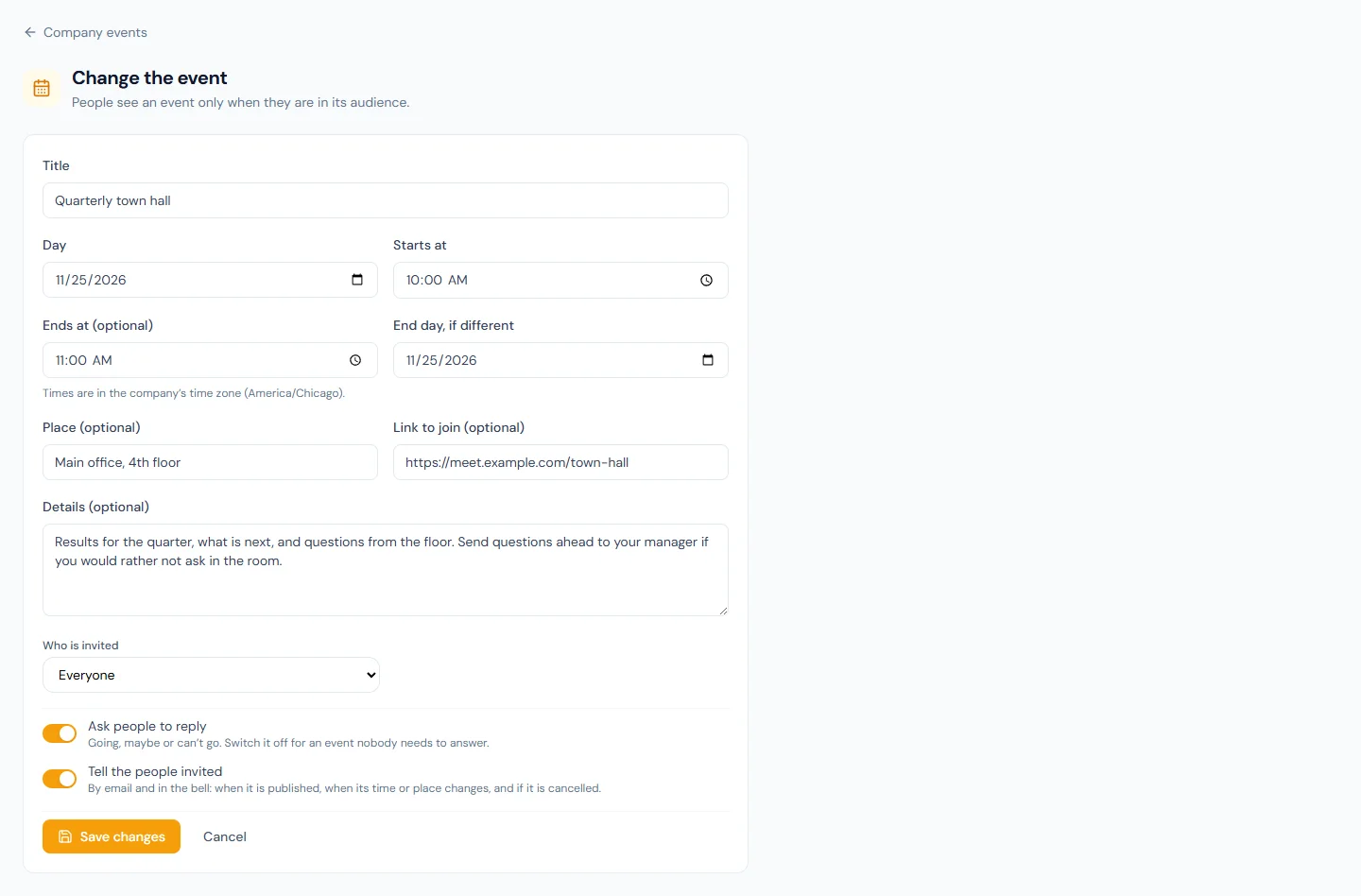
Three things on the form deserve a second look:
- The times are the company's. An HR officer travelling in another time zone still types 10:00 for a 10:00 town hall.
- The link has to start with
https://orhttp://. Anything else is refused. - Tell the people invited is on. Publishing sends each of them the invitation by email and in the bell. Switch it off for an event you are entering for the record.
81C.2 Replies and the roster
Open an event to read it as HR does.
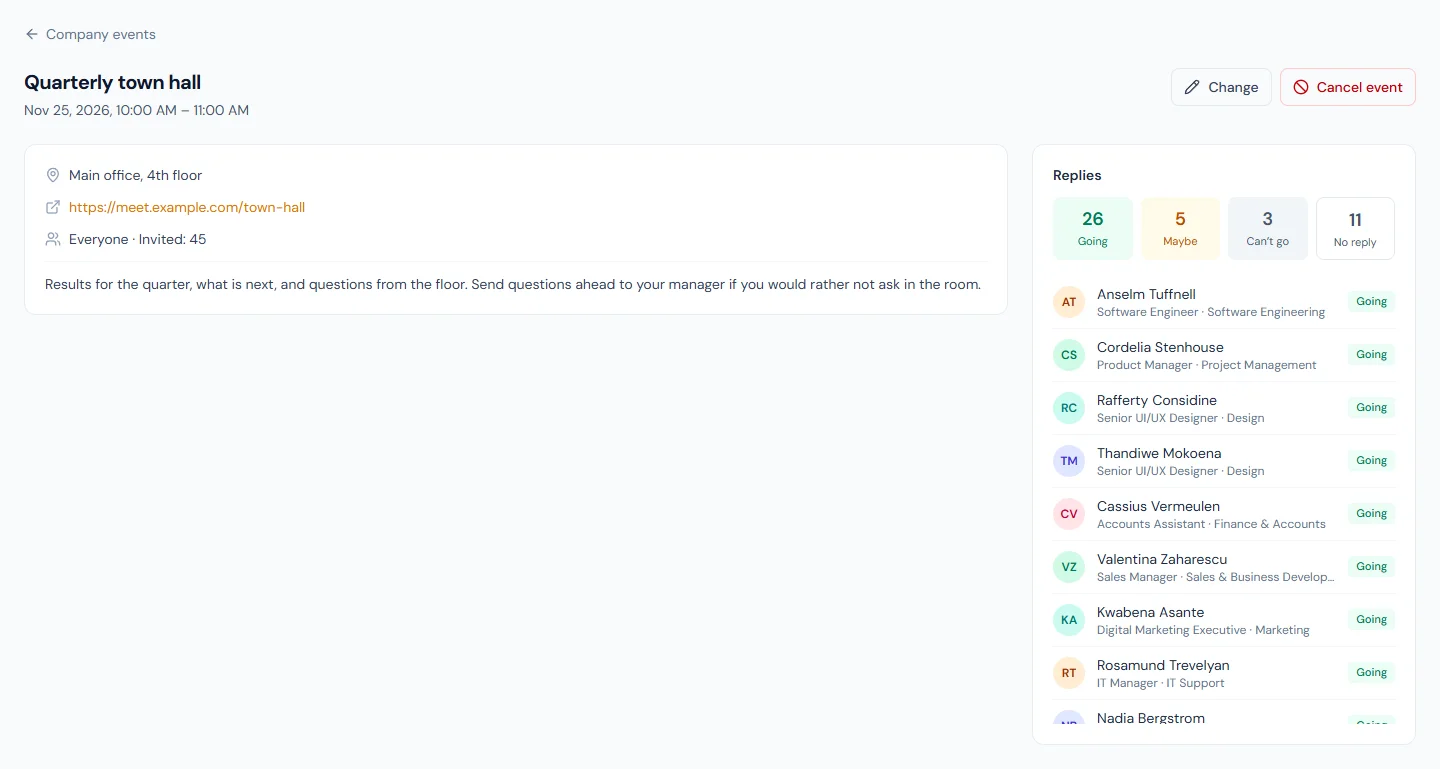
Invited counts the active employees in the audience today. Each person who answered is listed with their job title, department and answer. No reply is the rest, as a number: nobody is listed for not answering.
The person sees the same event in their portal, with the buttons to answer.
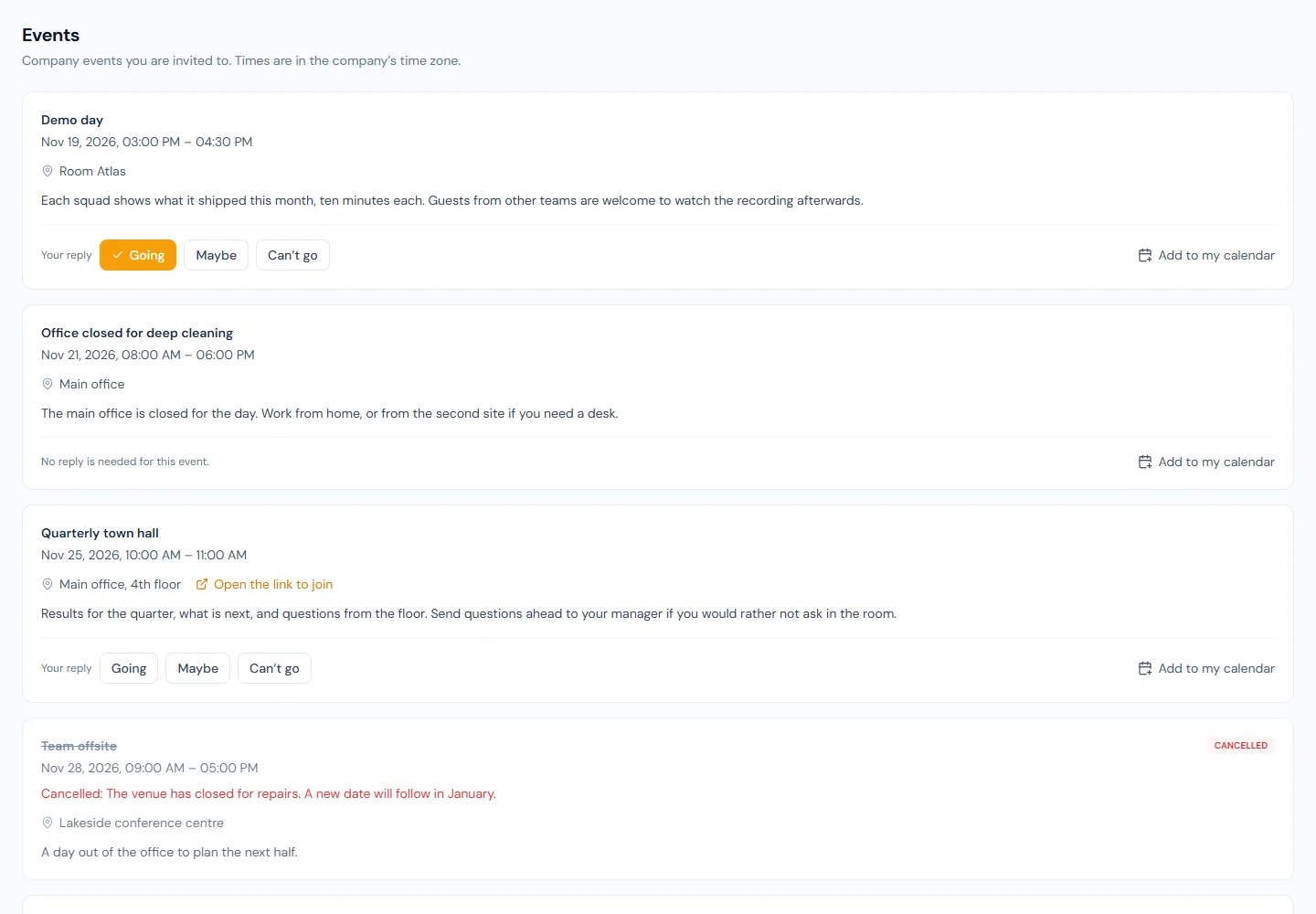
Add to my calendar downloads the event as a calendar file. On the Enterprise plan the person's own calendar subscribe link (Chapter 95) carries their events too, without the ones they declined.
81C.3 Changing and cancelling
Change opens the same form. What happens next depends on what changed:
| What changed | Who is told |
|---|---|
| The time, the place or the link | Everyone invited |
| The title or the details only | Nobody |
| Who is invited | The people added get the invitation. The answers of people no longer invited are removed |
Cancel event asks for a reason. The event stays on everyone's list, struck through, with the reason beneath it, and everyone who had not answered "Can't go" is told. Cancelling cannot be undone, and neither changing nor cancelling is possible once an event is over.
81C.4 Recognition and the company values
Announcements › Recognition has two halves.
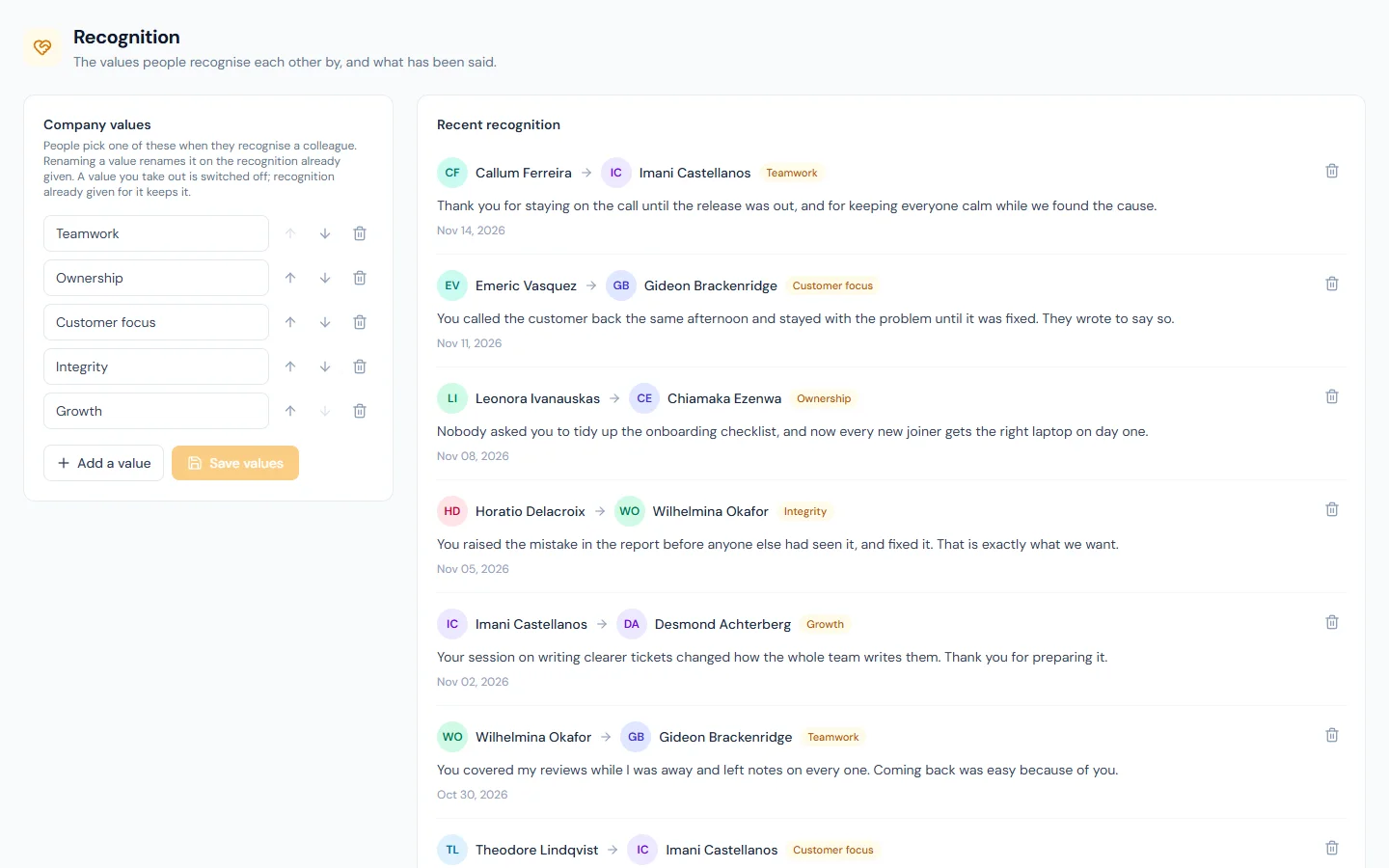
Company values is the list people choose from. A workspace starts with Teamwork, Ownership, Customer focus, Integrity and Growth; replace them with your own. A value you take out is switched off: it leaves the picker, and the recognition already given for it keeps it.
The feed is what people wrote. The bin beside a note takes it down for everyone, permanently; it is there for the rare note that should not have been written, not for tidying.
In the portal, a person picks a colleague, a value and writes what they did.
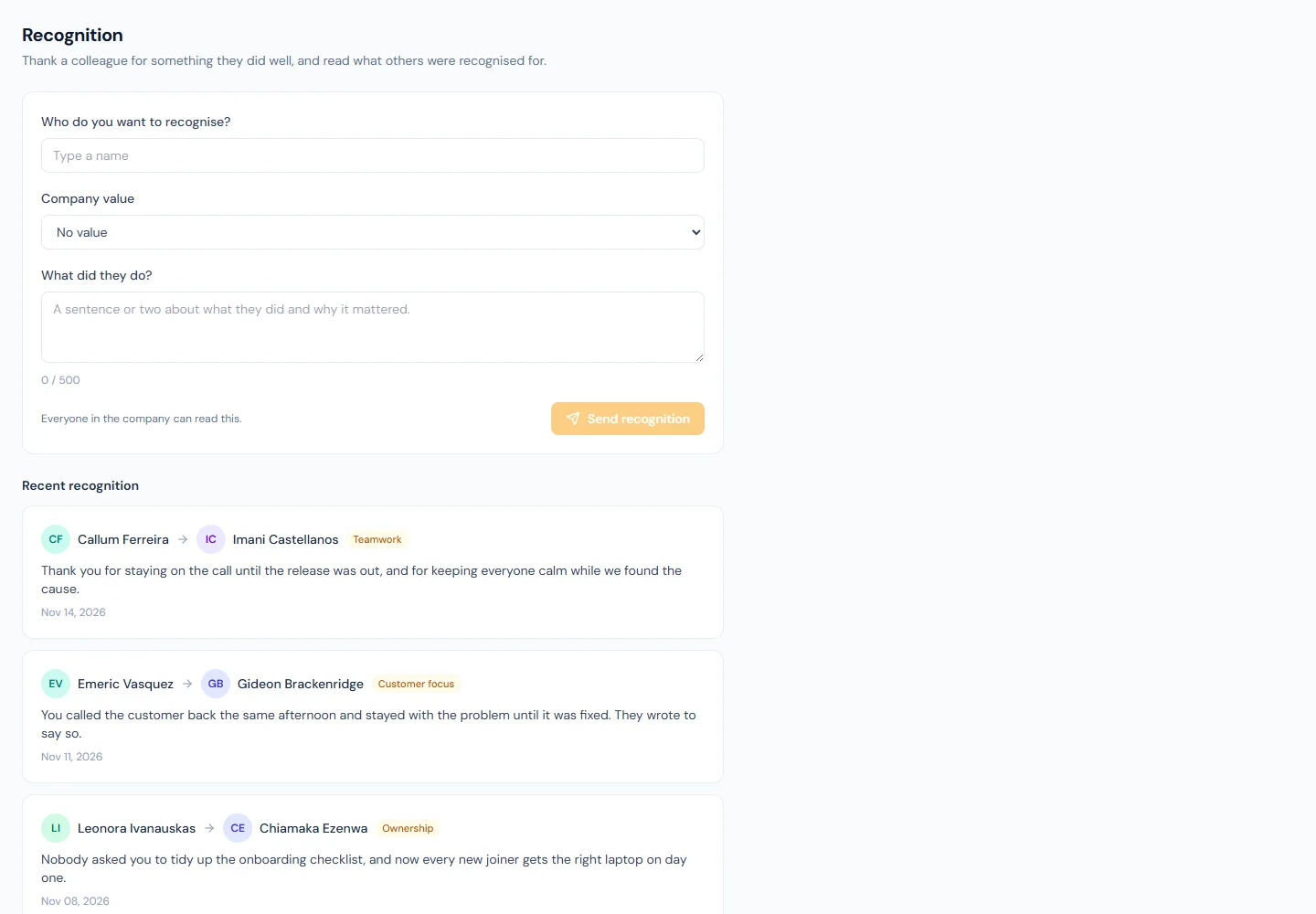
The colleague is told by email and in the bell. Three rules keep the feed honest: nobody recognises themselves, a note is at most 500 characters, and a person can send ten in any 24 hours.
What happens next
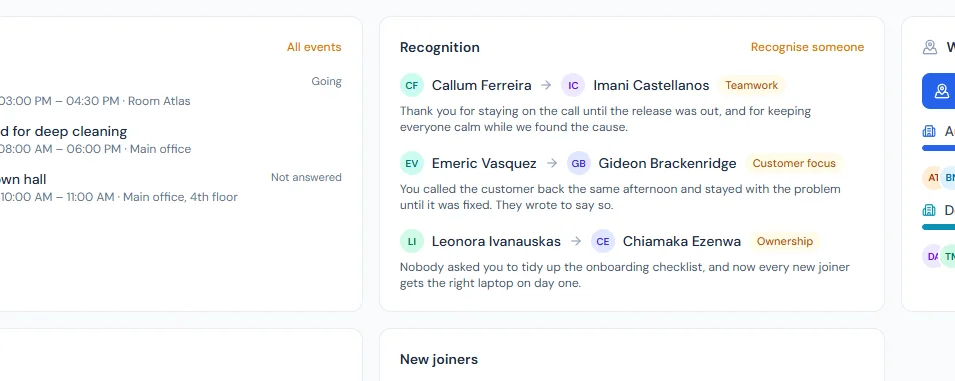
- The next three events and the latest three recognitions show on the portal's Home page (Chapter 84), where an administrator can switch either card off.
- A person's card in the people directory (Chapter 20) shows how often they were recognised in the last 12 months.
- Erasing a person (Chapter 93) deletes their replies and every recognition they gave or received.
What the employee sees
Events: what they are invited to, with their answer beside each, for a day after it ends. Recognition: the form and the feed. On Home, two cards.
Common mistakes
- Publishing to everyone what is for one team. People stop reading invitations that are not for them. Choose the audience.
- Changing the time by editing the title. "Town hall (now 11:00)" tells nobody. Change the time, and everyone invited is told.
- Deleting by cancelling without a reason. People who planned around the event open it to find out why. Give the reason.
- Publishing a draft idea to see how it looks. There is no draft: an event that is still to come invites everyone in its audience the moment it is published. Switch the notice off first if you are only trying the form.
- Chasing the people who have not replied by name. The roster shows a number on purpose. Remind the audience, not individuals.
- Leaving the starting values in place. Recognition tied to "Teamwork" at every company says nothing about yours. Put your own values in before you announce the feature.
- Using the bin to edit the feed. A removed note cannot be brought back, and the person who received it was already told.
Practice
Use your own trial workspace, not a customer's.
- Publish an event for one department, tomorrow at 10:00, with replies on. Sign in as someone in that department and answer Maybe; sign in as someone outside it and confirm it is not there.
- Change the place. Check the bell of the person who answered.
- Cancel it with a reason, and read it again in the portal.
- Replace two of the starting values with your own and save.
- Recognise a colleague for one of the new values, then open that colleague's card in the people directory.
Quiz
1. Who can see a company event?
The people in its audience: everyone, or the chosen departments,
locations, roles or named people. Anyone else never sees it and cannot
reply. Those who hold events.manage see every event on the admin
page.
2. An event's place changes from Room 4 to Room 9. Who is told?
Everyone invited, by email and in the bell, provided "Tell the people invited" is on for the event. A change to the title or the details alone tells nobody.
3. What happens to a cancelled event?
It stays on the list of everyone invited, marked cancelled, with the reason HR gave, and takes no more replies. Everyone who had not answered "Can't go" is told. It cannot be un-cancelled.
4. The roster shows "No reply: 11". Who are they?
The active employees in the audience who have not answered. They are shown as a number only; the roster lists the people who answered.
5. What limits are there on recognising a colleague?
Nobody can recognise themselves, a note is at most 500 characters, and a person can send ten recognitions in any 24 hours. HR can remove a note, permanently.
6. HR takes "Growth" out of the company values. What happens to recognition already given for Growth?
It keeps the value. A value taken out of the list is switched off, not deleted: it leaves the picker for new recognition only.