Chapter 75A — Goals, 1:1s and 360° feedback
An appraisal looks back once or twice a year. In between, people need to know what they are working towards, a manager and a report need somewhere to keep what they agreed last Tuesday, and a reviewer needs to hear from more than one direction. Each works only if people trust who can read it. 70.6 and 69.8 introduced the three. This chapter is the detail and the reading rules.
What this chapter covers
- 75A.1 Goals and how they are measured
- 75A.2 Check-ins, completion and the merit credit
- 75A.3 Who can read a goal
- 75A.4 One-to-ones and the private manager note
- 75A.5 360° feedback: asking, closing, reading
The concept
A goal is an outcome with a measure and a date. Goals align: the company sets a few, each team sets what it will do towards them, and each person's goals name the one they serve. A goal gives two signals: progress is the number, confidence the owner's judgement of whether it will land. A 1:1 is a regular private conversation between a manager and one report: their working record, not HR's file. 360° feedback asks the people around someone, not only the person above. People are frank only when an answer cannot be traced to them, so answers are read as a group's, and a group has a minimum size.
How Operentra handles it
- Plan: all three need the Performance feature (
performance, Appendix F). - Goals: HR works Performance › Goals. Everyone has Work → My Goals in the portal, with the tabs Mine, My team (for managers) and Alignment.
- 1:1s exist only in the portal, under Work → 1:1s.
- 360° feedback is answered under Work → Feedback Requests. It is asked for from an appraisal, only while Peer/360 review is on in Appraisals › Settings, and that is off in a new workspace.
- Who (Appendix E):
goals.view_ownfor one's own goals, check-ins and 1:1s (every role);goals.manage_teamto set, read and confirm direct reports' goals and open a 1:1 with a report (Super Admin, HR Manager, Department Head);goals.managefor company and team goals and every individual goal that is not private (Super Admin, HR Manager, HR Officer). Feedback is asked withappraisals.review, on one's own reviews, orappraisals.manage. Answering needs no permission: whoever is asked can answer.
Walkthrough
Northwind has three company goals, a team goal under two of them, and six individual goals under those.
75A.1 Goals and how they are measured
On Performance › Goals, New goal asks for the Level (Company goal, Team goal for one department, or Individual goal for one employee), a Weight from 1 to 10, and Measured as:
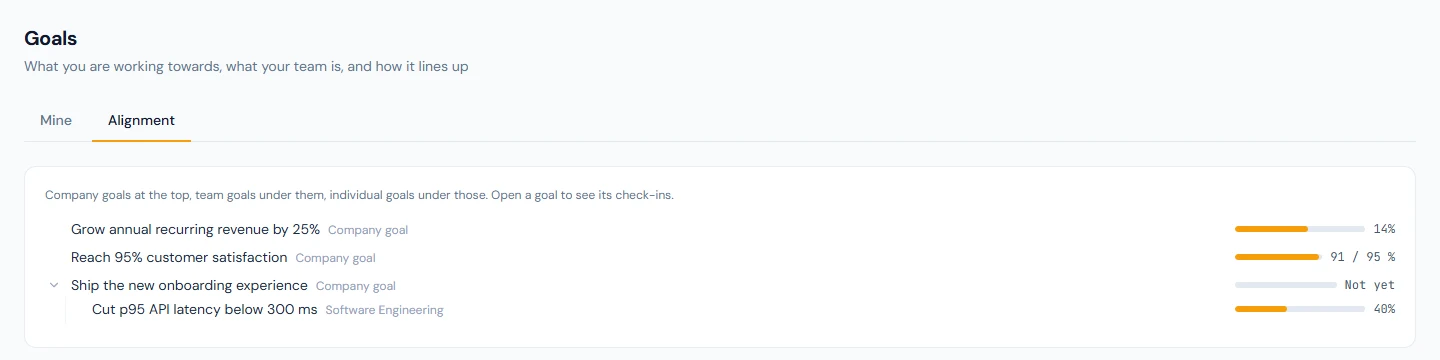
- Percent complete fills the bar by the current value over the target, 100 unless you set another: "Grow annual recurring revenue by 25%" has a target of 25 and stands at 14.
- A number against a target counts up to it, in a unit you name: "Reach 95% customer satisfaction" reads 91 / 95.
- Done or not done and Milestone have no number: "Ship the new onboarding experience" reads Not yet until it is completed.
A percent and a number run from a Start value to the target. Left empty, the start is 0 and the goal counts up, as above. Where lower is better, enter the figure the goal starts from as the start, above the target, and progress counts down: "Bring average handling time down to 8 minutes", started at 12 and now at 10, reads 10 → 8 minutes with the bar half full. A target equal to the start is refused, because no check-in could move it, and so is a target of zero with no start.
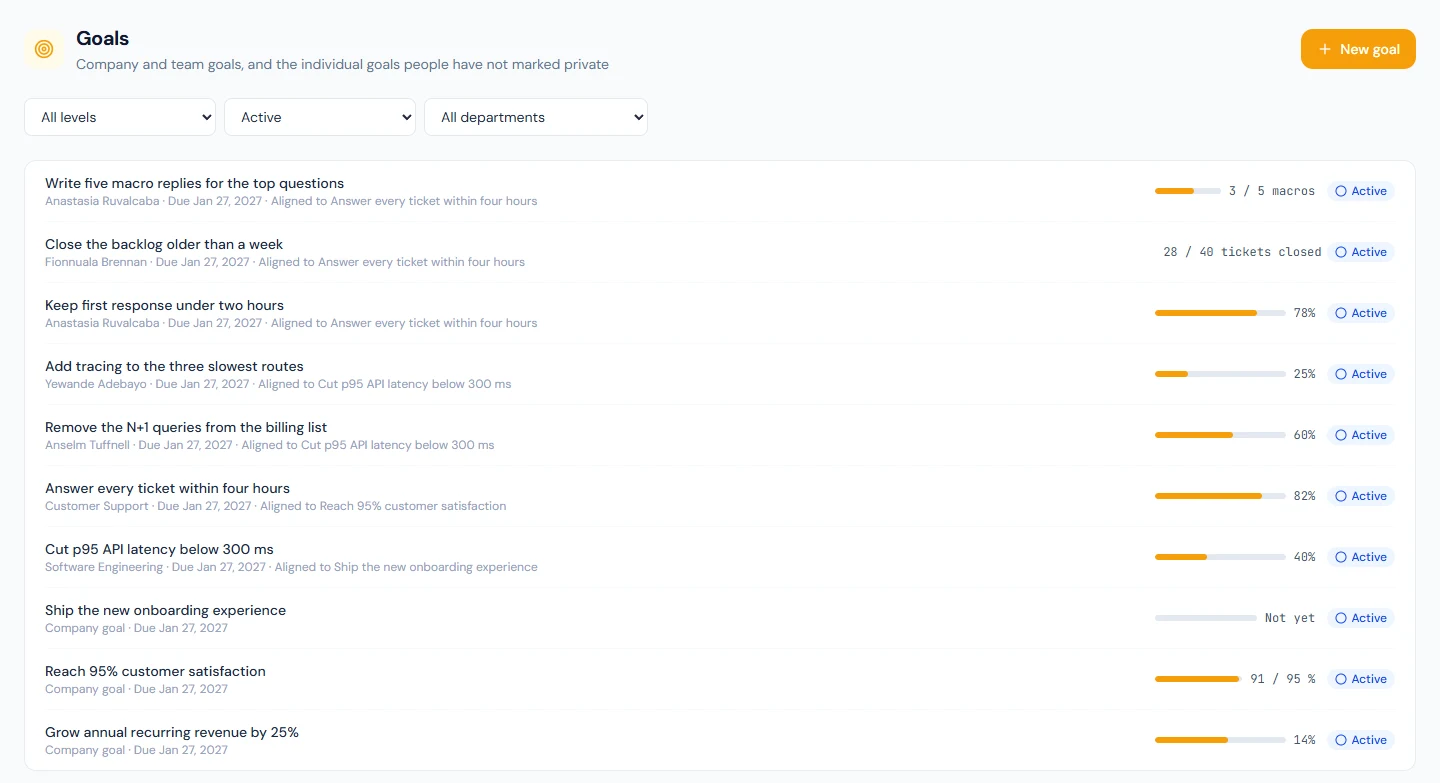
An individual goal is set by the person, with Add goal on
Mine in the portal; by their manager on My team; or by HR, with
New goal at the level Individual goal and the employee picked.
Set by anyone but the person, it emails them (goal_assigned). HR
cannot set someone a private goal. Aligns to names the goal it
serves, and the Alignment tab draws the tree: Software
Engineering's latency goal under the onboarding goal, three engineers'
goals under that.
75A.2 Check-ins, completion and the merit credit
Open a goal to Check in: the current value, How does it feel?
(On track, At risk, Off track) and a line on what changed.
Read the two together: Yewande Adebayo's tracing goal is at 25% and
At risk, Anselm Tuffnell's at 60% and On track. A check-in
cadence emails the owner when one is due (goal_checkin_due).
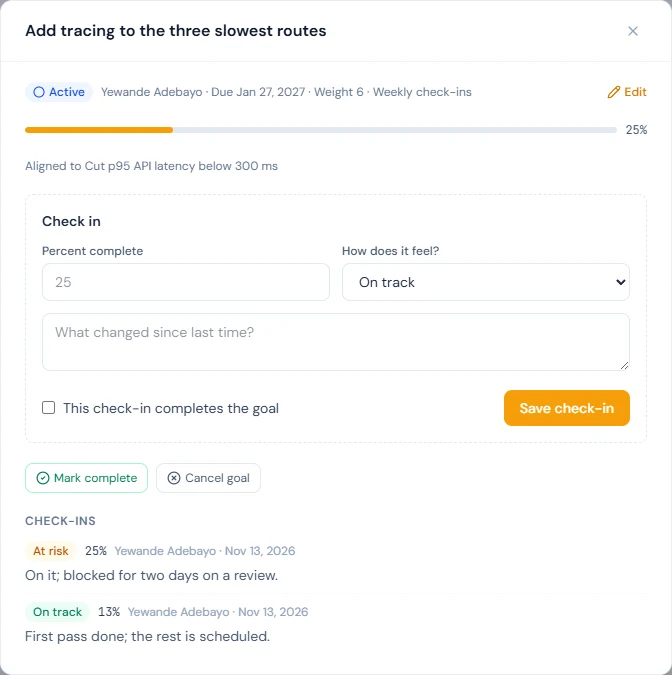
Mark complete, or This check-in completes the goal, closes it. A completed individual goal writes one line to the merit ledger (70.4): weight × 10 points, earned in the proportion the bar had reached. Soledad Marchetti (NWL-0009) closed her cache goal, weight 6, at 100%: 60 of 60. Company and team goals earn nothing.
Nobody awards themselves points. A goal a manager or HR set counts when completed. One the person set, or redefined, shows Awaiting confirmation until their manager or HR presses Confirm completion; the manager is told in the bell.
75A.3 Who can read a goal
| Goal | Read by | Changed by |
|---|---|---|
| Company goal | Everyone | HR |
| Team goal | The department's members and HR | HR |
| Individual, Everyone | Everyone | The person, their manager, HR |
| Individual, Manager and HR (the default) | The person, their manager, HR | The same three |
| Individual, Private (me and my manager) | The person and their direct manager | The same two |
"Manager" is the person's current reporting manager, and only one who
holds goals.manage_team. When the reporting line changes, the new
manager reads the goal and the old one no longer does.
A private goal is closed to everyone else, HR included. HR does not find it on Performance › Goals, in the tree or by its link, which answers "Goal not found", and cannot change or confirm it. Only the person or their manager can make a goal private. The public API never returns it, no event is sent for it, and the data export (93.1) and People analytics (91A.5) leave it out. Where others could meet it, it is counted and not named: its ledger line reads "a private goal completed at 80% of target", and its emails say "Private goal". For every goal, private or not, the activity log (92.1) records that a person saved a goal or a check-in and when, not what they wrote.
75A.4 One-to-ones and the private manager note
Under Work → 1:1s, New 1:1 asks With (your manager, or one of
your reports), When, a title and an Agenda. A report can always
open one with their manager; a manager opens one with a report when
they hold goals.manage_team. Northwind has two, each opened by a
report with the team lead Desmond Achterberg (NWL-0006): Imani
Castellanos (NWL-0007) and Soledad Marchetti (NWL-0009). Both carry an
agenda, two action items and a manager's note.
| Part | The manager | The report | Anyone else, HR included |
|---|---|---|---|
| Agenda and action items | Reads and edits | Reads and edits | Nothing |
| Employee's notes | Reads | Writes | Nothing |
| Manager's notes | Writes | Never sees | Nothing |
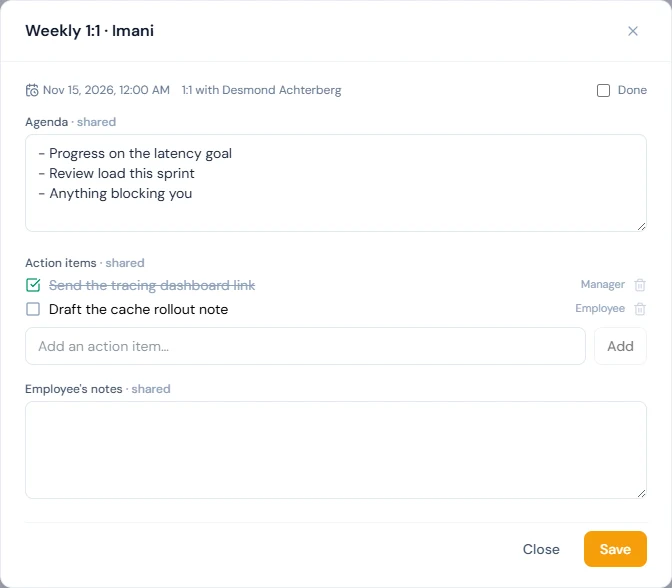
The Manager's notes box is labelled "only you can see these", and that is exact: they are never sent to the report's browser. HR has no page and no way in: a third person asking for a 1:1 is told it was not found. The data export leaves 1:1s out, and the activity log records that one was saved, by whom and when, with none of its text. A 1:1 belongs to the two people who held it: a new manager does not inherit the earlier ones.
75A.5 360° feedback: asking, closing, reading
Appraisals › Settings has Peer/360 review and under it the Feedback anonymity floor (68.4): five by default, never under three. The switch gates asking and only asking: while it is off a request is refused, but requests already sent can still be answered, and what was collected can be closed and read.
The appraisal's reviewer asks from the review under Work → Reviews,
and HR from the appraisal page: a Peer, a Direct report of the
person reviewed, or someone outside the workspace by email. The manager
is not a group: the reviewer reads the result, so cannot be asked, nor
can the person reviewed. HR does not run the feedback on their own
appraisal: someone holding appraisals.manage can neither ask, close
nor read it on the appraisal that is about them while anyone else holds
that permission. Their reviewer, or that other person, does.
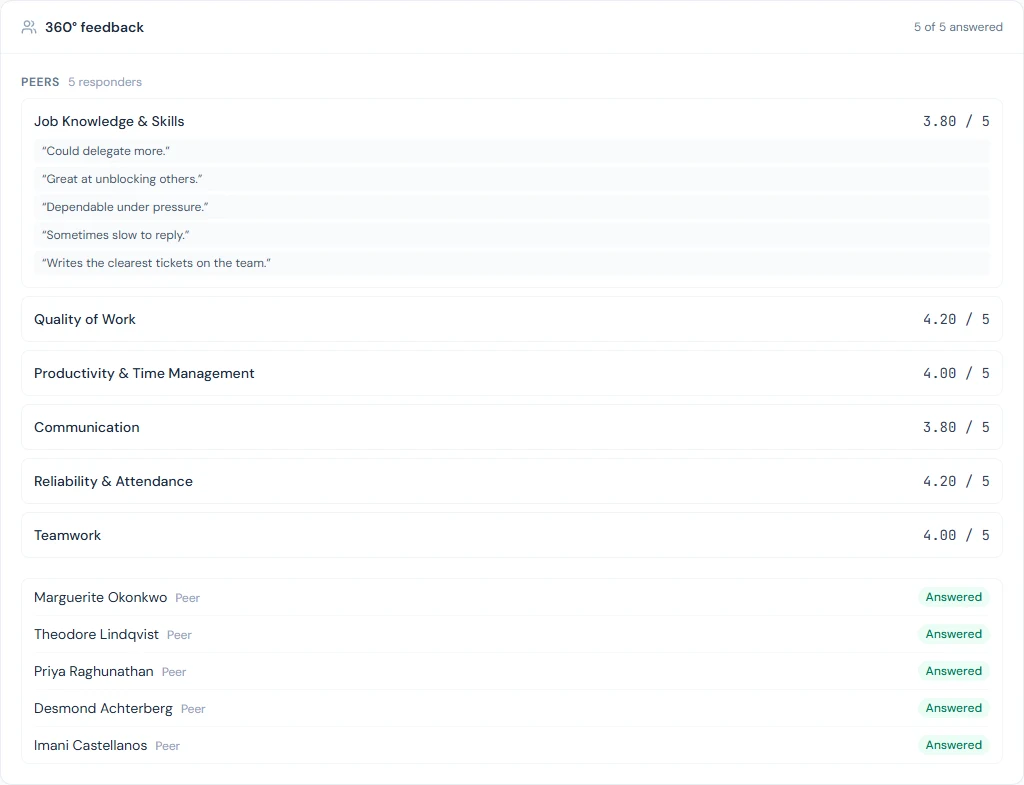
While answers come in, the panel shows each request as Waiting, Answered or Declined, and nothing anyone said. Results appear only once feedback is closed: the reviewer or HR presses Close feedback and show results, or the appraisal is finalised or its cycle closes. Closing cannot be undone. Each group, Peers, Direct reports and People outside the workspace, then gets its own block: the average per competency and the comments in a shuffled order. A group appears only if at least the floor of its members answered; a smaller one is left out whole and named as left out, never folded into another. The result informs the review and changes no rating (69.4), and an answer leaves no line in the activity log.
What happens next
- Completed goals feed the score and its increment recommendations (Chapter 75).
- Other systems read goals with an API key carrying
performance:read, never a private one.
What the employee sees
Imani Castellanos (NWL-0007) opens Work → My Goals: no goal of her own yet, My department's goals with the latency goal, and the three Company goals. Her Alignment tree stops at the team goal, because her colleagues' goals are marked Manager and HR. Solomon Nakamura (NWL-0037) also has My team, with Delphine Rousseau among his reports. Both have Work → 1:1s: Imani's lists her weekly 1:1 with Desmond Achterberg, with the agenda, the action items and her own notes box, and no manager's notes. On My Appraisals both have Ask for an appraisal, refused while they are in an active cycle (69.9).
Common mistakes
- Leaving the start empty on a "lower is better" goal. With no start the bar counts up from 0: 12 minutes against a target of 8 looks finished. Enter 12 as the start and the goal counts down to 8.
- Expecting HR to read a private goal or a 1:1. HR cannot. A goal HR must read has to be marked Manager and HR.
- A reporting manager without
goals.manage_team. A team lead on the Employee role has no My team tab and cannot confirm a goal or open a 1:1 with a report (Chapter 14). - Closing feedback to take a look, or asking four peers with a floor of five. Closing is final, and a group under the floor is never shown. Ask at least the floor in each group.
Practice
Use the Northwind demo, or your own trial workspace; never a customer's.
- As the admin, open Performance › Goals, compare the bar with the figure on the revenue goal, and say why the latency goal is measured as percent complete and not in milliseconds.
- As Imani, Add goal: percent complete, weight 5, aligned to the latency goal, Private. Check in at 40%, At risk. As the admin, look for it, then open the latency goal.
- As Imani, change it to Manager and HR and Mark complete. As the admin, filter to Completed and Confirm completion. Work out the points first: weight 5, closed at 40%.
- As Imani, open Work → 1:1s and her weekly 1:1 with Desmond Achterberg. Note which notes box her page has, and tick an action item.
- As the admin, start a New goal at the level Individual goal for Delphine Rousseau, and note which visibilities are offered. Then try a number goal with a target of 0.
Quiz
1. Who can read a goal marked Private, and who confirms a goal the person set for themselves?
The person and their current direct manager, if that manager holds
goals.manage_team; not HR, the public API or the data export. The
manager or HR confirms a self-set goal, and it earns its points then.
2. Who reads the manager's notes on a 1:1, and what does HR see of it?
Only the manager who wrote them. HR has no page for 1:1s; the activity log shows that one was saved, by whom and when, not its text.
3. Peer/360 review is switched off mid-cycle. What stops?
Asking: no new request can be sent. Requests already sent can still be answered, and feedback already collected can be closed and read.
4. Five peers and two direct reports answered, with the floor at five. What does the reviewer see after closing?
The Peers block: averages per competency and shuffled comments. Direct reports are named as left out, and there is no overall average.