Chapter 58A — The WPS salary file (SIF)
In the United Arab Emirates, salaries are paid under the Wage Protection System. The employer does not simply send a transfer batch: it uploads a Salary Information File, the SIF, to its bank or exchange house, which pays each employee and reports the payment. Operentra makes that file from a locked run. It does not connect to WPS or to any bank; you download the file and upload it yourself. This chapter is for UAE workspaces: the fields and the format it describes are offered only where the company's country is the United Arab Emirates.
What this chapter covers
- 58A.1 The establishment ID and the person IDs
- 58A.2 Each employee's bank or exchange house
- 58A.3 The format on the paying account
- 58A.4 Making the file
- 58A.5 What the file says
The concept
A SIF is a plain text file with a fixed layout, published by the agent banks from the Ministry of Human Resources and Emiratisation's standard. It has one EDR line per employee and one SCR line, last, for the file as a whole:
- EDR: the person's MOHRE person ID, the routing code of their bank or exchange house, their IBAN or salary card number, the first and last day paid, the number of days, the fixed income, the variable income and the days of unpaid leave.
- SCR: the employer's MOHRE establishment ID, the paying bank's routing code, the date and time the file was made, the salary month, the number of EDR lines, the total, the currency (AED) and the employer's reference.
The bank checks the file line by line. A line without a valid person ID, or routed to a bank with no routing code, is refused; a file without the establishment ID is refused whole. So the work is mostly in the records: get the IDs and the bank details right once, and each month's file is a download.
How Operentra handles it
- Two ID fields: MOHRE establishment ID on the Company Profile, MOHRE person ID on each employee. Both are offered in UAE workspaces only, or wherever a value is already on file.
- A built-in format: "WPS salary file (SIF)", applied to a paying account in the payment-file designer. Its rules decide who can be in the file and what each line carries.
- The same dialog as any bank file (Chapter 58): Download Bank File on a locked or disbursed run, with the people left out and the reason for each.
- Pre-flight warnings before the run is approved (Chapter 55), naming who the file would leave out. They never block approval.
- Who:
company.settingsto design the format;payroll.manageto make the file. Payroll is on the Growth and Enterprise plans.
Walkthrough
Dunebridge Technologies L.L.C., the course's Dubai example, keeps two operating accounts (Chapter 11). Its primary account at Emirates NBD keeps an ordinary transfer CSV. Its payroll account at First Abu Dhabi Bank carries the SIF. Every active employee has a person ID except the two most recent joiners, Farah Nasser and Yousef Darwish, whose labour cards are still being issued. The September 2026 run is locked.
58A.1 The establishment ID and the person IDs
Company Setup → Company Profile has MOHRE establishment ID in its Basic information section (Chapter 8): "The 13-digit number on your establishment card. Every WPS salary file is identified by it." Spaces and dashes are removed when it is saved.
Each employee's Edit page has MOHRE person ID under Personal Information: the 14-digit person ID on the labour card. Spaces and dashes are removed; emptying the field clears it. The profile shows it (Chapter 19). Where a Labour Card document already had a well-formed person ID typed into it, the upgrade copied it into this field, so check the field before typing it again.
58A.2 Each employee's bank or exchange house
On each employee's bank account, pick the bank or exchange house from the list; the list carries each one's 9-digit routing code, and that code routes the person's line. Then enter the IBAN, or, for an exchange house salary card, the card or account number (23 characters at most). A bank typed by hand, without a routing code, cannot route a SIF line.
58A.3 The format on the paying account
Company Setup → Bank Accounts → Design on the paying account opens the payment-file designer (Chapter 11). In a UAE workspace it shows Formats your country requires, with "WPS salary file (SIF)" and Start from this format. Select it, then Save format.
The designer then reads Follows: WPS salary file (SIF). The EDR row template and the SCR trailer template stay visible, the live preview shows them filled with sample data, and the rules apply when the file is made. Use my own design instead turns the rules off. Change the file name pattern only if your bank names its files differently. The paying account's bank must be one picked from the list, since its routing code goes into the SCR.
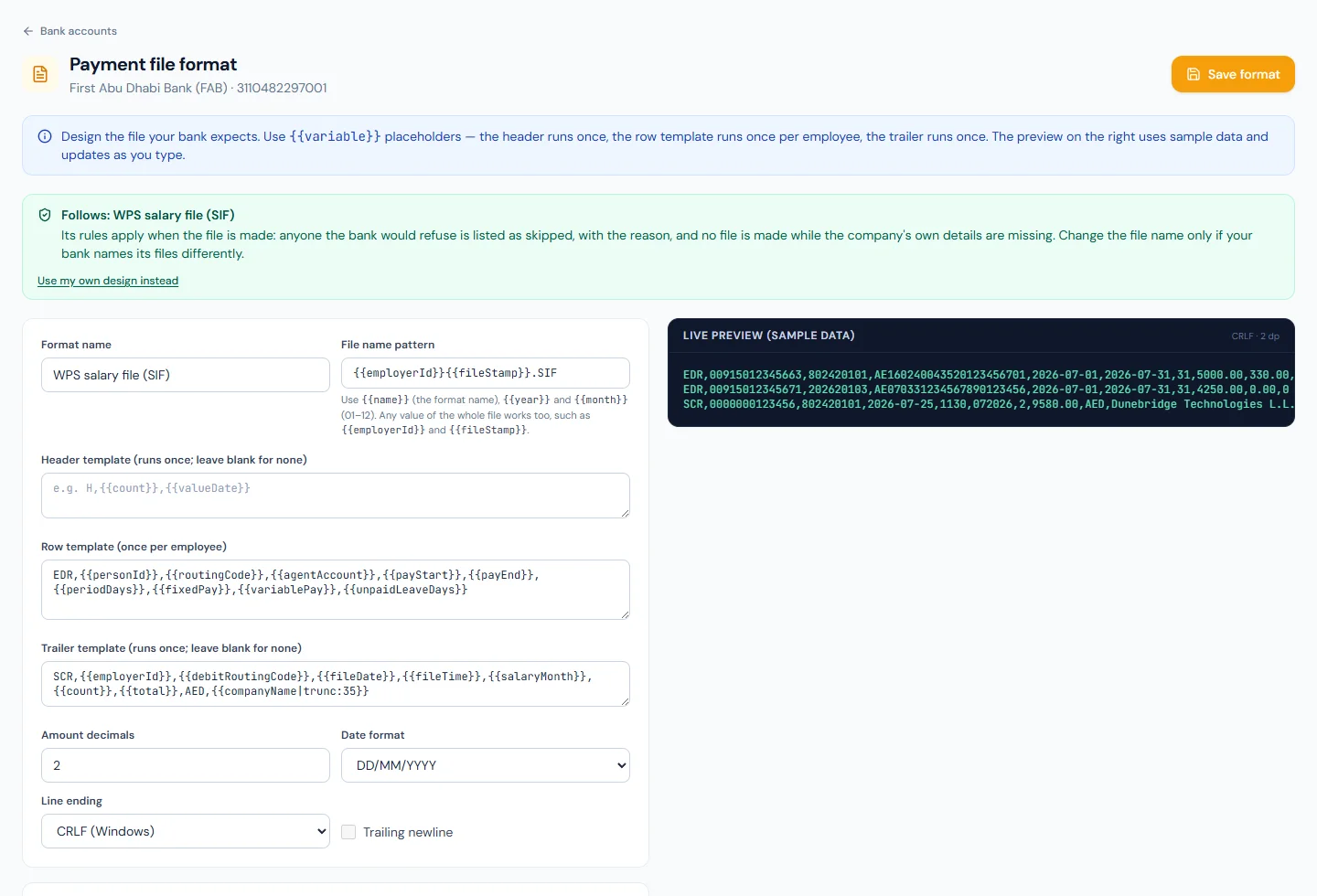
Dunebridge's Emirates NBD account keeps its CSV. A company may run both: the format belongs to the account, and the account chosen when the file is made decides which one is used.
58A.4 Making the file
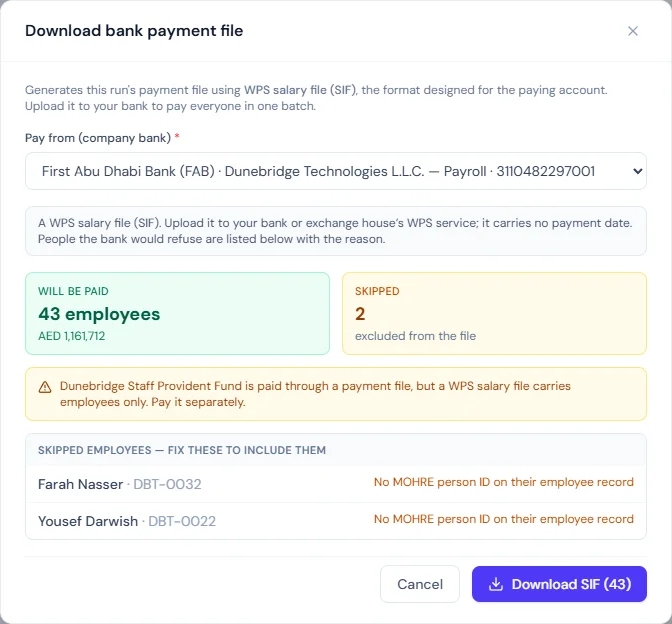
On the locked September run, Download Bank File, then Pay from (company bank): the First Abu Dhabi Bank account. A SIF carries no payment date, so the value date is replaced by a note: "A WPS salary file (SIF). Upload it to your bank or exchange house's WPS service; it carries no payment date. People the bank would refuse are listed below with the reason."
The dialog says 43 employees will be paid, with the total. Two are skipped: Farah Nasser and Yousef Darwish, each with "No MOHRE person ID on their employee record". A warning says the staff provident fund is paid through a payment file, but a WPS salary file carries employees only, so the fund is paid separately (Chapter 61). Download SIF (43) saves the file.
No file is made at all, and an error says why, when the company has no valid establishment ID, when the paying account's bank has no routing code, or when the workspace does not pay in AED. A person is left out, with the reason, when they have no valid person ID, no bank account, no IBAN or salary card number, no bank picked, a bank with no routing code, or no day of employment in the month; and for the reasons every bank file has: paid by cheque, on hold, paid by another method, or a net that is not above zero. Only entries not paid yet works as for any bank file.
Making the file does not mark anyone paid. Upload it, and once the bank or exchange house has accepted it, record the payment with Mark as Paid (Chapter 58).
58A.5 What the file says
- Pay period: the run's calendar month. For someone who joined in the month it starts on the joining day; for someone whose separation has a last working day in the month it ends there. The days are counted with both ends included.
- Fixed and variable income: variable is the run's overtime, bonuses and one-off additions; fixed is the rest of the net. The two always add up to what the person is paid, and neither is negative: when deductions take the net below the variable pay, all of it is reported as variable and fixed is 0. The SCR total is therefore the run's net for the people in the file.
- Days of unpaid leave: the run's unpaid leave, in whole days; a half day counts as one.
- Routing: every line goes by the routing code of the person's own bank or exchange house.
- Name and shape: the file is named by the establishment ID and
the moment it was made, in the company's time zone, as
YYMMDDHHMMSS, with the extension.SIF; the SCR carries the same date and time. Amounts have two decimals, lines end in Windows line endings, the SCR is the last line, and the file is plain text. - EVP line: optional. Tick Itemise variable income on an EVP line on the format when the agent asks for it. An EVP line then follows each EDR with seven amounts (housing, transport, medical, air ticket, overtime, other, leave encashment), and variable income becomes everything but basic pay.
58A.6 Late final salaries and refunds
A SIF holds one salary month. When a run pays someone whose last working day was in an earlier month, their line belongs to that month, so the dialog leaves them out with "Paid in this run for 11/2026: in that month's own file" and offers a button, 11/2026 file (1), that downloads a SIF for that month with only them in it.
When the agent has paid a line it should not have, the employer asks for the money back with a refund request. Request a refund for a SIF… in the same dialog lists the SIFs downloaded from the run (each is kept with its lines). Choose the file, enter the name of the ACK file the agent returned, choose the account to credit, then tick each person with a reason code and an amount (empty means the whole line). The download holds one FDR line per person and the FCR control line last, and is uploaded like the SIF.
The values behind these lines, such as fixedPay, payStart and
employerId, can be used in any payment-file format (Appendix D).
What happens next
- The bank or exchange house takes the file through its WPS service and pays each line.
- Mark as Paid (Chapter 58) records the payment once the file is accepted; the people skipped are paid another way and marked one by one.
- Contribution funds (Chapter 61) are paid separately.
What the employee sees
Nothing new. The employee is paid by their bank or exchange house, and the slip and the payment email follow the payment as usual (Chapter 59).
Common mistakes
- Calling it a connection. Operentra makes the file; you upload it. Nothing is sent to WPS or to the bank.
- Ignoring the pre-flight warnings. The people they name are left out of the file; fix the IDs and bank details before payday.
- A bank typed by hand. Without a routing code, its customers' lines cannot be routed. Pick the bank or exchange house from the list.
- Forgetting the fund. A SIF carries employees only; pay the provident fund separately.
- Renaming the file without a reason. The bank compares the name with the SCR; change the pattern only when the bank asks for another name.
- Editing the templates and expecting the rules to follow. Use my own design instead turns the rules off; keep the format following the SIF unless the bank specifies otherwise.
- Marking paid on download. Mark paid when the bank has accepted the file.
Practice
Use your own trial workspace, not a customer's. It must have the United Arab Emirates as its country and pay in AED.
- Enter the establishment ID on the Company Profile.
- Enter a person ID on two employees, and leave one employee without.
- Apply "WPS salary file (SIF)" to a paying account and save it; read the live preview.
- Open the pre-flight for a month and read the WPS warnings.
- Lock a run, open Download Bank File on that account, and read who is skipped and why. Download the file and open it in a text editor.
Quiz
1. Does Operentra send the SIF to WPS?
No. It makes the file; the employer uploads it to its bank or exchange house.
2. Why is a leaver whose final salary is in this month's run missing from this month's SIF?
Their last working day was in an earlier month, and every line in a SIF must be for the file's salary month. The dialog offers that month's own file with them in it.
3. What stops a SIF from being made at all?
No valid establishment ID, a paying bank with no routing code, or a workspace that does not pay in AED.
4. Why are Farah Nasser and Yousef Darwish missing from Dunebridge's file?
Neither has a MOHRE person ID on their employee record yet; the dialog lists them as skipped with that reason.
5. A person's net is 4,000.00 and their overtime and bonus come to 500.00. What are the fixed and variable income?
Fixed 3,500.00 and variable 500.00: they add up to the net.
6. How are 1.5 days of unpaid leave written?
As 2: whole days, a half day counting as one.
7. Where does the staff provident fund go when the run is paid by SIF?
Not in the file, which carries employees only; the dialog warns, and the fund is paid separately.