Chapter 24A — Skills and certifications
A job title says what someone is paid to do, not what they can do. The day the one person who knows the firewall is on leave, HR is asked who else can cover, and the honest answer is usually a guess. The same guess is made when a role is advertised and when a client asks which certificates are still valid. This chapter is the list that replaces the guesses: the library, each person's record, what each role requires.
What this chapter covers
- 24A.1 The library and its level scales
- 24A.2 Skills and certifications on a person
- 24A.3 What a role requires
- 24A.4 Proposals and the résumé
- 24A.5 The matrix and candidate matches
The concept
A skills record is three lists and the difference between them. The library is the vocabulary, so that "Linux" and "sysadmin" are one thing and can be counted. The requirements say what each role asks for, and the record what each person holds. What is left between the two is the gap: the training plan, the hiring brief, or the reason a promotion should wait.
A level makes the lists comparable: "SQL at Working, the role needs Proficient" is something to act on. Each entry also says who recorded it, because a claimed level and one a manager gave in a review are not equal evidence. A certification is a skill with an outside body's date on it, and unlike a skill it lapses.
How Operentra handles it
- Employees › Skills has four tabs: Library, Skill types, Proposals and Expiring certifications, which also lists the ones that have already lapsed. Each employee profile gains three cards, and Reports › Skills Reports is the matrix.
- A skill type groups skills that share one level scale; a level on a record is a position on that scale, not a word.
- A requirement is a skill and a level on a designation or a job opening. A record is one person, one skill, a level, who recorded it and optional certification dates. Employees propose; HR decides.
- Who (Appendix E):
skills.viewreads everyone's skills and the matrix (Super Admin, HR Manager, HR Officer, Department Head);skills.managewrites the library, records and résumés and decides proposals (Super Admin, HR Manager);skills.view_ownis one's own card and proposals (every role). Required skills can also be set withcompany.settingson a designation, orrecruitment.manageon an opening. - Plan: skills management (
skills) comes with the Growth and Enterprise plans (Appendix F); without it the pages are locked and the cards do not appear.
Walkthrough
Northwind runs the library every new workspace starts with: twelve skill types holding 108 skills, and a requirement list on each designation. Everyone active has a record measured against their role.
24A.1 The library and its level scales
Open Employees › Skills and the Skill types tab. Eleven of Northwind's types use Beginner, Working, Proficient, Expert; Languages uses A1 to C2. Add type takes a name and between two and ten levels, lowest first, one per line. A level is stored as its position, so rewording a scale changes nothing on anyone's record, and a scale cannot be shortened below a level someone holds.
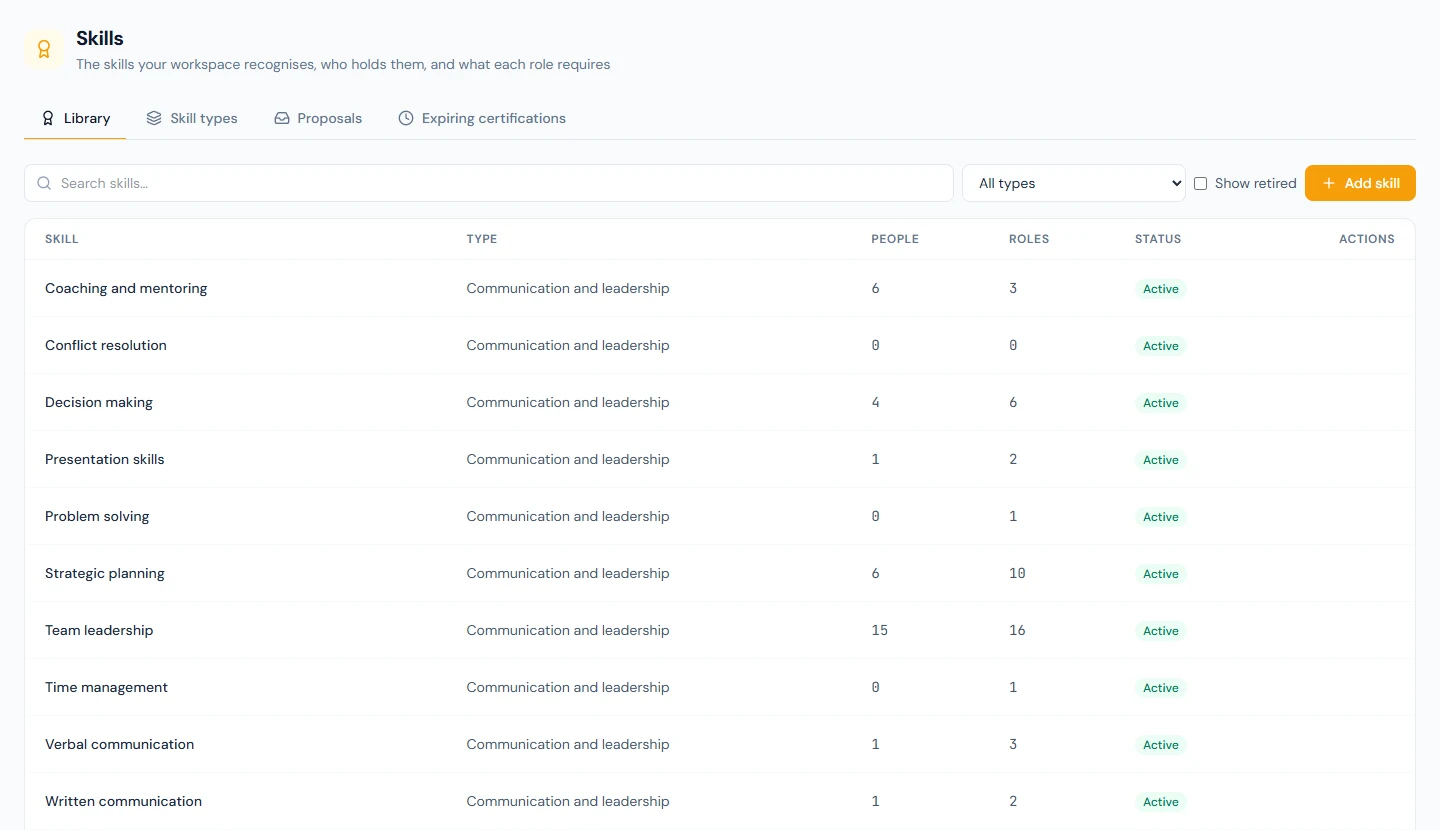
The Library tab lists each skill with its Type, how many People hold it and how many Roles require it. Add skill needs a type and a name no other skill has. Deleting removes a skill only when nobody holds it and no role or opening requires it; otherwise it is retired: kept on those records, no longer offered. Show retired finds it, and editing it makes it active again.
24A.2 Skills and certifications on a person
On an employee's profile, skills.view shows the Skills, Against
the role and Résumé cards
(19.7).
With skills.manage, Add skill picks a skill and a level and takes
a line of Notes on what the level rests on. The certificate file
belongs in the person's documents
(Chapter 22).
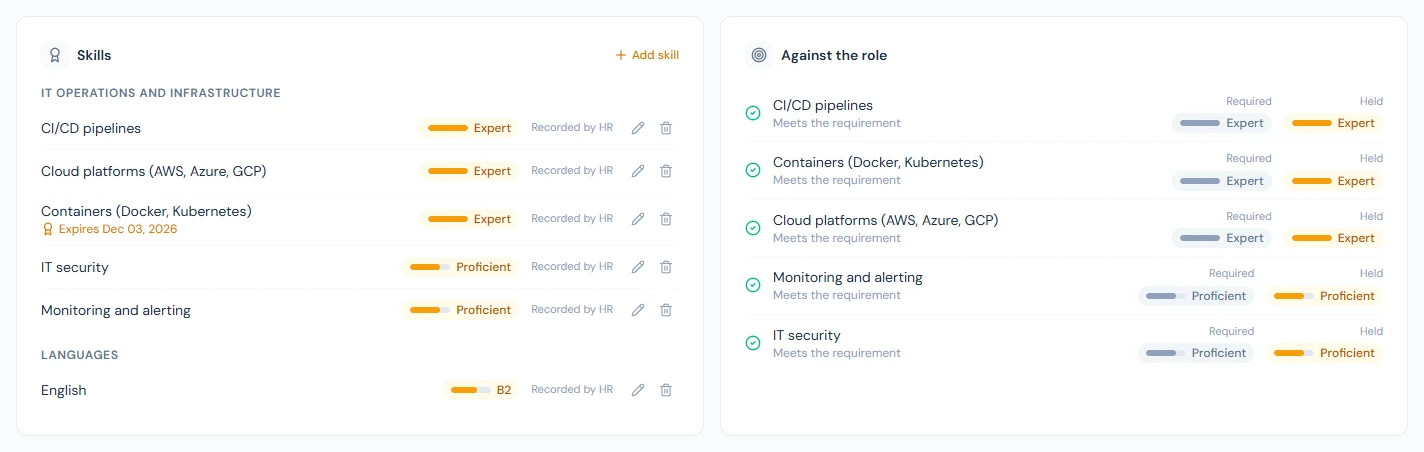
A person holds a skill once, and the record names its latest author: Recorded by HR when saved on the profile, Self-reported when HR approves a proposal (24A.4), From an appraisal when a finalised appraisal sets it (68.4), From a course when a completed course records it (Chapter 75B).
Certified on and Expires on are for skills that carry a
certificate. The expiry turns amber in its last thirty days and red
once passed. Thirty days ahead, in the workspace's 9 a.m. hour, the
employee is emailed and told in the bell and the people holding
skills.manage are copied, once (skill_certification_expiring,
Appendix C). A new
expiry date earns a new warning; a new level or note on the same date
does not send it again.
Expiring certifications lists everything lapsing within 30, 60, 90 or 180 days among active employees. A fresh Northwind demo shows Ignatius Oyelaran (NWL-0016), a DevOps Engineer whose Containers (Docker, Kubernetes) certificate lapses about three weeks after the demo is built. The day after its date a certificate moves down the same tab to Already lapsed, most recently lapsed first, and stays there, and on the record in red, until HR renews the date or removes the skill. Its level still counts towards the role.
24A.3 What a role requires
On Company › Designations, the target icon on a row opens Required skills. Pick a skill and the level the role asks for, then Add; Save replaces the whole list. Suggest from the job description drafts one from the designation's description, using only skills in the library, and keeps nothing until you save.
A job opening uses its designation's list until it is given its own on the Required skills card of its Details tab (26.5). Northwind's DevOps Engineer opening has three of its own: containers and Linux administration at Proficient, cloud platforms at Working.
Against the role compares the two, one line per required skill: Meets the requirement when held at the required position on the scale or above and in date, Certification lapsed when held at that level but its certificate has expired, Below the required level when held lower, Not on the record when not held. It reads the person's current designation, so a promotion or transfer (Chapter 24) changes what they are measured against.
24A.4 Proposals and the résumé
Employees see the three cards under Me → My Profile, on the Skills &
résumé tab (85.8), and
cannot edit them. Propose skills and Propose résumé entries each
send a list as one proposal, and one of each kind can wait at a time.
The people holding skills.manage are emailed, and it appears on the
Proposals tab and the Skills tab of Profile Approvals
(Chapter 21).
Approve writes every item onto the record as Self-reported, replacing the level of a skill already held. Return sends the whole proposal back with an optional note. The employee is emailed either way. Fionnuala Brennan (NWL-0035) has proposed Conflict resolution at Proficient, and it is waiting.
The Résumé is history, not measurement: Experience, Education, Certification or Other entries, each with a title, an organisation, dates or Current, and a description. HR adds one with Add entry. The five people from Theodore Lindqvist (NWL-0002) to Desmond Achterberg (NWL-0006) each carry two.
24A.5 The matrix and candidate matches
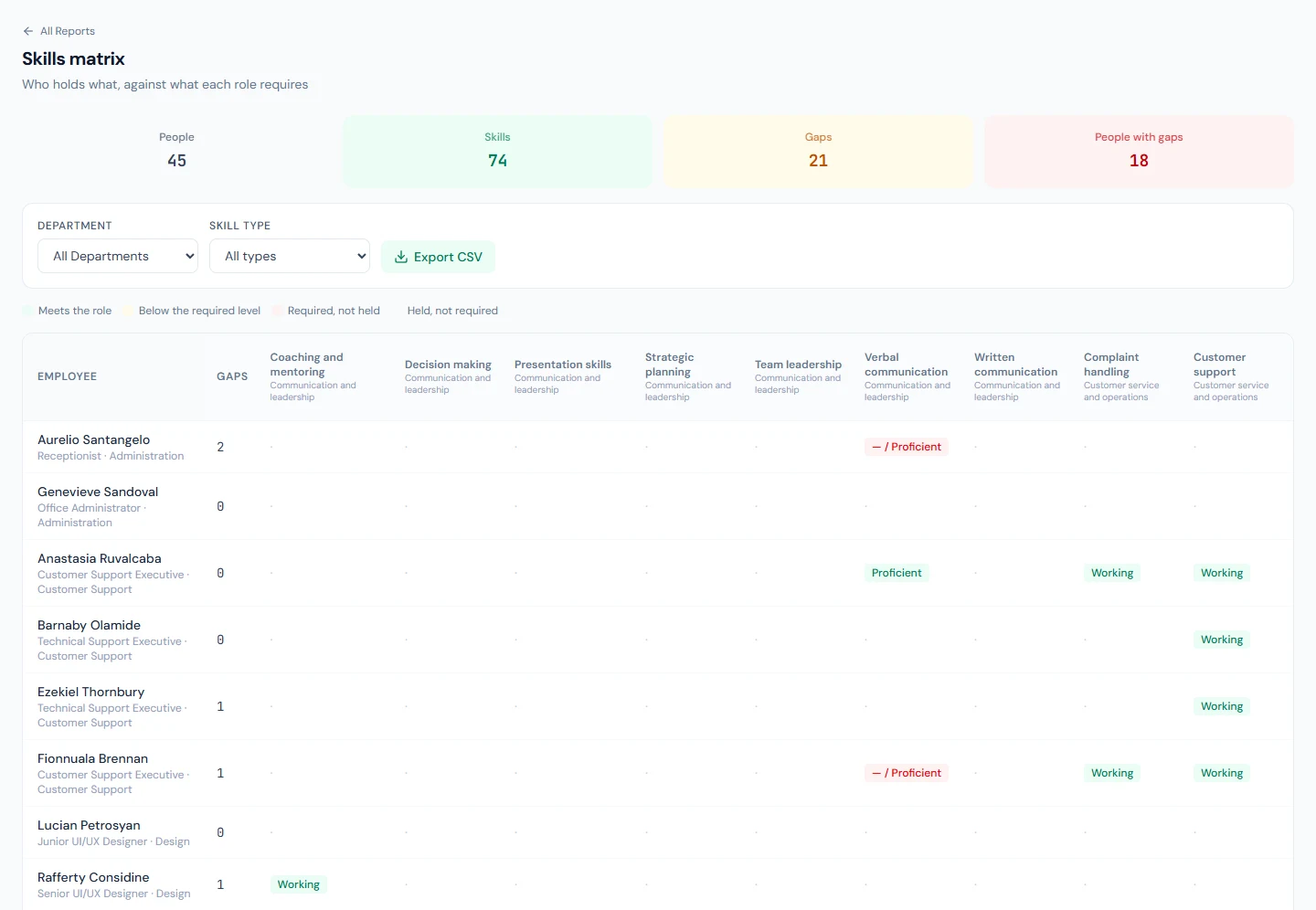
Reports › Skills Reports is the Skills matrix: active employees down the side, skills across, filtered by department and skill type. A cell shows the level held, then a slash and the level required when the requirement is not met. The legend names five states: Meets the role, Certification lapsed, Below the required level, Required, not held and Held, not required. The Gaps tile counts the middle three; a person's Gaps cell adds how many of theirs are certificates to renew. The export writes one line per person and skill.
The directory's More filters has a Skill filter (Chapter 20). In recruitment, HR records skills on a candidate, and each application shows a percentage match: the share of the opening's required skills the candidate meets (28.5). A candidate's skills stay with the candidate; after the hire, record them on the employee.
What happens next
- Appraisals can write the record: a competency tied to a skill sets the level at finalisation (68.4).
- Courses can write it too: a course tied to a skill records it on each person who completes the course, certified that day (Chapter 75B).
- Other systems read the library and who holds what with an API key
carrying
skills:read; the API does not write skills.
What the employee sees
Me → My Profile, Skills & résumé: their skills with level and source, Against the role, their résumé, and Your proposals as waiting, approved or returned. In the demo Imani Castellanos (NWL-0007) meets every Senior Software Engineer requirement, and Solomon Nakamura (NWL-0037) has one of his role's a level short.
Common mistakes
- Treating a lapsed certificate as a training gap. A certificate past its expiry date no longer meets the role, but the person still has the skill: the fix is a renewal, not a course. The matrix marks it Certification lapsed in amber, apart from Below and Missing, and Already lapsed lists every one to chase.
- Inserting a level into a scale in use. Records hold positions: a new level in the middle moves everyone above it to a different word.
- Approving a proposal without reading the level. Approval replaces what HR recorded. Return it with a note if you disagree.
- Putting a certificate on the résumé only. A résumé entry has no expiry and earns no warning. Record the skill with its dates.
- Setting the opening's list and forgetting the designation. The opening's list drives the advert and the match; employees are measured against the designation.
Practice
Use the Northwind demo, or your own trial workspace; never a customer's.
- On Employees › Skills, compare the Languages scale with another, then read the People and Roles counts of Linux administration.
- Open Expiring certifications, find Ignatius Oyelaran, set Expires on to a date last week on his profile, and find him under Already lapsed. Then move the date a year ahead and check both lists again.
- Approve Fionnuala Brennan's proposal, then read on her profile who the skill was recorded by.
- In the Skills matrix, pick a person with a gap, record the missing skill on their profile, and watch the Gaps tile fall.
- As Imani, propose a skill from her profile, then try to propose a second while the first waits.
Quiz
1. A role requires SQL at Proficient and the person holds it at Working. What does the card say, and what if they hold no SQL?
Below the required level; with no SQL, Not on the record. Both count as gaps in the matrix.
2. Who can put a skill on an employee's record?
Someone holding skills.manage, on the profile or by approving a
proposal, and a finalised appraisal. The employee can only propose.
3. When is the expiry warning sent, to whom, and how often?
Thirty days before the date, in the workspace's 9 a.m. hour, once, to
the employee and the people holding skills.manage.
4. A certificate expired last week. Where does it still show?
On the person's Skills card, in red, and under Already lapsed on the Expiring certifications tab, until HR renews the date or removes the skill. Against the role, and in the matrix, it reads Certification lapsed: it no longer meets the requirement until the date is renewed.
5. HR deletes a skill that nine people hold. What happens?
It is retired: it stays on those nine records and is no longer offered. Only a skill nobody holds and nothing requires is deleted.