Chapter 81A — Surveys
An announcement tells people something; a survey asks them. HR wants to know whether people would recommend the place, whether a new joiner's first month worked, why a leaver is leaving. The only honest answers come when people trust what happens to them: that an anonymous answer stays anonymous, and that a named one is read by someone who will follow up. This chapter is about asking in a way that earns that trust.
What this chapter covers
- 81A.1 Templates and the question types
- 81A.2 Anonymous or by name; the group-size floor
- 81A.3 Opening to an audience, triggers, closing
- 81A.4 Reading results: the heat-map and eNPS
The concept
A survey is a fixed list of questions put to a defined set of people for a defined time. Three things decide whether it is worth running: who is asked (everyone, a team, the people a step in a process reaches), whether answers are tied to names (never, for how people feel about the company; always, when someone will act on one person's answer), and what is done with the result (a number followed over time, a conversation, a fix). The employee net promoter score (eNPS) is the one-question pulse most companies run: "how likely are you to recommend this company as a place to work", 0 to 10; those answering 9 or 10 are promoters, 0 to 6 detractors, and the score is promoters minus detractors as a share of everyone, from −100 to 100. Its value is the trend, not the number.
How Operentra handles it
- Surveys in the admin menu holds every survey; employees answer under My Surveys in the portal. Surveys come with the Growth and Enterprise plans (Appendix F).
- Five templates are seeded: eNPS, quarterly engagement, onboarding day 30, onboarding day 90 and exit. A template is copied into a new survey and edited before it opens.
- A question is a scale (1 to a top you choose), a 0–10 recommendation (which gives the eNPS), one choice, several choices, or an open answer; required or optional.
- Anonymous surveys never store an answer with its author, show no result until they close, and then show results only for groups of at least a group-size floor (five by default, never under three). Answered by name surveys show HR each person's answers.
- A trigger on an open survey invites people by itself: an onboarding plan item at day 30 or 90, or a separation being recorded.
- Who:
surveys.manageto build, open, close and read (Super Admin, HR Manager, HR Officer);surveys.respondfor everyone to answer.
Walkthrough
Northwind runs the engagement template each quarter and the eNPS pulse between quarters; the exit survey is open all year with its trigger, and the onboarding day-30 survey is sent by the onboarding plan.
81A.1 Templates and the question types
Surveys › New survey opens the template picker. Choosing Quarterly engagement fills the form with its six agree–disagree statements, the 0–10 recommendation question and one open line. Every question can be reworded, reordered or removed, and more can be added up to forty. A choice question lists its options one per line; a scale picks its top (3, 4, 5, 7 or 10); the 0–10 recommendation is the question the eNPS is computed from, so keep its wording the same from run to run.
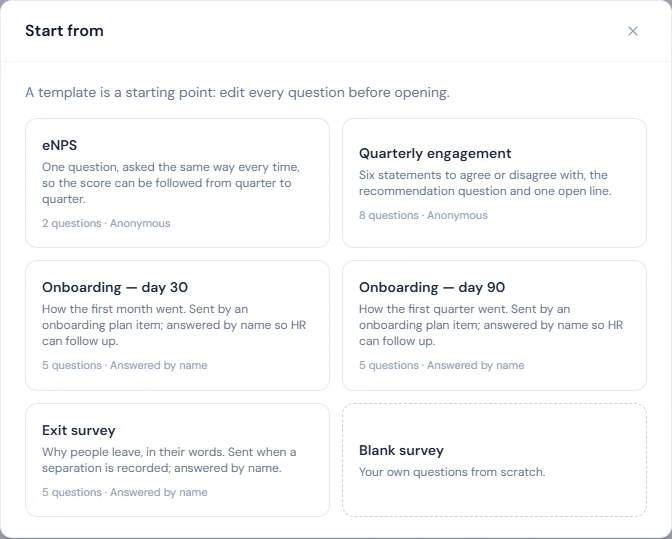
The form also sets the kind (a label), the introduction the people asked read first, the closing date, and the two settings the next section is about.
81A.2 Anonymous or by name; the group-size floor
Anonymous is on for the eNPS and engagement templates and off for onboarding and exit. An anonymous survey makes one promise: nobody can find out who answered what. The system keeps it in four ways.
- An answer is never stored with its author. The invitation records that the person has answered, so nobody answers twice. The answers are saved apart from it, with no link back and no time of their own. Only a scale or 0–10 answer keeps the department the person was invited in, which is how results can still be cut by department.
- Nothing is shown while the survey is open. HR sees how many were invited and how many have answered. A result that moved with each new answer would give that answer away to anyone who looked before and after. Nor is HR told which people have answered.
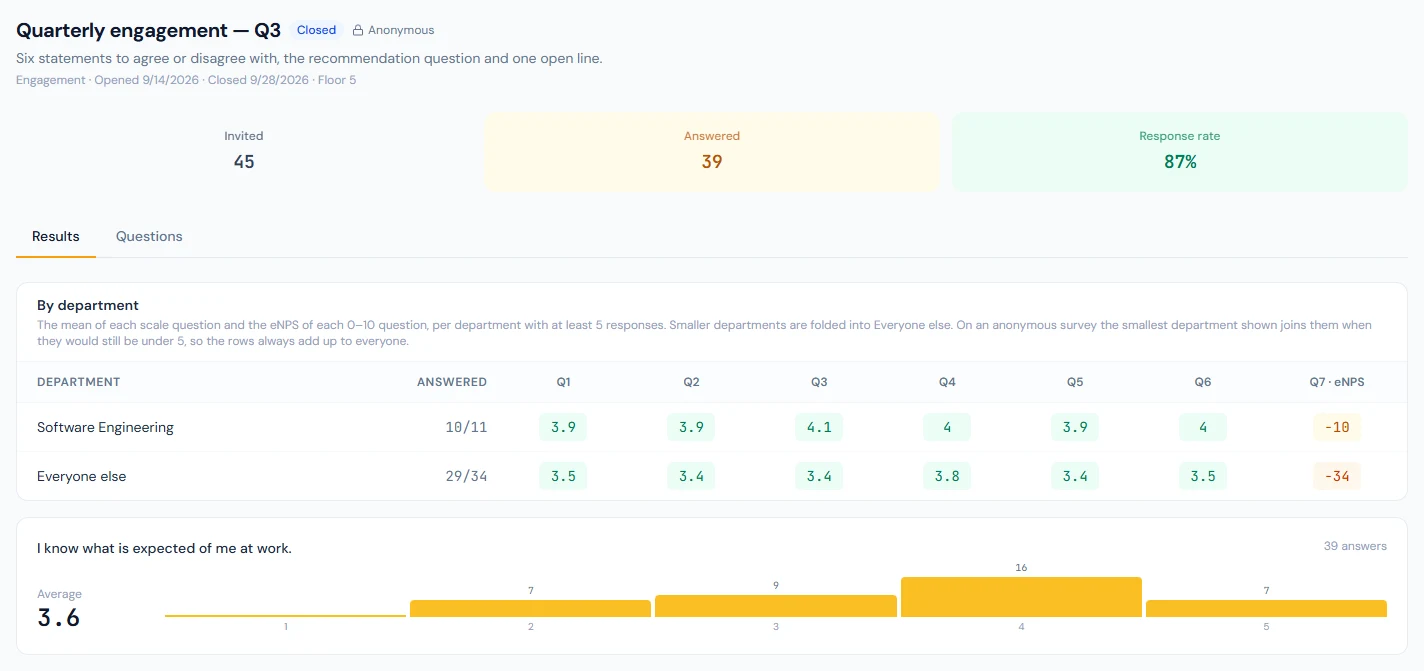
- Results come in groups of at least the floor. The group-size floor is five by default and never under three. A department with fewer responses is folded into one "everyone else" row. If that row would still be under the floor, the smallest department otherwise shown joins it, so the rows always add up to everyone and no hidden group can be worked out by subtraction. A figure resting on fewer answers than the floor is not shown either.
- Written answers are shown for the survey as a whole, never by department, and in an order that has nothing to do with who wrote them or when.
Answered by name surveys show HR a Responses by name tab: each person, whether they answered, and what they said. Use it only where a person will follow up: a new joiner's first month, a leaver's reasons.
Both settings are fixed once the survey opens.
81A.3 Opening to an audience, triggers, closing
Open survey asks who: Everyone active, chosen Departments, or Named people, plus the closing date. Everyone in the audience is invited at once and emailed. Invite more people adds to an open survey.
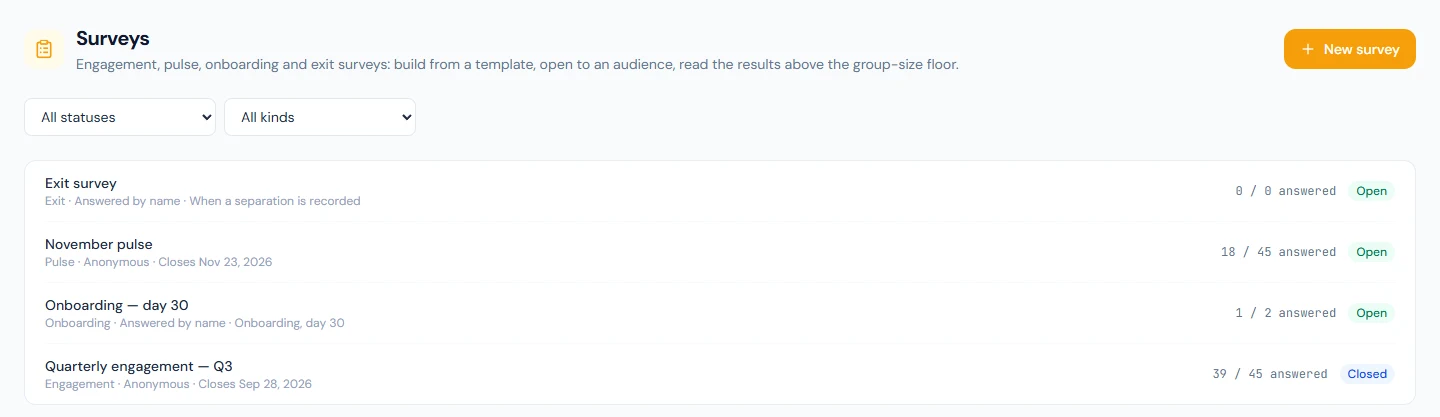
A survey with a trigger can be opened with nobody in it: it waits. Northwind's exit survey listens for When a separation is recorded, so every leaver is invited the moment HR opens their separation (Chapter 83). The onboarding day-30 survey listens for Onboarding, day 30, and the onboarding plan carries a Send a survey item due 30 days after joining (Chapter 32); running it invites the joiner. If no survey is open for the trigger the task is blocked with a message, not silently ticked.
Close survey ends it; a closing date closes it by itself, and an answer that arrives afterwards is refused. On an anonymous survey the close is the one irreversible step, and the confirmation says so: the results become readable, the record of who answered is erased, a department too small to be shown is merged with others in what is stored, and if fewer people than the floor answered, the answers are deleted.
81A.4 Reading results: the heat-map and eNPS
The survey page shows invited, answered and the response rate. For an anonymous survey that is all it shows until the survey has closed; a survey answered by name shows its results while open. The results are By department: a row per department above the floor, a column per scale or 0–10 question, each cell the mean (scale) or the eNPS (0–10), coloured from red to green. Below it, one card per question: the distribution bars and the mean, the eNPS with its promoters, passives and detractors, the count per option, or the texts.
Reports › People Analytics adds an eNPS (latest) tile and an eNPS by survey list (Chapter 91A): run the same eNPS template at a steady cadence and that list is the trend.
What happens next
- Part 13 turns to exits, where the exit survey's trigger fires (Chapter 83).
What the employee sees
My Surveys: the surveys waiting for them, with whether each is anonymous or by name, and the ones they answered. An email and a bell notification when they are invited. One submission per survey.
Common mistakes
- Rewording the eNPS question between runs. The trend breaks.
- Lowering the floor to three because the form allows it. Three is the least the system accepts, not the recommendation; keep five unless a team is genuinely that small and everyone knows it.
- Opening a triggered survey and forgetting it. It stays open and keeps inviting; give it a closing date or close it when the cycle ends.
- Asking by name what people will only say anonymously.
- Closing early for a quick read. There is no quick read: an anonymous survey has no results before the close, the close cannot be undone, late answers are refused, and under the floor the answers are deleted.
- Chasing the people who have not answered. On an anonymous survey nobody is told who they are, by design. Remind everyone.
Practice
Use your own trial workspace, not a customer's.
- Create a survey from the eNPS template, open it to one department and answer it as five of its members.
- Open the Results tab while it is open: note that it shows the two counts and nothing else.
- Close it, read the results, then try to find who answered what.
- Create the exit template, open it with nobody, record a separation for a test employee and check their portal.
Quiz
1. What does closing an anonymous survey do that cannot be undone?
It makes the results readable and erases the record of who answered. Departments too small to be shown are merged in what is stored, and a survey that closes with fewer answers than its floor loses them.
2. How is the eNPS computed?
Promoters (9–10) minus detractors (0–6), as a share of all answers to the 0–10 question, from −100 to 100.
3. When does a department appear in the heat-map?
When at least the group-size floor of its people have answered; smaller departments are folded into one "everyone else" row. On an anonymous survey the smallest department shown joins that row when it would otherwise be under the floor, so the rows always add up to everyone.
4. How does a leaver get the exit survey?
The exit survey is open with the "when a separation is recorded" trigger; recording a separation invites the person.
5. Can a person change their answers after sending?
No. One submission per survey, and nothing after the closing date.
6. What does HR see of an anonymous survey while it is open?
How many were invited and how many have answered. No result, and not who has answered: a result that moved with each answer would give that answer away.