Chapter 15A — Running a group of entities
A company with entities in several countries keeps one workspace per entity: each is paid under its own country's rules, in its own currency, on its own fiscal year. A group sits above those workspaces. It lists every entity in one console, sends news, policies, documents and courses to all of them at once, joins their directories and org charts, consolidates their headcount and payroll cost, and moves people from one entity to another with their years of service. This chapter follows a group of two: Northwind Labs in the United States and Dunebridge in the United Arab Emirates, run as one group for this chapter's examples.
What this chapter covers
- 15A.1 Starting a group and adding entities
- 15A.2 What each entity shares
- 15A.3 Group news, articles, documents and courses
- 15A.4 The group directory and org chart
- 15A.5 The group report
- 15A.6 One bill
- 15A.7 One sign-in address
- 15A.8 Moving a person between entities
The concept
A group is not a bigger workspace. Each entity stays a workspace of its own, with its own people, payroll, leave law and settings, and the people who run the group get no access inside an entity by being in the group: that still takes a membership there (Chapter 15). What the group adds is a layer above: a console, content written once and copied into each entity, and figures added up across them.
Two rules hold everything together. An entity joins only through its own super admin, never because a group admin added it. And an entity shares only what it chooses: its name, country, currency and headcount come with joining; its people and its payroll totals are each a switch its own administrators turn on.
How Operentra handles it
- Groups come with the Enterprise plan. Only the workspace that starts the group needs it; an entity on any plan can join.
- The console is at Group in the account menu, outside any one workspace. Its people are owners, admins and viewers, by sign-in email.
- Content the group publishes arrives in each entity as an ordinary item of its own, marked From your group, which the entity reads but cannot change.
- The group directory, org chart and report read only what each entity shares.
Walkthrough
15A.1 Starting a group and adding entities
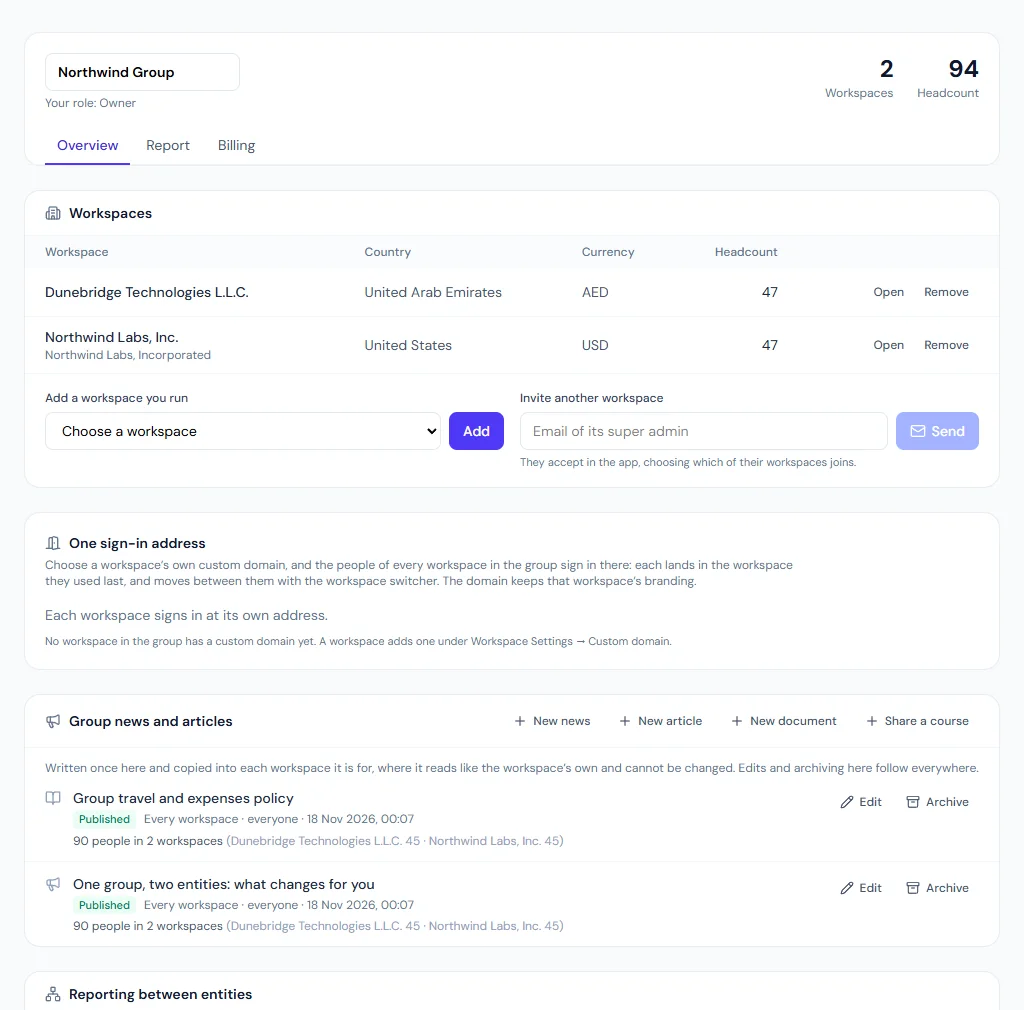
Signed in to Northwind as its super admin, open the account menu, select Group, enter "Northwind Group" and Start a group with this workspace. You are its owner.
To add Dunebridge: if you are also Dunebridge's super admin, pick it under Add a workspace you run. If someone else runs it, enter their email under Invite another workspace; they sign in, open Group, choose Dunebridge and Join with this workspace. Either way, the console now lists both, each with its country, currency and headcount.
15A.2 What each entity shares
Joining shares the entity's name, country, currency and headcount, and nothing else. Two switches, each set inside the entity by its own administrators, share more:
| Switch | Where | What it shares |
|---|---|---|
| Show our people in the group directory | Settings → People Directory | Its people in the group directory and org chart, with what its own directory settings show |
| Show payroll totals to the group | The console's Report tab, by the entity's super admin | Its payroll cost in the group report |
The directory switch works both ways: an entity's people see the group's other entities only while it shares its own.
15A.3 Group news, articles, documents and courses
In the console's Group news and articles, owners and admins write news, a knowledge article or a library document once, choose the entities it is for and who in them (by system role), and publish. Each entity gets its own copy: the news on its announcements, the article in its knowledge base, the document, with its own copy of the file, in its library. A must-read stops each person until they confirm it, in every entity, and the console adds up who has confirmed.
Edit the item in the group and every copy follows; a changed must-read asks everyone again. Archive it and every copy goes.
A course is shared rather than written in the console: sign in to the entity where it was written, choose Share a course, pick it, and optionally assign it in each entity to the chosen roles with a due date. Entities whose plan has no Learning are left out.
15A.4 The group directory and org chart
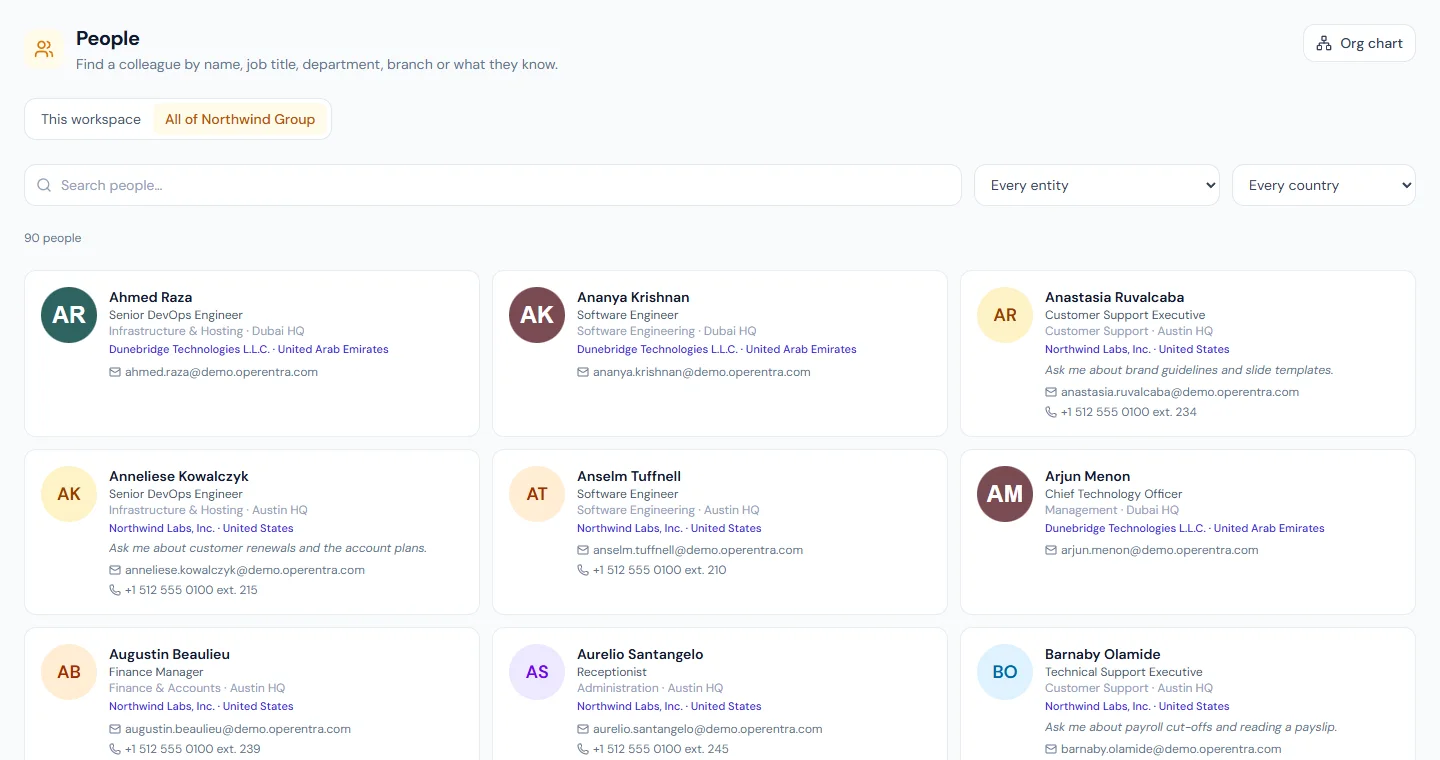
Where both entities share their people, People and Org chart in the portal have a view called All of Northwind Group: colleagues in both entities, each with their entity and country. In the console, Reporting between entities places Dunebridge's chart under Northwind's chief executive; the group org chart then joins the two trees and marks the join Another entity. This is for the chart only: Dunebridge's leave and approvals stay in Dunebridge.
15A.5 The group report
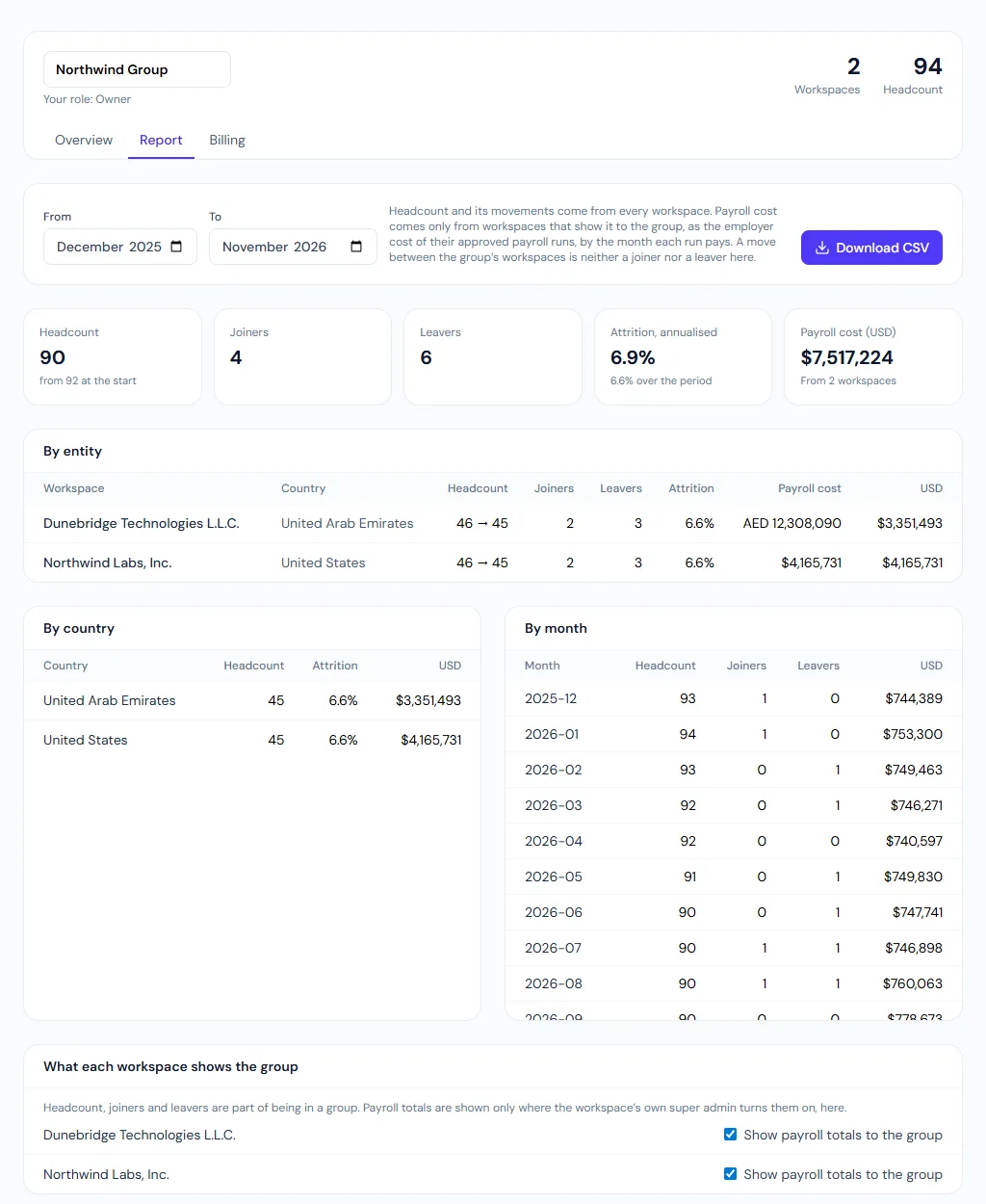
The console's Report tab adds up the entities over a range of months: headcount, joiners, leavers and attrition from every entity; payroll cost from those that share it, as the employer cost of their approved payroll runs (Chapter 58). Payroll is converted into the group's reporting currency with rates the group enters for each month. Where a month has no rate, the report shows each currency's subtotal and no converted total, and names the months missing a rate.
15A.6 One bill
In the console's Billing tab, a group owner who is Northwind's super admin makes Northwind the workspace that pays. Dunebridge's super admin then selects Bill through the group for Dunebridge: it takes Northwind's plan and status, its own Billing page says it is billed through the group, and its people are added to Northwind's seats, the plan's minimum counted once. Nothing is charged or cancelled by this: a workspace paying its own subscription cancels it first. Pay its own again gives Dunebridge back the subscription it had.
15A.7 One sign-in address
Northwind serves its workspace at its own custom domain. Under One sign-in address, the owner (Northwind's super admin) chooses that domain for the group. Dunebridge's people now sign in at Northwind's address too: each lands in the workspace they used last and switches between the two as usual. Someone in neither workspace cannot sign in there.
15A.8 Moving a person between entities
Jordan Lee has worked for Northwind since 2021 and is moving to run Dunebridge's Dubai office. Each entity is a separate employer, so Jordan leaves Northwind and joins Dunebridge, but should not start from zero.
In Northwind, HR opens Offboarding → Move to another workspace, chooses Jordan and Dunebridge, sets the last day here (31 December) and the first day there (1 January), and decides what happens to end-of-service:
| Choice | Northwind's settlement | Dunebridge |
|---|---|---|
| Carried | Pays no gratuity; its preview shows what it would have been | Counts gratuity from 2021 |
| Settled here | Pays it as for anyone leaving | Counts gratuity from 1 January |
Which one is right depends on each country's law and on what was agreed with Jordan (Chapter 82). Starting the move opens a separation of the type Moved within the group, with its clearance and settlement (Chapter 83), and tells Dunebridge.
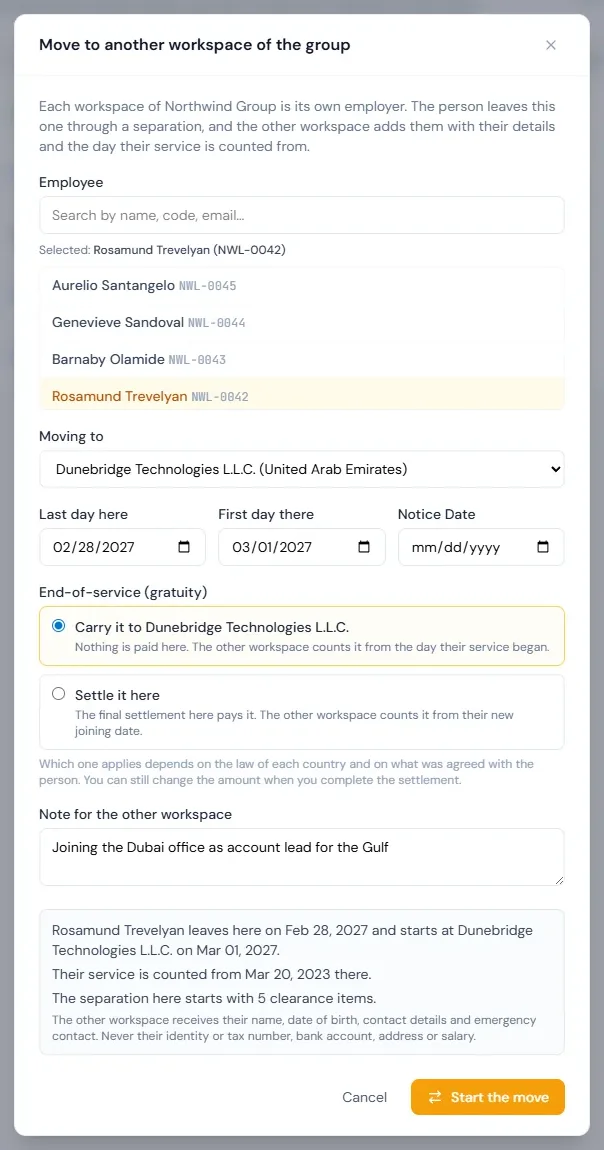
In Dunebridge, Employees shows Jordan under people moving here from the group. Add opens Add Employee filled in with Jordan's name, date of birth, contact details and emergency contact (never an identity or tax number, a bank account, an address or a salary: those are Dunebridge's to collect). HR sets the role, pay and place in Dubai. The new record's Service counted from is 2021: Jordan's tenure, work anniversary, length-of-service badges and any leave that needs a minimum of service count from it, while payroll and leave accrual start on 1 January. Decline, with a reason, tells Northwind instead.
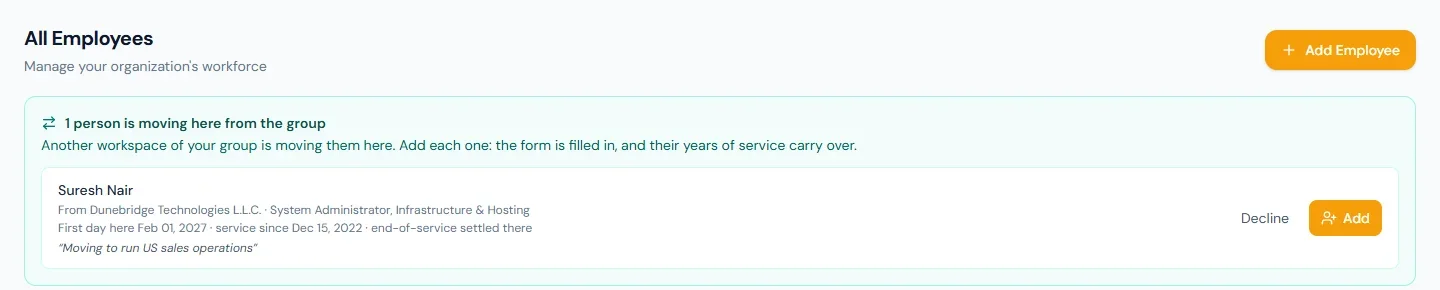
Jordan keeps one login: the invitation goes to the address Jordan already signs in with, and both workspaces appear in the switcher until Northwind's access closes after the settlement. In the group report the move is neither a joiner nor a leaver.
What happens next
- Each entity goes on running its own payroll, leave and approvals; the group changes none of them.
- The group's content stays in step: an edit or an archive in the console reaches every copy.
- The report grows as entities share more and rates are entered.
- A person who moved finishes their separation in the entity they left, while the entity they joined runs their new employment from their first day there, with their service counted from the start.
What the employee sees
Group news and must-read items in their own portal, like their entity's own; group articles, documents and courses in the usual places; and, where their entity shares its people, colleagues across the group in People and Org chart. Someone who moves between entities keeps one login and finds their years of service, and their work anniversary, carried over.
Common mistakes
- Expecting group access to open an entity. A role in the group gives no access inside a workspace; that still takes a membership there.
- Forgetting the directory switch is two-way. An entity that does not share its people sees nobody else's either.
- Editing a group copy inside an entity. It cannot be changed there; change it in the console.
- Reading a converted total that is not there. A missing rate is never guessed: enter it, and the total appears.
- Expecting the reporting link to change approvals. It places one chart under another, for the chart only.
- Billing an entity through the group while it still pays its own subscription. The group cancels nothing: cancel the entity's own subscription under Billing first.
- Moving someone with an ordinary separation and a fresh hire. Their service then starts again from zero in the new entity. Use Move to another workspace, or set Service counted from on the new record.
Practice
Use your own trial workspaces, not a customer's.
- With two trial workspaces you run, start a group from one and add the other under Add a workspace you run.
- Publish a must-read news item to both entities from the console; confirm it in one entity's portal and read the console's count.
- Turn Show our people in the group directory on in both, and find a colleague of the other entity in People.
- Turn Show payroll totals to the group on for one, open the Report tab, and enter a rate for a month to see the converted total appear.
- In the Billing tab, make one trial workspace the payer and bill the other through the group; read the payer's seats, then select Pay its own again.
- Move a test employee from one trial workspace to the other with end-of-service carried; in the other, add them from Employees and read Service counted from on the new record. Then read the settlement preview of the separation in the first.
Quiz
1. Who decides that an entity joins a group?
The entity's own super admin: they add it, or accept an invitation for it. A group admin alone cannot.
2. What does joining a group share, before any switch is turned on?
The entity's name, country, currency and headcount.
3. Why is an entity's people missing from the group directory?
Its directory does not share its people with the group; and while it does not, its own people see nobody else's either.
4. The report shows payroll in each currency but no converted total. Why?
A month in the range has no exchange rate for one of the currencies. Enter the rate in the Report tab and the converted total appears.
5. Can an entity edit a policy the group published to it?
No. It reads it like its own; the group changes it, and every copy follows.
6. Dunebridge is billed through the group. Where are its seats charged?
On Northwind's bill, the workspace that pays: Dunebridge's people are added to Northwind's seats, with the plan's minimum counted once. Dunebridge's own Billing page shows no price or seats.
7. Jordan moves from Northwind to Dunebridge with end-of-service carried. Where is it paid, and from when does it count?
Not by Northwind: its settlement pays no gratuity. Dunebridge counts it from the day Jordan's service began at Northwind, the Service counted from date on the new record, and pays it when Jordan leaves Dunebridge.