Timesheets
Timesheets (/admin/timesheets, needs timesheets.manage; Timesheets → Projects for the catalogue) is where hours worked are recorded against what they were worked on. Attendance says when a person was in; a timesheet says how the week was spent: eight hours on the Harbourline portal, two on the retainer, one on onboarding. It is what a services business bills from, what a project manager budgets with, and, for hourly-paid staff, what payroll can read instead of the clock.
Timesheets are a plan feature (timesheets) that comes with the Growth and Enterprise plans. Without it the pages show a locked panel and the routes answer 402.
Projects and tasks
Timesheets → Projects is the catalogue people pick from.
| Field | Notes |
|---|---|
| Name, code | Name unique in the workspace; the short code shows on the grid and in the CSV. |
| Client | Free text, shown on the list. Leave it empty for internal work. |
| Project manager | An employee, for information; approval is the person's reporting manager, not the project's. |
| Billable by default | New tasks inherit it. A project's hours count as billable in the report only when the project and the task are both billable. |
| Active | An archived project keeps its hours but takes no new ones: it disappears from the grid's picker and a saved draft that still uses it is refused on save. |
Tasks are optional. A project without tasks takes hours on the project itself ("Whole project" on the grid); with tasks, the person picks one. A task can be billable or not and open or done; a done task leaves the picker. A project with hours logged cannot be deleted, only archived; its tasks can be edited at any time.
Settings
The Settings tab on the Timesheets page keeps three things:
- The week starts on: the weekday a timesheet starts from, Monday by default. Every timesheet is seven days from that day; changing it affects weeks not yet created.
- Most hours a person may log in a day: the per-day cap, 12 by default, 1 to 24. Hours are entered in quarter hours.
- Pay hourly employees from approved timesheets: see Payroll from timesheets. Off by default.
Reviewing a week
A person fills the week in from the portal and submits it. The submission goes through the approvals engine with the subject Timesheet: the default flow is the reporting manager, provided they hold timesheets.approve, then anyone with timesheets.manage; a workspace with custom approval flows can route it like any other subject (by hours, department, or amount). A reporting manager whose role does not hold timesheets.approve is passed over, and the week waits on the second step straight away. The manager decides from the Approvals inbox or from Team timesheets on the portal; HR decides from the Review tab here, which lists every submitted week in the workspace, filterable by status, week and person. Someone who is both the person's manager and holds timesheets.manage settles the week in one action from Team timesheets or Review.
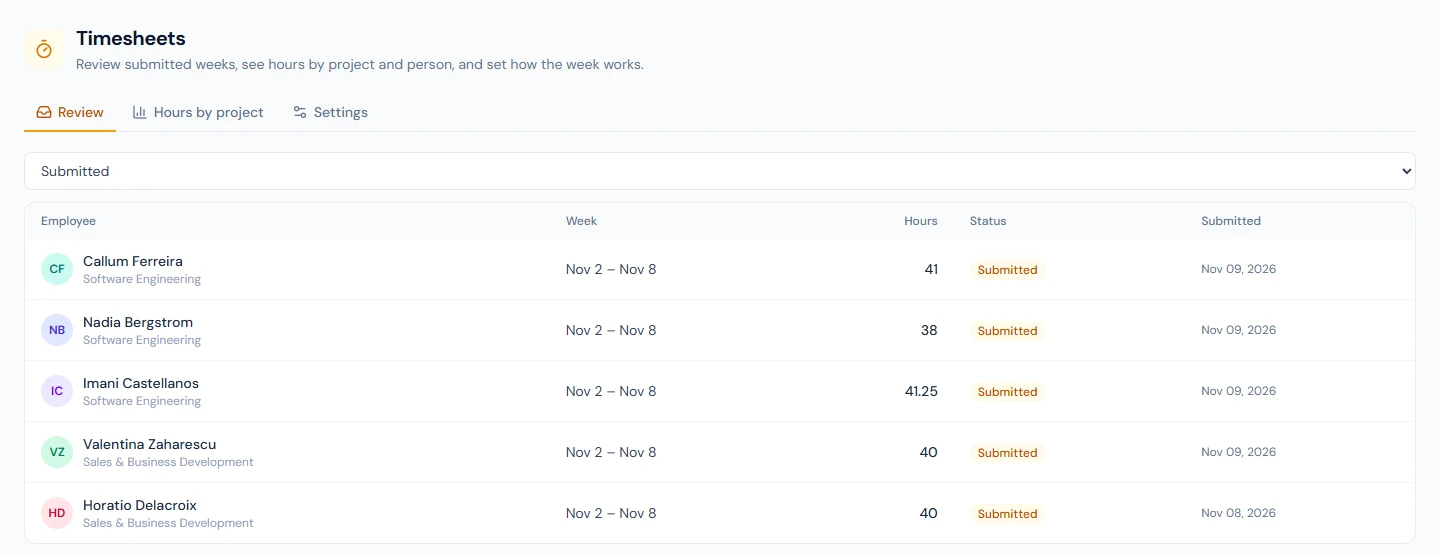
Opening a week shows the grid as the person saw it, with the totals per day and per project. Approve records the week. Return for changes needs a note; the week goes back to the person as Returned, with the note on the page and in the email, and they edit and resubmit. A submitted week can be withdrawn by the person themselves until a decision is made. If two reviewers decide the same week at the same moment, or the person withdraws it just as it is decided, the first one to land stands and the other is told the week has already been decided; nobody is emailed twice.
The person is emailed on approval and on return (timesheet_approved, timesheet_rejected); both land in the bell too. An approved week is read-only.
Hours by project
The Hours by project tab is the report: a date range, optionally one project, and which weeks to count (approved only by default; submitted and approved; or everything, drafts included). It lists each project with its total and billable hours and, under it, each person's hours. CSV exports the same rows with employee code and department.
Billable hours are counted per entry: the project must be billable and the task, when there is one, must be too. An entry on a non-billable task of a billable project is work but not revenue, and the report says so.
Payroll from timesheets
When Pay hourly employees from approved timesheets is on, the payroll run reads, for every employee whose salary record has the hourly pay basis, the approved timesheet hours of the month instead of attendance: each day's hours are the person's hours for that day, and hours above the standard day on the salary record are overtime, paid under the overtime rules already in place. Only approved weeks count: a week still submitted when payroll runs is zero hours, so close the week's approvals before you process the month. Monthly and daily pay bases ignore the switch entirely.
With the switch off, hourly staff are paid from attendance as before, and the timesheet is for billing and reporting only.
Permissions
| Permission | Who has it by default | What it allows |
|---|---|---|
timesheets.view_own | every role | My timesheet: fill, save, submit, withdraw; see the project list |
timesheets.approve | department heads, HR | Team timesheets: the direct reports' weeks, approve and return |
timesheets.manage | HR manager, HR officer, super admin | Projects, settings, every week in the workspace, the report |
Over the API
GET /v1/projects, /v1/timesheets and /v1/timesheets/{id}/entries on the timesheets:read scope, and the events timesheet.submitted, timesheet.approved and timesheet.rejected; see the API reference.