Knowledge base
Company Documents → Knowledge Base (/admin/knowledge) is where you write what people keep asking: the leave policy in plain words, how to claim an expense, who to ask for a laptop, what the dress code is on a client site. An article is written here, published to an audience, and read on the portal under Company → Knowledge Base; the AI assistant's help search reads the same articles, so "what is our policy on working from home" is answered from your own words rather than from the generic guides.
The menu entry is shown to people with knowledge.manage, who write anywhere. Someone who owns or edits a space writes in that space without it, from Manage articles on the portal's Knowledge Base page.
The knowledge base sits beside the document library. The difference is the form: a library entry is a file (a signed handbook PDF, a form to download), an article is text written and searched in place. Both can ask for an acknowledgement.
Spaces, owners and editors
A space is a part of the knowledge base with someone answerable for it. Every workspace starts with two, HR policies and Company, and adds its own: an engineering handbook, a sales playbook, a site's safety rules. Each article and each category belongs to exactly one space, and the list has a tab for each.
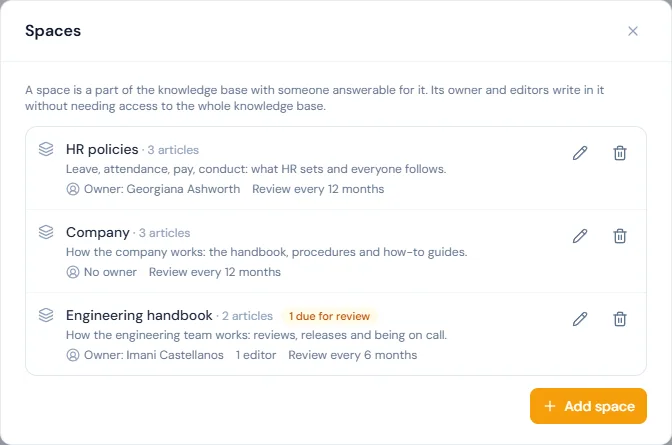
Spaces, at the top of the list, shows them all.
| Field | Notes |
|---|---|
| Name | Up to 120 characters; no two spaces share a name. |
| Description | One line shown under the name. |
| Owner | One current employee. The owner writes in the space, chooses its editors, and is reminded on Mondays of articles due for review. A space can be left with no owner. |
| Editors | Current employees who may write in the space beside its owner. |
| Review articles | How long after an article is published or reviewed it is due again: 3, 6, 12 or 24 months, or No reviews. A new space starts at 12 months. |
Who may do what:
knowledge.manage | The space's owner | An editor | |
|---|---|---|---|
| Write, publish, archive and delete articles; keep categories | Every space | Their space | Their space |
| See drafts, versions and who has acknowledged | Every space | Their space | Their space |
| Change the description, the editors and the review interval | Every space | Their space | No |
| Add, rename or delete a space; choose its owner | Yes | No | No |
Neither an owner nor an editor needs knowledge.manage, an admin role, or access to the employee list: the pick-lists they need (colleagues by name and department, departments, branches, roles) are given to them for this purpose only. Moving an article to another space needs the right to write in both, and clears its category, since categories belong to a space.
A space is deleted only once it holds no articles and no categories, and the last space cannot be deleted.
Writing an article
New article opens the editor. Everything on the left is the article; everything on the right is where it is filed, who gets it and what happens on publish.
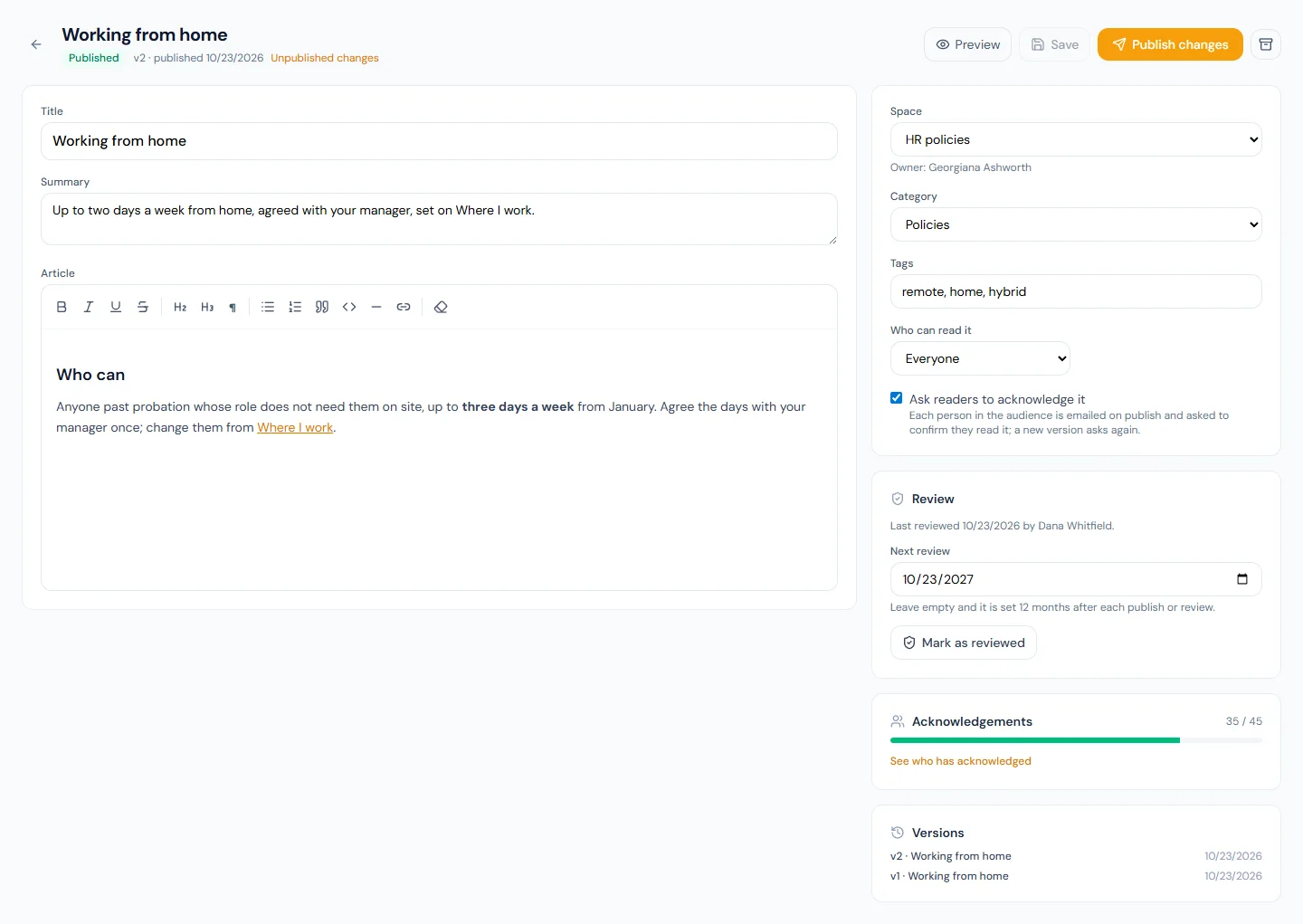
| Field | Notes |
|---|---|
| Title | Required, up to 200 characters. Matches in the title rank highest in search. |
| Summary | One paragraph, up to 500 characters, shown in lists and search results. Counts next after the title in search. |
| Article | Rich text: headings, bold and italic, lists, quotes, code blocks, rules, links and simple tables. Anything else — images, embeds, scripts, styles — is removed when you save, on the server and again on display. If pasted content opens one of those and never closes it, only that piece goes: the article is kept from its next paragraph, heading, list or table on, and the editor says so above the article when it saves, so you can check what is left before publishing. Links may point at the web (https://…), a mailbox (mailto:) or a portal page (/portal/…). An article can run to 50,000 characters, formatting included; a longer one is refused on save, so split it in two or keep the full text as a file in the document library. |
| Space | Where the article is filed: one of the spaces you may write in. Started from a space's tab, a new article goes into that space. |
| Category | Optional, from the categories of the article's space. Categories are kept from the Categories button on the list, one space at a time, and go two levels deep: a category can sit inside a top-level one. Deleting a category keeps its articles, uncategorised, and moves any categories inside it to the top level. |
| Tags | Comma-separated, lower-cased, up to twenty. Searched like the summary; the portal filters by tag. |
| Who can read it | The announcement audience: Everyone, or chosen Departments, Branches, Roles or Named people. A narrowed audience with nobody in it cannot be saved. The space decides who writes an article, never who reads it. |
| Ask readers to acknowledge it | When ticked, each person in the audience is emailed on publish (knowledge_article_published) and asked to confirm they read it; a new version asks everyone again. |
| Next review | Under Review. Leave it empty and it is set from the space's interval each time the article is published or reviewed; set a date to have this one article checked sooner or later. See Review dates. |
Save draft keeps the article without showing it to anyone. Preview renders the working copy exactly as the portal will.
Publishing, versions and the working copy
An article has a working copy (what the editor shows) and a published copy (what readers see). Publish copies the first into the second. Editing a published article changes only the working copy, flagged Unpublished changes on the list and the editor; readers keep seeing the last published version until you press Publish changes.
Every publish that changes the title, summary or body moves the version by one and records the content under Versions, where each earlier version can be opened and read. Re-publishing an unchanged article moves nothing and asks nobody to acknowledge again.
Archive takes a published article off the portal and out of the assistant's search; acknowledgements already recorded are kept, and it can be published again. A draft or an archived article can be deleted, which removes its versions and acknowledgements too; a published one is archived first.
Review dates
A page nobody has looked at in two years is trusted exactly as much as one checked last week, which is the problem. Every published article therefore carries the date it was last reviewed and the date its next review is due.
- Publishing an article for the first time, or with changed content, counts as a review: the article is marked reviewed by whoever published it, and its next review is counted from that day by the space's interval. A date set by hand that is still ahead is kept.
- Mark as reviewed, under Review in the editor, is for an article that was read and still holds: it records the review and moves the next one on by the space's interval, without a new version and without asking anyone to acknowledge again.
- An article whose review date has come is due for review. It carries an amber Due since badge on the list and in the editor, its space's tab is dotted, and Due for review above the list filters to those articles alone. Only published articles are ever due.
- Readers are told too: a due article says on the portal that it is past its review date and may be out of date, and every other published article shows when it was last reviewed.
- On Mondays, in the workspace's 09:00 hour, each owner gets one email (
knowledge_review_due) listing what is due in the spaces they own, oldest first, up to ten titles with a count of the rest. A space with no owner sends nothing; its due articles still show on the list. Nothing is unpublished by a review date: it is a prompt, not an expiry.
A space set to No reviews gives its articles no date; a date set by hand on one article still counts.
Acknowledgements
An article that asks for acknowledgement shows Acknowledgements on the right: how many of the audience have confirmed the current version, with a bar, and See who has acknowledged for the roster. A person who confirmed an earlier version reads v2 only until they confirm the new one. The audience is counted the day you look, from active employees, so someone who joins the department later is asked the next time they open the article and is counted from then on.
The acknowledgement carries the version read and the date. It is the same shape as the document library's, so a policy that lives in both places can be checked the same way.
Articles from your group
In a workspace that is part of a group, articles the group publishes appear in the Company space marked "From your group". Nobody here can edit, archive or delete them, however they write in the knowledge base, and they are left out of the Monday review reminder: the group keeps them current.
Search
The portal's Knowledge Base page searches the published copy: every word typed has to appear somewhere as a word or the start of one (leav finds leave), title matches count most, then the summary and tags, then the body, and the result shows an excerpt around the first match. Only articles the reader is in the audience of are searched, so two departments with different travel policies each find their own. The page lists the spaces with their categories on the left, to browse instead of searching.
The assistant's search_help tool runs the same search for the signed-in person before it searches the generic guides, and links the article on the portal. An archived article leaves both searches at once.
Permissions and public API
knowledge.view— every default role: read what is published for you, search, acknowledge. It is also all that a space's owner or editor needs to write in that space.knowledge.manage— Super Admin, HR Manager, HR Officer: every space, its articles and categories, and the spaces themselves.
Existing workspaces get the grants from npm run db:seed -- --module=knowledge-acl --all-companies; new workspaces have them from sign-up.
Articles are read-only on the public API as articles on the knowledge:read scope: the published copy with its body, space, category, tags, version, and the dates it was last reviewed and is next due. Drafts and the working copy are never exposed, and the audience is not either.