Speak up
Speak up is where a person raises a concern in confidence: misconduct, harassment, a safety problem, fraud, a worry about data. They can put their name on it or leave it off. It is read by the people you name to receive concerns and by nobody else.
It comes with the HR Desk, on the Growth and Enterprise plans, and it is kept apart from the desk's requests on purpose.
Who can read a concern
| Person | Can they read a concern? |
|---|---|
| A named handler | Yes, unless the sender kept that concern from them. |
| The person who raised it | Yes: their own, and only theirs. |
| The sender's manager | No. |
| HR, and the people who work the HR Desk | No, unless named as a handler. |
| Someone who reads every team's requests | No. |
| A super admin | No, unless named as a handler. |
Being a handler is being on the list below. No role and no permission lets anyone read a concern, and a person who is not a handler is told a concern does not exist, not that they may not see it.
A concern is never in the HR Desk's lists or report, the portal search, the AI assistant, a chat channel, a webhook, the public API or a group report. The activity log does not record who raised a concern or what it says.
Naming the handlers
HR Desk → Speak up (/admin/hr-desk/speak-up, permission speakup.manage, held by the Super
Admin by default).
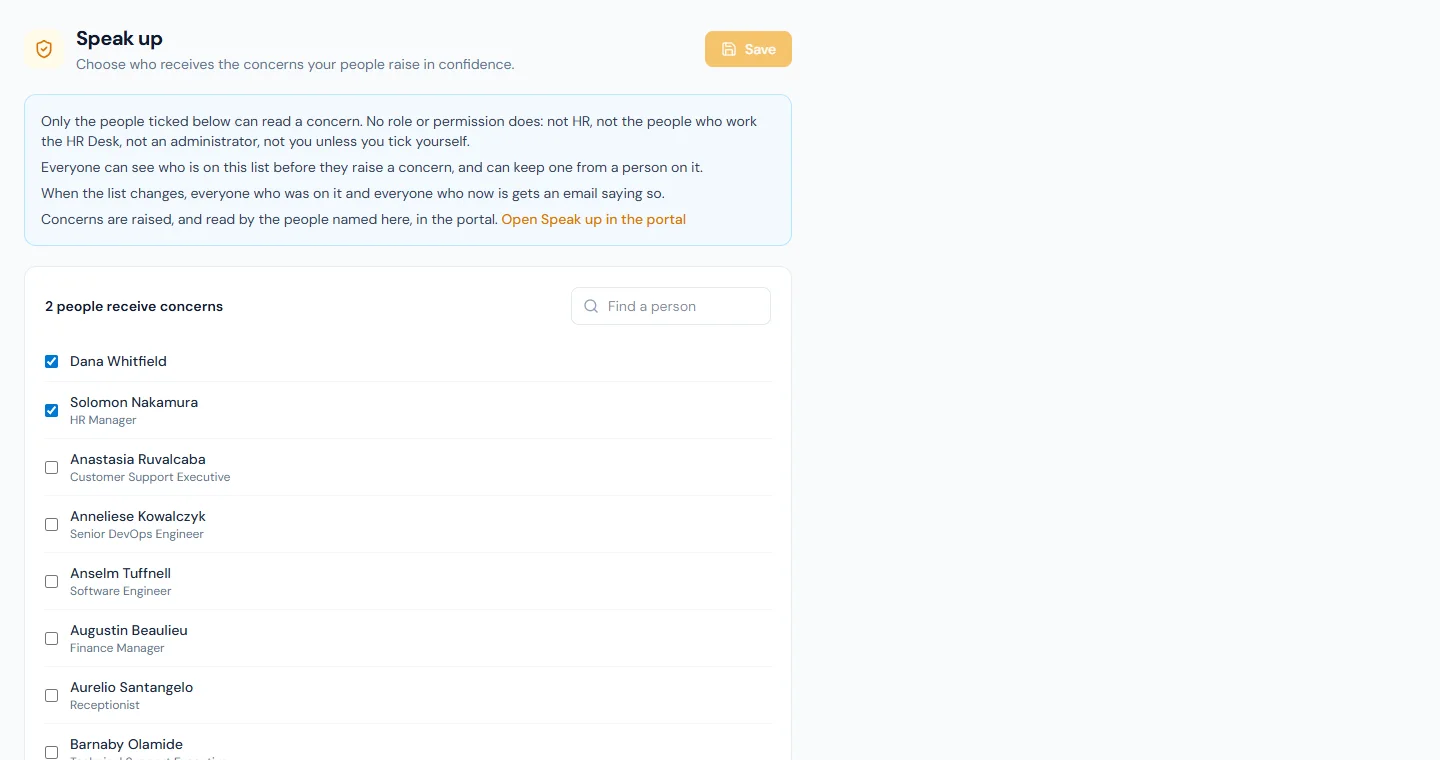
- Tick the people who should receive concerns. Any active login of your workspace can be named: a handler does not need an admin role, and reads concerns in the portal.
- Save.
- Name at least two people. A concern may be about one of them, and the sender can keep it from that person.
- The list is public to your people. Everyone sees who receives concerns before they raise one. That is what lets them trust it.
- A change is never silent. When the list changes, everyone who was on it and everyone who now is gets an email saying so. Someone who adds themselves cannot do it unnoticed.
- Choosing the handlers does not let you read anything. This page shows no concern and no count.
- The last handler cannot be removed while a concern is still open.
- With nobody named, concerns cannot be raised, and the portal says so.
What a person does
In the portal, under Company → Speak up. The employee guide describes it.
- They choose what it is about, write what happened, and choose with my name or without my name.
- Without a name, nothing about them is stored with the concern: no employee, no login, no address. They are shown a key, once, and use it to read replies and add to the concern. The key is not kept anywhere; if they lose it, nobody can give it back.
- With a name, the handlers see who they are, and they follow the concern from their own list.
- They can keep it from one or more handlers, never from all of them.
- They can attach up to five files (PDF, images, Word, Excel, CSV or text, 10 MB each), with the concern and with anything they add later. Nothing records who uploaded a file, and the form warns that a file can itself say who made it: its name, the author in its properties, the place in a photo.
They are not emailed about a concern, named or not: a line in an email log saying a person was written to about one would name them. They read replies in the portal.
What a handler does
In the portal, under Company → Speak up → Concerns to handle.
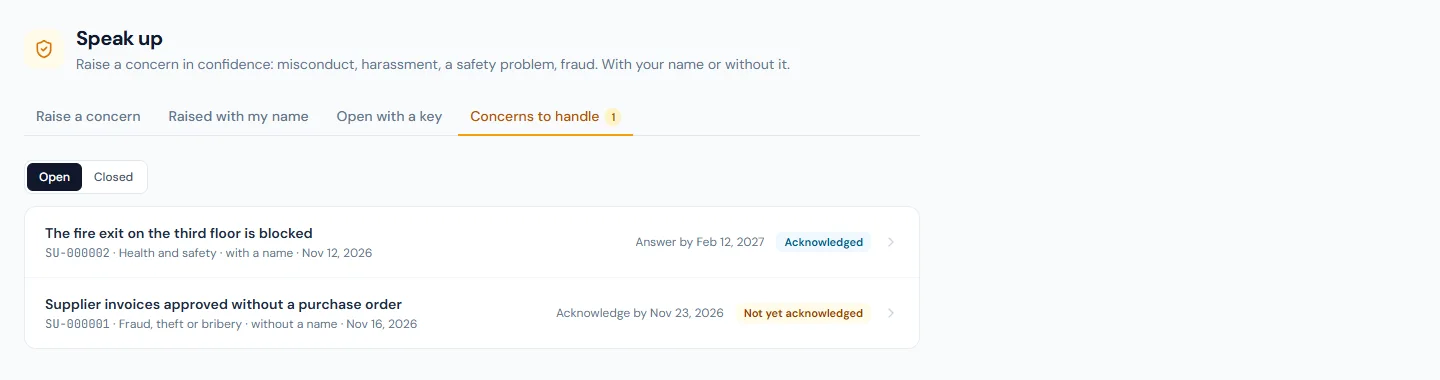
Open one to read it. A concern raised without a name says so, and shows nothing else about its sender.
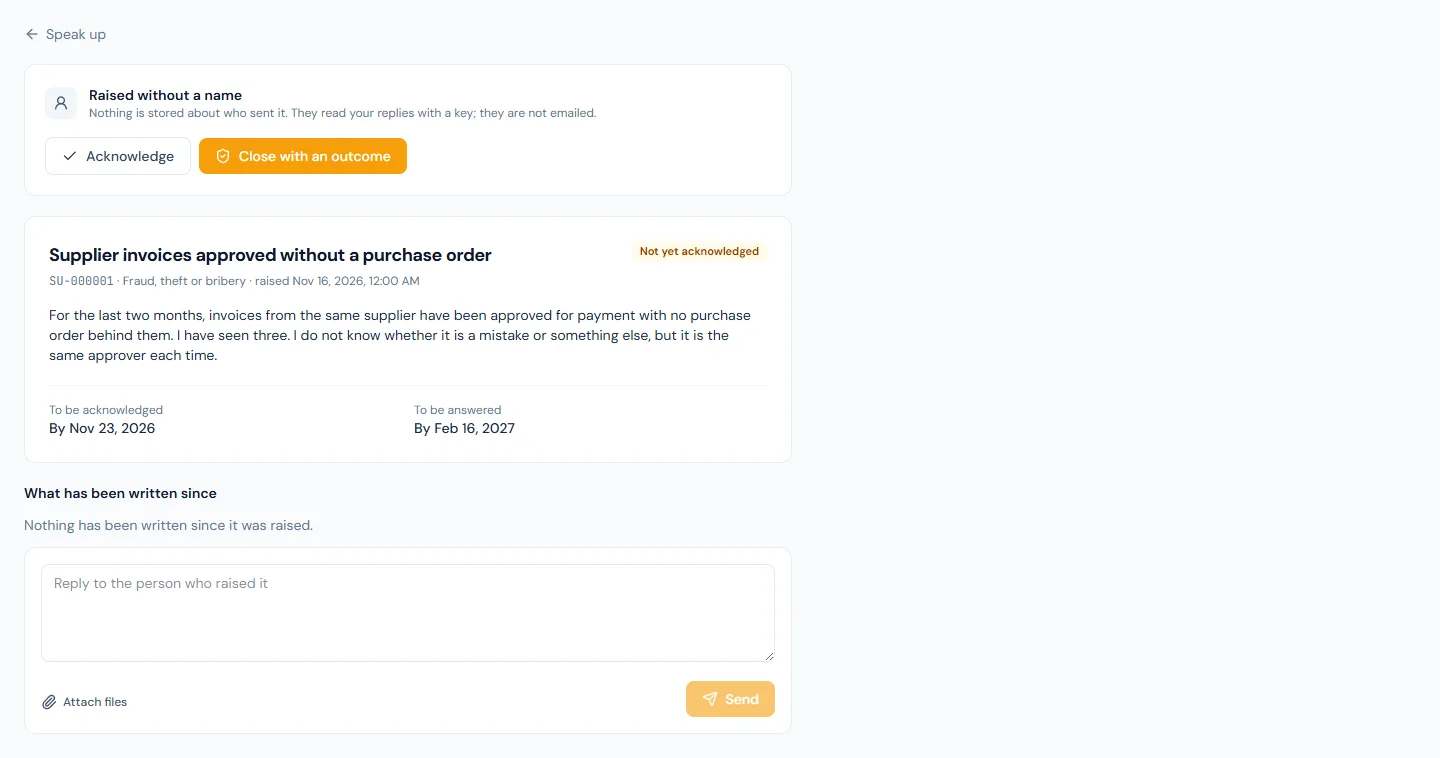
| Step | What happens |
|---|---|
| Acknowledge | Tells the person their concern has been received. A first reply acknowledges it too. It is due within 7 days. |
| Reply | The person reads it in the portal: with their key, or in their own list. A reply can carry up to five files. |
| Close with an outcome | You say what was found and what was done. That is the answer the person is owed, and it is due within 3 months. Nothing more can be written afterwards. |
| Reopen | Takes a closed concern back. |
Both dates are shown on the concern and in the list, in red once they have passed.
Reminders. The handlers a concern was not kept from are emailed once before each date: two days before the acknowledgement is due, and two weeks before the answer is. The email says only that a concern is due soon.
Files are downloaded, never opened in the page, and are read by the same people as the concern they belong to.
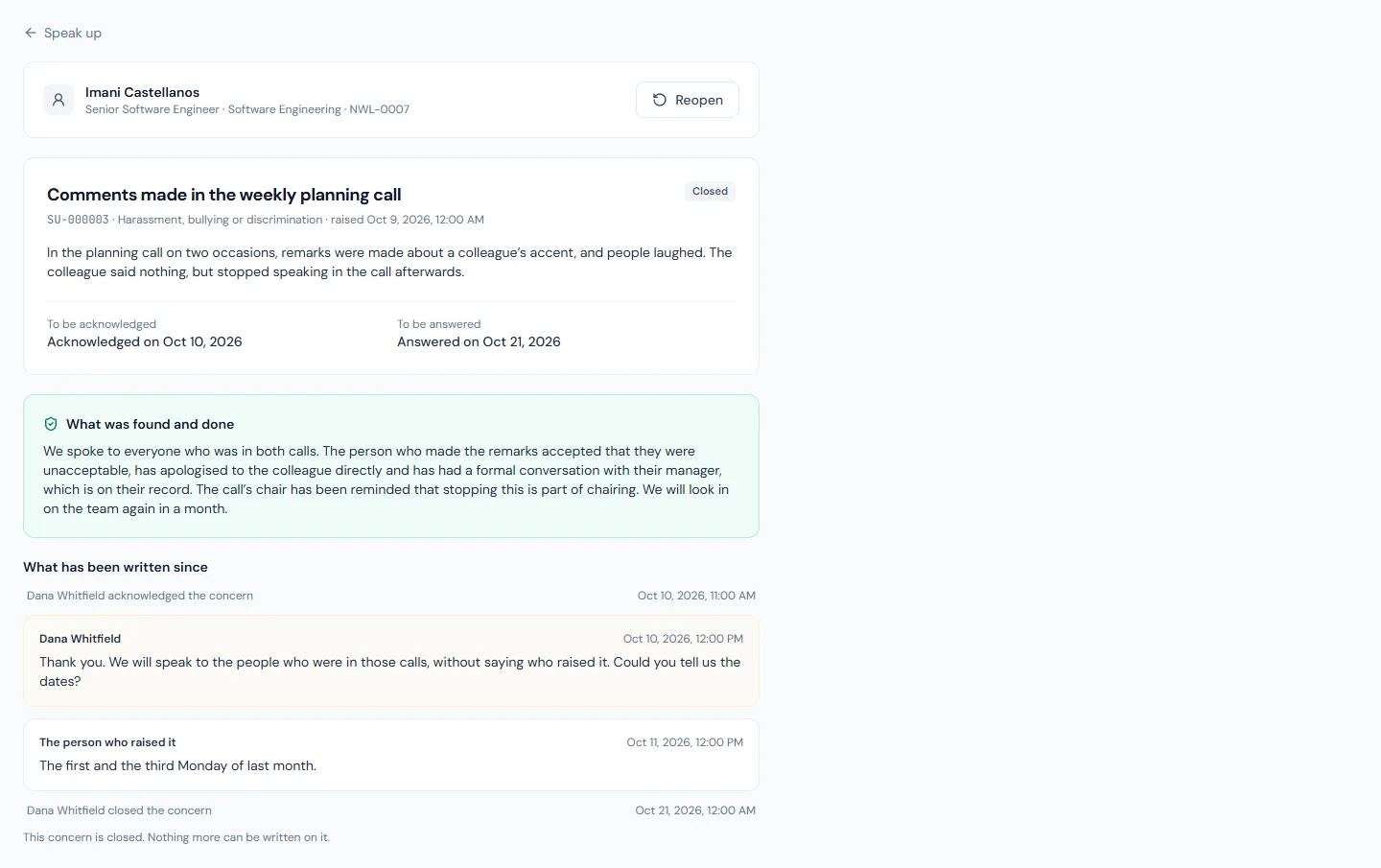
A handler is emailed when a concern arrives or the person adds to one. The email says only that something is waiting: nothing about the concern is in it.
A concern raised without a name shows nothing about its sender. Do not try to work out who it was; ask your questions in a reply.
What "without a name" does and does not promise
Nothing that identifies the sender is stored with the concern or with what they write on it afterwards, and the routes that carry a concern are left out of the activity log.
Two things remain true, and the form tells the person the first:
- What they write can identify them. A detail only one person could know names that person.
- The person is signed in when they send it, as any member of your workspace must be. Nothing records that against the concern.
Who can do what
| Permission | Lets a person | Default roles |
|---|---|---|
speakup.report | Raise a concern and follow their own | Everyone |
speakup.manage | Choose who receives concerns. It does not let them read one | Super Admin |
Emails
| When | To | |
|---|---|---|
| A Concern Is Waiting | A concern is raised, or its sender adds to it | The handlers it was not kept from |
| A Concern Is Due Soon | Two days before a concern's acknowledgement is due, and two weeks before its answer is. Once each | The handlers it was not kept from |
| Who Receives Concerns Has Changed | The list of handlers changes | Everyone on the list before and after |
None of them says anything about a concern. Each is an email template of the workspace: you can edit its wording or switch it off.
When a person's data is erased
A concern is about someone else, so it is not deleted when the person who raised it is erased. Their name is removed from it and the concern stays, with its files, as one raised without a name. What an erased person wrote as a handler stays too, without their name.
What it does not do
- It is open to the people in your workspace, not to the public.
- It does not decide what your law requires. Where a law sets how concerns must be received, acknowledged and answered, check your process against it.