Surveys
Admin → Surveys asks your people a fixed list of questions between an open and a close, and shows you what they said in a form that cannot be traced back to anyone when the survey is anonymous. Five templates come seeded: an eNPS pulse, a quarterly engagement survey, onboarding day 30 and day 90, and an exit survey. Every template is a starting point you edit before opening.
Surveys come with the Growth and Enterprise plans (the Surveys plan feature). Without it the admin menu entry shows a lock and the portal entry is not shown. Two permissions govern it: surveys.manage (Super Admin, HR Manager, HR Officer) to build, open, close and read results; surveys.respond (every role) to answer what one is invited to.
Building a survey
New survey opens the template picker. Pick a template or Blank survey, then edit:
| Setting | Meaning |
|---|---|
| Title and Introduction | What the people asked read first: what it is for and what happens with their answers. |
| Kind | Engagement, pulse, onboarding, exit or custom. A label for the list and the public API; it changes no behaviour. |
| Anonymous | On, an answer is stored with no link to the person who gave it, results can be read only once the survey has closed, and only in groups of at least the floor (see What anonymous means). Off, HR reads the answers by name (the onboarding and exit templates). Fixed once the survey is open. |
| Group-size floor | Default 5. The smallest group whose results are shown: a department with fewer responses is folded in with others, and an anonymous survey shows nothing at all under it. An anonymous survey needs a floor of at least 3. Fixed once open. |
| Invites by itself when | A trigger: Onboarding, day 30 and day 90 are fired by a Send a survey item on an onboarding plan; When a separation is recorded fires when HR opens a separation. While the survey is open, the event invites the person without anyone doing anything. |
| Closes on | The survey closes by itself at the end of that day (checked hourly). Empty: close it by hand. |
| Questions | Up to 40, in order. Each is one of five types (below), required or optional. Choice questions carry their options, one per line, at least two. |
The question types:
- Agree–disagree scale — 1 to a top of 3, 4, 5, 7 or 10. Results give the mean and the distribution.
- 0–10 recommendation (eNPS) — "how likely are you to recommend this company as a place to work". Results give the mean, the distribution and the eNPS: promoters (9–10) minus detractors (0–6), as a share of answers, from −100 to 100.
- One choice and Several choices — results count each option.
- Open answer — up to 2,000 characters. Results list the texts for the survey as a whole, never by department; on an anonymous survey their order has nothing to do with who wrote them or when.
A draft can be edited freely and deleted. Once open, only the title, introduction, trigger and closing date can change: the questions are what people already answered.
Opening, inviting, closing
Open survey asks for the audience, Everyone (every active employee), chosen Departments or Named people, and the closing date. Everyone in the audience is invited at once, emailed (the Survey Invitation template) and told in the bell. A survey with a trigger may be opened with nobody in it: it then waits and invites each person as the event happens. Invite more people adds to an open survey; someone already invited is left as they are.
Each person answers once, from My Surveys in the portal, and cannot change their answers afterwards. Each invitation records the person's department at the time, which is what the department cut is built on.
Close survey ends it, and a response that arrives after it is refused. On an identified survey the answers stay readable by name. On an anonymous survey closing is the one irreversible step, and the confirmation says so:
- the results become readable;
- the record of who answered is erased: from then on the survey holds how many answered, per group, and nothing says which people they were;
- a department too small to be shown is merged with others in what is stored, not only in what is displayed;
- if fewer people than the floor answered, the answers are deleted. They could never have been shown, and in a group that small they could be traced to people.
Close an anonymous survey only when you are done collecting. There are no results to look at before that, and no way to reopen it afterwards.
What anonymous means
An anonymous survey makes one promise to the people asked: nobody can find out who answered what. This is what the system does to keep it.
- An answer is never stored with its author. While the survey is open, the invitation records that the person has answered, so nobody answers twice. The answers are saved separately, with no pointer to the invitation and no time of their own. A scale or 0–10 answer keeps the department the person was invited in; a choice or a written answer keeps nothing.
- Nothing is shown while the survey is open. You see how many were invited and how many have answered, and no result. A result that moved each time someone answered would give that person's answer away to anyone who looked before and after.
- Nobody is told who has answered. No page, export, event or API route lists which invited people have or have not answered an anonymous survey. You have the two counts.
- Results come in groups of at least the floor. A department under the floor is folded into Everyone else. If that row would still be under the floor, the smallest department otherwise shown joins it. The rows therefore always add up to everyone: a hidden group cannot be worked out by subtracting the rows from the total. If no department can be shown on its own, there is no department table, only the survey's own figures.
- A figure needs at least the floor's worth of answers. An optional question that fewer people than the floor answered shows how many answered and no figures; a heat-map cell resting on fewer answers is empty.
- Written answers are shown for the survey as a whole. Never by department, and in an order that has nothing to do with who wrote them or when.
- The floor is at least 3. Under that, a "group" is one or two people.
The same rules apply to the workspace data export and to a backup download: neither contains the answers of an anonymous survey that is still open, nor who has answered one (see Data privacy and backups).
What anonymity cannot do: a written answer that says who wrote it identifies them, and a group in which everyone gave the same answer tells you what each of them said. Say so in the introduction if it matters, and keep the floor at 5 unless your teams are smaller than that.
Reading results
The survey page shows Invited, Answered and the response rate, then, for an identified survey at any time and for an anonymous one once it has closed:
- By department — the heat-map: one row per department with at least the floor's worth of responses, one column per scale or eNPS question, the cell being the mean (scale) or the eNPS (0–10). Smaller departments are folded into one Everyone else row, as described above for an anonymous survey. On an identified survey a small department is simply left out of the table, and Everyone else appears only when it reaches the floor.
- One card per question — the mean and the distribution bars, the eNPS with its promoters, passives and detractors, the counts per option, or the texts.
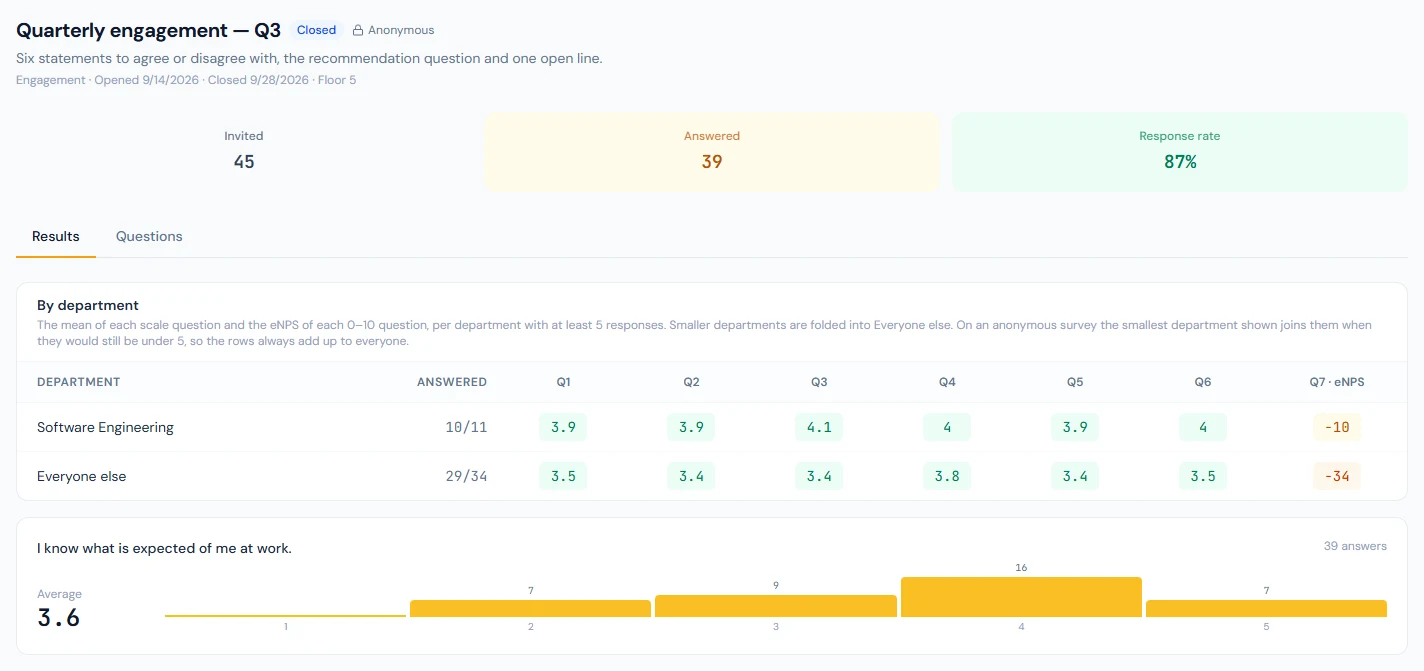
While an anonymous survey is open the Results tab says how many have answered so far and that the results come with the close. After it closed under its floor, the tab says there are no results.
Responses by name appears on identified surveys only: each invited person with whether and when they answered, and their answers under each question. The onboarding and exit templates are identified because HR follows them up with the person.
The eNPS trend
Reports → People Analytics gains an eNPS (latest) tile and an eNPS by survey list: every survey with a 0–10 question that closed in the window, dated by its close, with its response count and score, or — where the survey's own results would show none (an anonymous survey under its floor). An open survey is not listed until it closes. Run the eNPS template at a steady cadence and the list becomes the trend.
Triggers in practice
- Onboarding: add a Run an action → Send a survey item to an onboarding plan with Onboarding, day 30 (or day 90) as its trigger and a due offset of 30 (or 90) days. When HR runs the task, the joiner is invited to every open survey listening for that trigger. If no survey is open for it the task is blocked with a message rather than silently done: open one from the matching template first and run the task again.
- Exit: open the exit template (the trigger is preset). From then on every separation HR records invites the leaver, who answers from the portal while their account is open.
The seeded onboarding and exit templates are answered by name. A triggered survey can be made anonymous, but people then arrive one at a time: nothing is readable until you close it, and closing it with fewer responses than the floor deletes them. Leave it open until enough people have answered, close it, and open the next one. With a single person invited, the two counts alone say whether that person has answered.
Public API and events
survey.opened (with the number invited) and survey.closed (with the number invited and the number who answered) go to webhooks; survey.opened is also a Slack, Teams and Mattermost channel line with the title and closing date. GET /v1/surveys, /v1/surveys/{id} and /v1/surveys/{id}/results on the surveys:read scope return the survey and the same aggregates the page shows. No event and no route carries an individual answer. See the API reference.