Approval flows
Every leave application, expense claim, shift swap, leave allocation request and timesheet, and every HR Desk request of a type that needs approval, travels an approval flow: an ordered list of steps, each decided by whoever the step's approver type resolves to for the person asking. The flow decides who and in what order; the module keeps doing what it always did when the answer is yes or no — deducting leave days, creating the payroll reimbursement, sending the emails.
Approval flows live under Settings → Approval flows (/admin/settings/approval-flows). Approvers work from the portal's Approvals inbox (/portal/approvals), or from the module pages they already know (Pending Approvals, Team Expenses, the claim detail page), which decide the same request.
The default flows
Each workspace carries one default flow per kind of request. The defaults reproduce how the modules decided before flows existed, so switching them on changes nothing:
| Request | Default flow | Which is to say |
|---|---|---|
| Leave application | 1 step — Anyone with a permission: leave.approve, team-only without leave.view_all | HR and admins decide anyone's leave; a Department Head decides their direct reports' |
| Expense claim | 1 — Reporting manager, who must hold expenses.approve_team; 2 — Anyone with a permission: expenses.manage | The manager first, if their role lets them approve their team's claims; then HR/Finance, who may also decide straight away |
| Shift swap or drop | 1 — Reporting manager, who must hold roster.publish; 2 — Anyone with a permission: roster.publish | Whoever publishes the roster, the requester's own manager first when they are one of them (Attendance → Roster) |
| Leave allocation request | 1 — Reporting manager, who must hold leave.approve; 2 — Anyone with a permission: leave.allocate, team-only without leave.view_all | The manager vouches for the request, then someone who may allocate leave grants the days |
| Timesheet | 1 — Reporting manager, who must hold timesheets.approve; 2 — Anyone with a permission: timesheets.manage | The manager first, then HR, who may also decide straight away |
| HR Desk request | 1 step — Reporting manager, who must hold requests.approve | The person's manager decides. Only for request types with approval switched on; with nobody able to decide, the request goes straight to its team (HR Desk) |
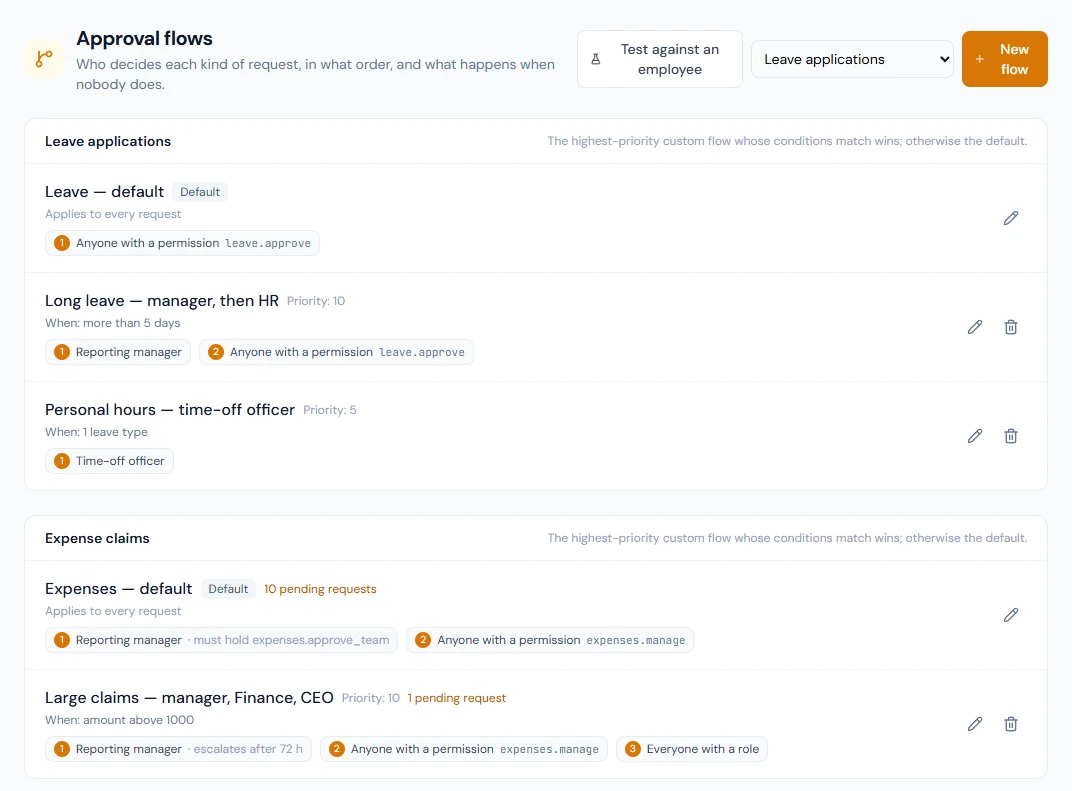
A manager step in a default flow asks for more than the reporting line: the manager must also hold the permission the module's own approve button needs. A reporting manager whose role does not carry it is passed over, and the request goes to the next step.
A default cannot be deleted, switched off or given conditions. Its steps can be re-wired (a workspace that wants HR to see every leave request after the manager adds a second step), and that needs the Custom approval flows plan feature (Growth and Enterprise plans) like any other change.
Flows are created for a workspace by the approval-flows seeder (new workspaces get them at sign-up). Until it has run, requests of that kind are decided by the module alone, exactly as before, and the Approval flows page says so. Running the seeder again brings a default that nobody has changed up to date with the definitions above; a default whose steps an admin has re-wired is left exactly as it is.
Custom flows
A custom flow has conditions. When a request is submitted, the highest-priority active custom flow whose every condition holds is chosen; if none matches, the default is used.
| Condition | Applies to | Matches when |
|---|---|---|
| Total amount above | Expense claims and HR Desk requests | the claim total, or the first amount of money entered on the request's form, is strictly above the figure |
| Only these request types | HR Desk requests | the request's type is one of them |
| Leave days above | Leave applications and leave allocation requests | the days asked for are strictly above the figure |
| Only these leave types | Leave applications and leave allocation requests | the leave type is one of them |
| Only these departments | Every kind of request | the requester's department is one of them |
A shift swap and a timesheet carry no amount, days or leave type, so a custom flow for either can depend on the requester's department only.
A custom flow with no conditions takes every request of its kind ahead of the default. Give a flow made for one leave type the condition Only these leave types, even when that type is also pinned to it.
Two custom flows with the same priority are ordered by name, so the choice is always the same. Typical flows: Leave over 5 days → reporting manager, then HR; Expenses over 50,000 → reporting manager, then Finance, then the CEO.
Steps and approver types
Each step names who decides:
| Approver type | Resolves to |
|---|---|
| Reporting manager | The requester's reporting manager |
| Manager's manager | The reporting manager's own manager |
| Department head | The head set on the requester's department |
| Time-off officer | The time-off officer set on the requester's employee record; nobody when none is set |
| Everyone with a role | Every active member holding the role |
| A specific person | One named member |
| Anyone with a permission | Every active member holding the permission; with a scope permission set, a holder who lacks it reaches only their direct reports — the rule the default leave flow uses |
Only someone who can sign in. Whatever its type, a step resolves only to members who can sign in and decide. A deactivated member, someone who has not accepted their invitation yet, and a member added with No portal login (an HR-managed record, marked No portal under Users) are left out, so a request never waits on a person who cannot open it. Invite that person to the portal and, once they accept, steps resolve to them like anyone else.
The approver must also hold. Any step, whatever its approver type, can name a permission that whoever it resolves to must hold as well. Reporting manager with expenses.approve_team means the requester's manager decides only if their role lets them approve team claims; without the requirement, being someone's reporting manager is enough. Someone who lacks the permission is passed over as if the step had nobody.
A step that resolves to nobody for a given requester (no manager, an empty role, a manager without the required permission, a manager with no portal login) is skipped, so a request never waits on an empty chair. The request does not go back to a skipped step if someone becomes able to decide it later, and its history says the step was skipped because nobody could decide it. If every step of the matched flow would be skipped, the default flow is used instead; if that has nobody either, the request is not put on a flow and the module decides it as it would without one.
Who can decide is worked out when the decision is made. A step does not remember who its approvers were when the request was submitted. Whoever holds the role or the permission, or is the requester's manager, at the moment of deciding can decide, and someone who has since lost the role, moved team or been deactivated cannot, from the inbox or from the module's own page. If the people a request was waiting on are all gone, it moves on by the same rules as above: to the next step somebody can decide, then to the default flow, and failing that back to the module.
Nobody decides their own request. The requester is never one of a step's approvers while anyone else can decide it. Leave and expense claims keep the exception they have always had: in a workspace where nobody else could decide the request (a single administrator, say), that person may decide their own from the module's page. For shift swaps, leave allocation requests and timesheets there is no exception.
Mode. First decision settles the step (the usual choice) or Everyone resolved must approve, where every approver who can decide the step at that moment has to say yes before it completes. A yes already given still counts if the person later leaves the role; someone who leaves it before answering is no longer waited for; the requester is never waited for. A rejection at any step ends the flow.
Deciding at a later step. Someone who is an approver of a later step may decide while an earlier step is still waiting; the steps in between are recorded as passed over, which the history tells apart from a step nobody could decide. This is how HR has always been able to approve a claim that is still waiting on its manager. It applies to a step that needs everyone's yes too: a later step's approver can pass it over without the others having answered.
An approver of more than one step. Someone can be an approver of two steps of the same request: the requester's manager who is also HR, or a planner who is the requester's manager. On the module's own page they decide at the last step they hold, so one action settles the request as it did before flows existed: HR's approve or reject on a claim, Team timesheets and the timesheet Review tab, the roster's Swaps & drops tab, Allocation Requests. In the Approvals inbox a card is the step the request is waiting on: they answer that step there, and the request comes back to them for the next one.
Escalation. A step may carry a waiting time in hours and what happens when it runs out: Notify sends an approval.escalated webhook event once for that step; Approve automatically records an automatic approval, which completes the step whatever its mode, and moves on; Skip to the next step moves the request on and records that the step ran out of time. The check runs hourly.
Changing a flow that requests are travelling
Saving a flow re-routes the pending requests on it at the same moment, so none is left on a step that no longer exists or with approvers the flow no longer names. Before saving, the editor says how many requests are pending on the flow and how many of them have reached a step you changed.
- A request that has reached a changed step (a different approver, a different required permission, a different mode, or a step removed) starts again at the first step. The approvals it already had stay in its history and no longer count.
- A request that has not reached a changed step keeps its place and its approvals.
- Changing only a waiting time or an escalation restarts nothing.
Either way, who can decide each request is worked out afresh from the saved steps.
Out-of-office delegation
A member who holds Delegate Approvals can hand their pending approvals to a colleague for a period, for all request kinds or some of them, from the Delegations tab of the Approvals inbox. During the window the colleague sees those requests in their own inbox and their decisions are recorded on behalf of the delegator. Only the delegator (or someone who configures approvals) can end a delegation early. Delegation is part of the Custom approval flows feature.
The dates are calendar days in the workspace's timezone: a delegation from the 11th to the 12th starts when the 11th begins there and ends when the 12th ends there. A colleague standing in for someone can decide what that person could decide today, except their own requests.
Testing a flow
Test against an employee on the Approval flows page takes a request kind, an employee and the facts that kind of request carries: the days and the leave type for a leave application or an allocation request, the claim total for an expense claim, the request type and an amount for an HR Desk request, and nothing more for a shift swap or a timesheet. It shows the flow a request submitted now would travel and who would decide each step today, with any permission a step requires of its approver, without writing anything. Use it after changing a flow, or when someone asks why their request went to a particular person.
The answer is the one the request itself would get:
- A step nobody can decide for that employee reads Nobody — this step would be skipped.
- When nobody can decide any step of the flow that matches, the test says so and shows the default flow, which is the one the request would travel.
- When nobody can decide on the default either, it says that no approval would start and the request would be decided on its own page, as in a workspace without flows.
- For a leave application, a leave type pinned to a flow is followed, as it is when the application is submitted.
The Approvals inbox
Portal → Approvals lists everything waiting on the signed-in member, whatever kind of request it is (leave, expense claims, shift swaps, leave allocation requests, timesheets, HR Desk requests): the requester, what they asked for, the step the request is at out of how many, when it was requested, and whether the member is deciding on someone's behalf. Approve and Reject (with a reason the requester sees) decide the request there and then, with the same effects as the module's own page. My requests shows a member's own requests of every kind with their step progress and every decision taken on them.
A card carries Open when the member has a module page that lists that request and lets them decide it: Pending Approvals or Allocation Requests (with leave.view_all, or for a direct report), the claim's own page or Team Expenses, the roster's Swaps & drops tab, Timesheets or Team timesheets. Someone a step names who has no such page (a time-off officer on the Employee role, say) decides on the card, which has no Open.
A decision is checked against who can decide the request at that moment. Someone who has lost the role since the list was loaded is refused, and the request leaves their inbox. If two approvers decide the same step at once, the first decision stands and the second is told the request has already been decided; a card showing a step the request has since left is refused the same way rather than deciding the next step.
The list itself is brought up to date every hour, and for a request whenever someone tries to decide it. Someone who becomes an approver while a request is already waiting can decide it at once from the module's own page, and sees it in the inbox within the hour.
A request's history also records what its flow did without anyone deciding: a step nobody answered, with the reason (nobody could decide it, the request was decided without waiting for it, or its waiting time ran out), a start again from the first step after the flow was edited, a move to the default flow when nobody was left to decide on its own, and an approval that was closed because the request had been decided outside its flow.
The menu item, Work → Approvals, is in every member's portal menu and needs no permission: a step can name anyone, and My requests is each person's own. What a member sees there is decided request by request. The Delegations tab alone depends on a permission, approvals.delegate.
Who can do what
| Permission | Lets the holder… |
|---|---|
approvals.configure | Open the Approval flows page; create, edit and delete flows (with the plan feature); test flows; see any request's chain |
approvals.delegate | Delegate their own pending approvals to a colleague (with the plan feature) |
Super Admin and HR Manager hold both; HR Officer, Accountant and Department Head hold approvals.delegate. Deciding a request still needs the module's own permission, as before.
Integrations
Four webhook events carry the approval object: approval.requested, approval.approved, approval.rejected and approval.escalated (see the API reference's webhook event list). The module's own events (leave.approved, …) are sent as before.
A leave application approved or rejected through the public API, with a key that holds leave:write, is decided for the workspace: it is approved through to the end of its flow, or rejected, whatever step it was waiting at. The request's history names the key the decision was made with.
A connected Slack or Microsoft Teams channel (see Integrations) can announce approval.requested as one line — Approval requested from you: leave from Sara Khan (step 1 of 2) — without the reason or the amount, which stay in the app. The line names the kind of request: leave, an expense claim, a shift swap, a leave allocation, a timesheet or a request to the HR Desk. Untick the event on the connection if the channel should not hear about it.