Skills management
Skills management records what each person can do, at what level, and what each role asks for. It is a plan feature (skills) that comes with the Growth and Enterprise plans (see Plans and seats); on a plan without it the Skills menu entry shows a lock, and the skills cards and fields elsewhere do not appear. Everything lives under Employees › Skills in the admin sidebar (/admin/skills), on each employee's profile, and on the Skills category of Reports.
How skills fit together
Three layers, set up in this order the first time:
- Skill types group skills that share one level scale (Beginner, Working, Proficient, Expert; or A1 to C2 for languages). A level on a person's record is a position on their skill type's scale, so a scale can be reworded later without touching anyone's record.
- The library holds the skills themselves, each filed under a type, optionally with an ESCO concept URI and a description.
- Requirements sit on designations (and, when an opening needs its own list, on job openings): each required skill with the level the role asks for.
A new workspace starts with a seeded library of twelve types and 108 skills, and a requirement list on every seeded designation. Edit freely; the seeder never overwrites your edits.
Permissions
| Permission | Name | Default roles |
|---|---|---|
| View Skills | skills.view | Super Admin, HR Manager, HR Officer, Department Head |
| Manage Skills | skills.manage | Super Admin, HR Manager |
| View Own Skills | skills.view_own | Every role |
Required skills on a designation can also be edited by anyone holding company.settings; on an opening, by anyone holding recruitment.manage.
The Skills page
Employees › Skills has four tabs.
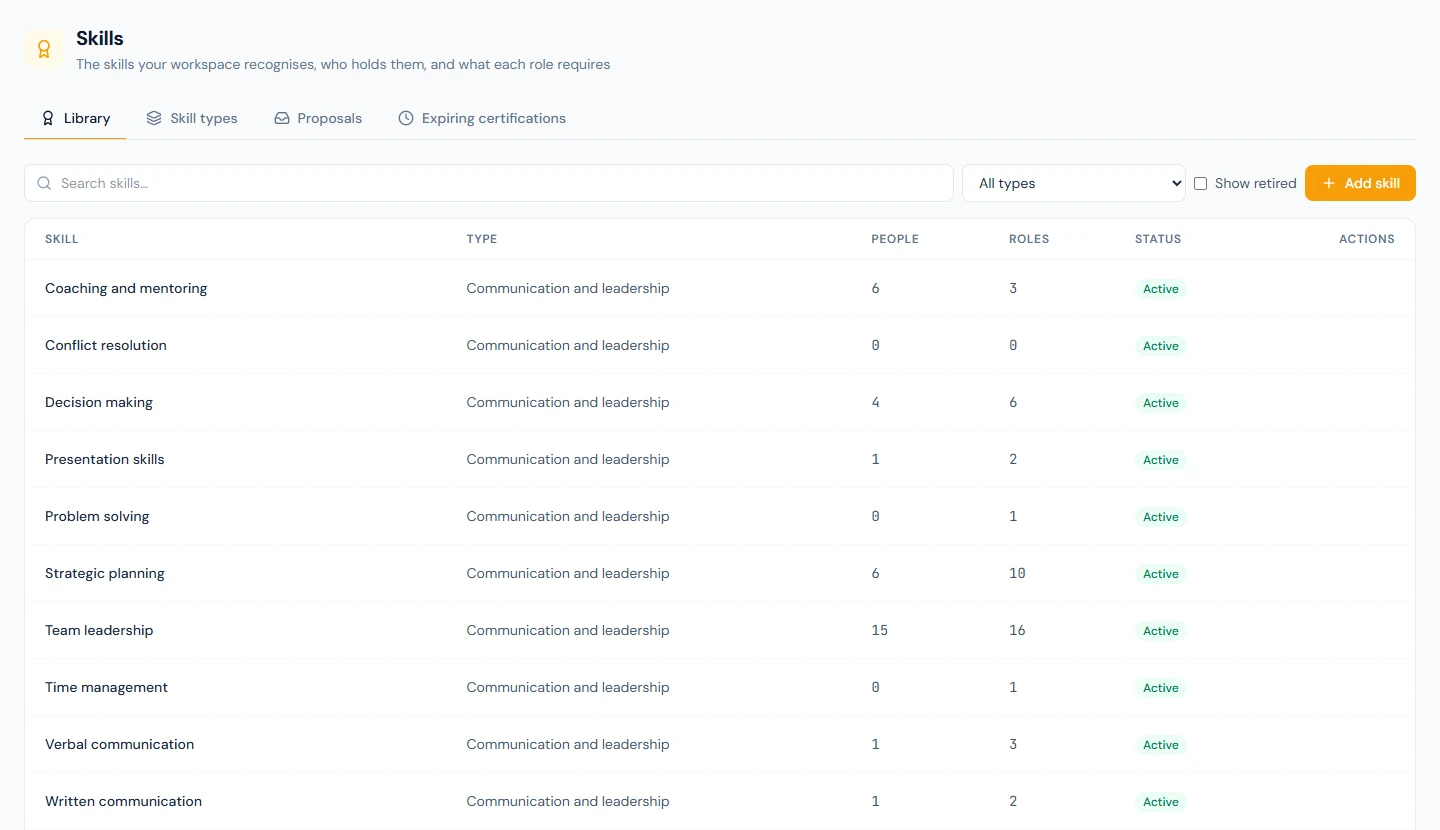
- Library lists every skill with its type, how many people hold it and how many roles require it. Add skill needs a type and a name; the ESCO URI and description are optional. Deleting a skill that someone holds, or a role or opening requires, retires it instead: it stays on those records and stops being offered. Tick Show retired to see and reactivate retired skills.
- Skill types shows each type with its scale. A scale has between 2 and 10 levels, lowest first, and cannot shrink below a level someone already holds.
- Proposals (people holding
skills.manage) is the review queue for skills and résumé entries employees propose from the portal; see Proposals. The same queue is the Skills tab of Profile Approvals. - Expiring certifications lists certifications lapsing within 30, 60, 90 or 180 days and, under Already lapsed, every certification whose expiry date has passed, most recent first.
Skills on the employee profile
On an employee's profile (/admin/employees/{id}), three cards appear once the feature is on and you hold skills.view:
- Skills, grouped by type, each with its level, who recorded it (self-reported, recorded by HR, from an appraisal, or from a course), and its certification dates. A skill reads From a course when a completed course recorded it. With
skills.manage, Add skill picks a skill and a level and takes optional Certified on and Expires on dates and a note; the pencil edits, the bin removes. - Against the role compares the record with the designation's requirements: each required skill reads Meets the requirement, Certification lapsed (held at the level, but its certificate has expired, so the requirement is not met until it is renewed), Below the required level or Not on the record, with the level required and the level held side by side.
- Résumé holds experience, education, certifications and other entries, each with an organisation, dates (or Current) and a description.
The employee list's More filters panel gains a Skill filter, so "everyone who holds Linux administration" is one click.
Required skills on designations and openings
On Company › Designations, the target icon on a row opens Required skills for that designation. Add skills one at a time with the level the role asks for, or click Suggest from the job description: the assistant reads the designation's job description and the library and proposes a list with a reason for each pick. Nothing is saved until you click Save, and it only ever proposes skills already in your library.
On a job opening's Details tab, the Required skills card shows the designation's list until you save one of the opening's own. The published job page lists whichever applies under a Skills heading, so candidates see the levels expected before applying.
Proposals from employees
Employees cannot write their own skills record. From My Profile › Skills & résumé in the portal they propose skills (with a level and, where it applies, certification dates) or résumé entries; one proposal of each kind can wait at a time. The people who hold skills.manage are emailed (profile_submission_pending), and the proposal appears under Proposals and on Profile Approvals. Approve writes the items onto the record with source Self-reported; Return sends it back with an optional note. Either way the employee is emailed (profile_submission_reviewed).
Certification expiry
Thirty days before a certification's Expires on date, the employee and the people holding skills.manage are emailed once (skill_certification_expiring, category Documents) and the employee sees it in the bell. If the email could not be delivered that morning (the mail server refused it, say), the notice is tried again the next morning, for as long as the certification is still within the thirty days, rather than being lost. If your workspace has switched this email off, or has used up its email allowance, the notice in the bell is the notice and the email is not sent later. Setting a new expiry date on the record earns a new warning when its time comes; changing the level or the note and leaving the date as it is does not send the warning again.
A certification whose date has passed leaves the expiring list and appears under Already lapsed on the same tab, most recently lapsed first. Like the expiring list, it covers active employees. The certification stays there, and stays on the record in red, until HR renews the date or removes the skill. Expiry does not change Against the role or the matrix: both compare the level held with the level required, so a lapsed certification still reads as meeting the requirement. The lapsed list is where to look for those.
The skills matrix
Reports › Skills Reports (/admin/reports/skills) is the matrix: people down the side, skills across, each cell the level held against the level the role requires, coloured meets, certification lapsed (amber, outlined), below, missing (required, not held) or extra (held, not required). A lapsed certificate counts as a gap; the Gaps column says how many of a person's gaps are renewals. Filter by department and skill type; Export CSV writes one line per person and skill. The tiles above count people, skills, gaps and people with at least one gap.
Public API
With a key holding the skills:read scope, GET /v1/skill_types, GET /v1/skills and GET /v1/employee_skills mirror the library and who holds what. They are read-only: a level is a claim about a person that HR reviews in the app. See the API reference.